Table of Contents for
Practical Malware Analysis
 Practical Malware Analysis
Published by
No Starch Press, 2012
Practical Malware Analysis
Published by
No Starch Press, 2012
- Cover
- Practical Malware Analysis: The Hands-On Guide to Dissecting Malicious Software
- Praise for Practical Malware Analysis
- Warning
- About the Authors
- About the Technical Reviewer
- About the Contributing Authors
- Foreword
- Acknowledgments
- Individual Thanks
- Introduction
- What Is Malware Analysis?
- Prerequisites
- Practical, Hands-On Learning
- What’s in the Book?
- 0. Malware Analysis Primer
- The Goals of Malware Analysis
- Malware Analysis Techniques
- Types of Malware
- General Rules for Malware Analysis
- I. Basic Analysis
- 1. Basic Static Techniques
- Antivirus Scanning: A Useful First Step
- Hashing: A Fingerprint for Malware
- Finding Strings
- Packed and Obfuscated Malware
- Portable Executable File Format
- Linked Libraries and Functions
- Static Analysis in Practice
- The PE File Headers and Sections
- Conclusion
- Labs
- 2. Malware Analysis in Virtual Machines
- The Structure of a Virtual Machine
- Creating Your Malware Analysis Machine
- Using Your Malware Analysis Machine
- The Risks of Using VMware for Malware Analysis
- Record/Replay: Running Your Computer in Reverse
- Conclusion
- 3. Basic Dynamic Analysis
- Sandboxes: The Quick-and-Dirty Approach
- Running Malware
- Monitoring with Process Monitor
- Viewing Processes with Process Explorer
- Comparing Registry Snapshots with Regshot
- Faking a Network
- Packet Sniffing with Wireshark
- Using INetSim
- Basic Dynamic Tools in Practice
- Conclusion
- Labs
- II. Advanced Static Analysis
- 4. A Crash Course in x86 Disassembly
- Levels of Abstraction
- Reverse-Engineering
- The x86 Architecture
- Conclusion
- 5. IDA Pro
- Loading an Executable
- The IDA Pro Interface
- Using Cross-References
- Analyzing Functions
- Using Graphing Options
- Enhancing Disassembly
- Extending IDA with Plug-ins
- Conclusion
- Labs
- 6. Recognizing C Code Constructs in Assembly
- Global vs. Local Variables
- Disassembling Arithmetic Operations
- Recognizing if Statements
- Recognizing Loops
- Understanding Function Call Conventions
- Analyzing switch Statements
- Disassembling Arrays
- Identifying Structs
- Analyzing Linked List Traversal
- Conclusion
- Labs
- 7. Analyzing Malicious Windows Programs
- The Windows API
- The Windows Registry
- Networking APIs
- Following Running Malware
- Kernel vs. User Mode
- The Native API
- Conclusion
- Labs
- III. Advanced Dynamic Analysis
- 8. Debugging
- Source-Level vs. Assembly-Level Debuggers
- Kernel vs. User-Mode Debugging
- Using a Debugger
- Exceptions
- Modifying Execution with a Debugger
- Modifying Program Execution in Practice
- Conclusion
- 9. OllyDbg
- Loading Malware
- The OllyDbg Interface
- Memory Map
- Viewing Threads and Stacks
- Executing Code
- Breakpoints
- Loading DLLs
- Tracing
- Exception Handling
- Patching
- Analyzing Shellcode
- Assistance Features
- Plug-ins
- Scriptable Debugging
- Conclusion
- Labs
- 10. Kernel Debugging with WinDbg
- Drivers and Kernel Code
- Setting Up Kernel Debugging
- Using WinDbg
- Microsoft Symbols
- Kernel Debugging in Practice
- Rootkits
- Loading Drivers
- Kernel Issues for Windows Vista, Windows 7, and x64 Versions
- Conclusion
- Labs
- IV. Malware Functionality
- 11. Malware Behavior
- Downloaders and Launchers
- Backdoors
- Credential Stealers
- Persistence Mechanisms
- Privilege Escalation
- Covering Its Tracks—User-Mode Rootkits
- Conclusion
- Labs
- 12. Covert Malware Launching
- Launchers
- Process Injection
- Process Replacement
- Hook Injection
- Detours
- APC Injection
- Conclusion
- Labs
- 13. Data Encoding
- The Goal of Analyzing Encoding Algorithms
- Simple Ciphers
- Common Cryptographic Algorithms
- Custom Encoding
- Decoding
- Conclusion
- Labs
- 14. Malware-Focused Network Signatures
- Network Countermeasures
- Safely Investigate an Attacker Online
- Content-Based Network Countermeasures
- Combining Dynamic and Static Analysis Techniques
- Understanding the Attacker’s Perspective
- Conclusion
- Labs
- V. Anti-Reverse-Engineering
- 15. Anti-Disassembly
- Understanding Anti-Disassembly
- Defeating Disassembly Algorithms
- Anti-Disassembly Techniques
- Obscuring Flow Control
- Thwarting Stack-Frame Analysis
- Conclusion
- Labs
- 16. Anti-Debugging
- Windows Debugger Detection
- Identifying Debugger Behavior
- Interfering with Debugger Functionality
- Debugger Vulnerabilities
- Conclusion
- Labs
- 17. Anti-Virtual Machine Techniques
- VMware Artifacts
- Vulnerable Instructions
- Tweaking Settings
- Escaping the Virtual Machine
- Conclusion
- Labs
- 18. Packers and Unpacking
- Packer Anatomy
- Identifying Packed Programs
- Unpacking Options
- Automated Unpacking
- Manual Unpacking
- Tips and Tricks for Common Packers
- Analyzing Without Fully Unpacking
- Packed DLLs
- Conclusion
- Labs
- VI. Special Topics
- 19. Shellcode Analysis
- Loading Shellcode for Analysis
- Position-Independent Code
- Identifying Execution Location
- Manual Symbol Resolution
- A Full Hello World Example
- Shellcode Encodings
- NOP Sleds
- Finding Shellcode
- Conclusion
- Labs
- 20. C++ Analysis
- Object-Oriented Programming
- Virtual vs. Nonvirtual Functions
- Creating and Destroying Objects
- Conclusion
- Labs
- 21. 64-Bit Malware
- Why 64-Bit Malware?
- Differences in x64 Architecture
- Windows 32-Bit on Windows 64-Bit
- 64-Bit Hints at Malware Functionality
- Conclusion
- Labs
- A. Important Windows Functions
- B. Tools for Malware Analysis
- C. Solutions to Labs
- Lab 1-1 Solutions
- Lab 1-2 Solutions
- Lab 1-3 Solutions
- Lab 1-4 Solutions
- Lab 3-1 Solutions
- Lab 3-2 Solutions
- Lab 3-3 Solutions
- Lab 3-4 Solutions
- Lab 5-1 Solutions
- Lab 6-1 Solutions
- Lab 6-2 Solutions
- Lab 6-3 Solutions
- Lab 6-4 Solutions
- Lab 7-1 Solutions
- Lab 7-2 Solutions
- Lab 7-3 Solutions
- Lab 9-1 Solutions
- Lab 9-2 Solutions
- Lab 9-3 Solutions
- Lab 10-1 Solutions
- Lab 10-2 Solutions
- Lab 10-3 Solutions
- Lab 11-1 Solutions
- Lab 11-2 Solutions
- Lab 11-3 Solutions
- Lab 12-1 Solutions
- Lab 12-2 Solutions
- Lab 12-3 Solutions
- Lab 12-4 Solutions
- Lab 13-1 Solutions
- Lab 13-2 Solutions
- Lab 13-3 Solutions
- Lab 14-1 Solutions
- Lab 14-2 Solutions
- Lab 14-3 Solutions
- Lab 15-1 Solutions
- Lab 15-2 Solutions
- Lab 15-3 Solutions
- Lab 16-1 Solutions
- Lab 16-2 Solutions
- Lab 16-3 Solutions
- Lab 17-1 Solutions
- Lab 17-2 Solutions
- Lab 17-3 Solutions
- Lab 18-1 Solutions
- Lab 18-2 Solutions
- Lab 18-3 Solutions
- Lab 18-4 Solutions
- Lab 18-5 Solutions
- Lab 19-1 Solutions
- Lab 19-2 Solutions
- Lab 19-3 Solutions
- Lab 20-1 Solutions
- Lab 20-2 Solutions
- Lab 20-3 Solutions
- Lab 21-1 Solutions
- Lab 21-2 Solutions
- Index
- Index
- Index
- Index
- Index
- Index
- Index
- Index
- Index
- Index
- Index
- Index
- Index
- Index
- Index
- Index
- Index
- Index
- Index
- Index
- Index
- Index
- Index
- Index
- Index
- Index
- Index
- Updates
- About the Authors
- Copyright
After you run the malware, pop-up messages are displayed on the screen every minute.
The process being injected is explorer.exe.
You can restart the explorer.exe process.
The malware performs DLL injection to launch Lab12-01.dll within explorer.exe. Once Lab12-01.dll is injected, it displays a message box on the screen every minute with a counter that shows how many minutes have elapsed.
Let’s begin with basic static analysis. Examining the imports for
Lab12-01.exe, we see CreateRemoteThread,
WriteProcessMemory, and VirtualAllocEx. Based on the discussion in Chapter 12, we
know that we are probably dealing with some form of process injection. Therefore, our first goal
should be to determine the code that is being injected and into which process. Examining the strings
in the malware, we see some notable ones, including explorer.exe,
Lab12-01.dll, and psapi.dll.
Next, we use basic dynamic techniques to see what the malware does when it runs. When we run the malware, it creates a message box every minute (quite annoying when you are trying to use analysis tools). Procmon doesn’t have any useful information, Process Explorer shows no obvious process running, and no network functions appear to be imported, so we shift to IDA Pro to determine what is producing the message boxes.
A few lines from the start of the main function, we see the
malware resolving functions for Windows process enumeration within psapi.dll.
Example C-63 contains one example of the three
functions the malware manually resolves using LoadLibraryA and
GetProcAddress.
Example C-63. Dynamically resolving process enumeration imports
0040111F push offset ProcName ; "EnumProcessModules" 00401124 push offset LibFileName ; "psapi.dll" 00401129 call ds:LoadLibraryA0040112F push eax ; hModule 00401130 call ds:GetProcAddress00401136 mov ❶dword_408714, eax
The malware saves the function pointers to dword_408714, dword_40870C, and dword_408710. We can change these global variables to more easily identify
the function being called later in our analysis by renaming them myEnumProcessModules, myGetModuleBaseNameA, and
myEnumProcesses. In Example C-63, we should rename dword_408714 to myEnumProcessModules at ❶.
After the dynamic resolution of the functions, the code calls dword_408710 (EnumProcesses), which retrieves a PID
for each process object in the system. EnumProcesses returns an
array of the PIDs referenced by the local variable dwProcessId.
dwProcessId is used in a loop to iterate through the process list
and call sub_401000 for each PID.
When we examine sub_401000, we see that the dynamically
resolved import EnumProcessModules is called after OpenProcess for the PID passed to the function. Next, we see a call to
dword_40870C (GetModuleBaseNameA) at ❶, as shown in Example C-64.
Example C-64. Strings compared against explorer.exe
00401078         push    104h
0040107D         lea     ecx, [ebp+Str1]
00401083         push    ecx
00401084         mov     edx, [ebp+var_10C]
0040108A         push    edx
0040108B         mov     eax, [ebp+hObject]
0040108E         push    eax
0040108F         call    dword_40870C ❶          ; GetModuleBaseNameA
00401095         push    0Ch                     ; MaxCount
00401097         push    offset Str2             ; "explorer.exe"
0040109C         lea     ecx, [ebp+Str1]
004010A2         push    ecx                     ; Str1
004010A3         call    _strnicmp ❷
The dynamically resolved function GetModuleBaseNameA is
used to translate from the PID to the process name. After this call, we see a comparison at
❷ between the strings obtained with GetModuleBaseNameA (Str1) and explorer.exe (Str2). The malware is
looking for the explorer.exe process in memory.
Once explorer.exe is found, the function at sub_401000 will return 1, and the main function will
call OpenProcess to open a handle to it. If the malware obtains a
handle to the process successfully, the code in Example C-65 will execute, and the handle hProcess will be used to
manipulate the process.
Example C-65. Writing a string to a remote process
0040128C push 4 ; flProtect 0040128E push 3000h ; flAllocationType 00401293 push 104h ❷ ; dwSize 00401298 push 0 ; lpAddress 0040129A mov edx, [ebp+hProcess] 004012A0 push edx ; hProcess 004012A1 call ds:VirtualAllocEx❶ 004012A7 mov [ebp+lpParameter], eax ❸ 004012AD cmp [ebp+lpParameter], 0 004012B4 jnz short loc_4012BE ... 004012BE push 0 ; lpNumberOfBytesWritten 004012C0 push 104h ; nSize 004012C5 lea eax, [ebp+Buffer] 004012CB push eax ; lpBuffer 004012CC mov ecx, [ebp+lpParameter] 004012D2 push ecx ; lpBaseAddress 004012D3 mov edx, [ebp+hProcess] 004012D9 push edx ; hProcess 004012DA call ds:WriteProcessMemory❹
In Example C-65, we see a call to VirtualAllocEx at ❶. This
dynamically allocates memory in the explorer.exe process: 0x104 bytes are
allocated by pushing dwSize at ❷. If VirtualAllocEx is successful, a pointer to the
allocated memory will be moved into lpParameter at ❸, to be passed with the process handle to WriteProcessMemory at ❹, in
order to write data to explorer.exe. The data written to the process is
referenced by the Buffer parameter in bold.
In order to understand what is injected, we trace the code back to where Buffer is set. We find it set to the path of the current directory
appended with Lab12-01.dll. We can now conclude that this malware
writes the path of Lab12-01.dll into the explorer.exe
process.
If the malware successfully writes the path of the DLL into explorer.exe, the code in Example C-66 will execute.
Example C-66. Creating the remote thread
004012E0 push offset ModuleName ; "kernel32.dll" 004012E5 call ds:GetModuleHandleA004012EB mov [ebp+hModule], eax 004012F1 push offset aLoadlibrarya ; "LoadLibraryA" 004012F6 mov eax, [ebp+hModule] 004012FC push eax ; hModule 004012FD call ds:GetProcAddress00401303 mov [ebp+lpStartAddress], eax ❶ 00401309 push 0 ; lpThreadId 0040130B push 0 ; dwCreationFlags 0040130D mov ecx, [ebp+lpParameter] 00401313 push ecx ; lpParameter 00401314 mov edx, [ebp+lpStartAddress] 0040131A push edx ❷ ; lpStartAddress 0040131B push 0 ; dwStackSize 0040131D push 0 ; lpThreadAttributes 0040131F mov eax, [ebp+hProcess] 00401325 push eax ; hProcess 00401326 call ds:CreateRemoteThread
In Example C-66, the calls to GetModuleHandleA and GetProcAddress (in bold) will be
used to get the address to LoadLibraryA. The address of LoadLibraryA will be the same in explorer.exe as it
is in the malware (Lab12-01.exe) with the address of LoadLibraryA inserted into lpStartAddress shown at
❶. lpStartAddress is
provided to CreateRemoteThread at ❷ in order to force explorer.exe to call
LoadLibraryA. The parameter for LoadLibraryA is passed via CreateRemoteThread in lpParameter, the
string containing the path to Lab12-01.dll. This, in turn, starts a thread in
the remote process that calls LoadLibraryA with the parameter of
Lab12-01.dll. We can now conclude that this malware executable
performs DLL injection of Lab12-01.dll into
explorer.exe.
Now that we know where and what is being injected, we can try to stop those annoying pop-ups,
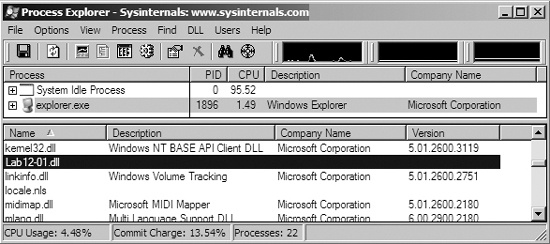
launching Process Explorer to help us out. As shown in Figure C-42, we select explorer.exe in
the process listing, and then choose View ▸ Show Lower Pane
and View ▸ Lower Pane View ▸ DLLs. Scrolling through
the resulting window, we see Lab12-01.dll listed as being loaded into
explorer.exe’s memory space. Using Process Explorer is an easy way to
spot DLL injection and useful in confirming our IDA Pro analysis. To stop the pop-ups, we can use
Process Explorer to kill explorer.exe, and then restart it by selecting
File ▸ Run and entering explorer.
Having analyzed Lab12-01.exe, we move on to Lab12-01.dll to see if it does something in addition to creating message boxes. When we analyze Lab12-01.dll with IDA Pro, we see that it does little more than create a thread that then creates another thread. The code in Example C-67 is from the first thread, a loop that creates a thread every minute (0xEA60 milliseconds).
Example C-67. Analyzing the thread created by Lab12-01.dll
10001046 mov ecx, [ebp+var_18] 10001049 push ecx 1000104A push offset Format ; "Practical Malware Analysis %d" 1000104F lea edx, [ebp+Parameter] 10001052 push edx ; Dest 10001053 call _sprintf ❷ 10001058 add esp, 0Ch 1000105B push 0 ; lpThreadId 1000105D push 0 ; dwCreationFlags 1000105F lea eax, [ebp+Parameter] 10001062 push eax ; lpParameter 10001063 push offsetStartAddress❶ ; lpStartAddress 10001068 push 0 ; dwStackSize 1000106A push 0 ; lpThreadAttributes 1000106C call ds:CreateThread10001072 push 0EA60h ; dwMilliseconds 10001077 call ds:Sleep1000107D mov ecx, [ebp+var_18] 10001080 add ecx, 1 ❸ 10001083 mov [ebp+var_18], ecx
The new thread at ❶, labeled StartAddress by IDA Pro, creates the message box that says “Press OK
to reboot,” and takes a parameter for the title of the box that is set by the sprintf at ❷. This parameter
is the format string "Practical Malware Analysis %d", where
%d is replaced with a counter stored in var_18 that increments at ❸. We conclude that
this DLL does nothing other than produce annoying message boxes that increment by one every
minute.