Table of Contents for
Practical Malware Analysis
 Practical Malware Analysis
Published by
No Starch Press, 2012
Practical Malware Analysis
Published by
No Starch Press, 2012
- Cover
- Practical Malware Analysis: The Hands-On Guide to Dissecting Malicious Software
- Praise for Practical Malware Analysis
- Warning
- About the Authors
- About the Technical Reviewer
- About the Contributing Authors
- Foreword
- Acknowledgments
- Individual Thanks
- Introduction
- What Is Malware Analysis?
- Prerequisites
- Practical, Hands-On Learning
- What’s in the Book?
- 0. Malware Analysis Primer
- The Goals of Malware Analysis
- Malware Analysis Techniques
- Types of Malware
- General Rules for Malware Analysis
- I. Basic Analysis
- 1. Basic Static Techniques
- Antivirus Scanning: A Useful First Step
- Hashing: A Fingerprint for Malware
- Finding Strings
- Packed and Obfuscated Malware
- Portable Executable File Format
- Linked Libraries and Functions
- Static Analysis in Practice
- The PE File Headers and Sections
- Conclusion
- Labs
- 2. Malware Analysis in Virtual Machines
- The Structure of a Virtual Machine
- Creating Your Malware Analysis Machine
- Using Your Malware Analysis Machine
- The Risks of Using VMware for Malware Analysis
- Record/Replay: Running Your Computer in Reverse
- Conclusion
- 3. Basic Dynamic Analysis
- Sandboxes: The Quick-and-Dirty Approach
- Running Malware
- Monitoring with Process Monitor
- Viewing Processes with Process Explorer
- Comparing Registry Snapshots with Regshot
- Faking a Network
- Packet Sniffing with Wireshark
- Using INetSim
- Basic Dynamic Tools in Practice
- Conclusion
- Labs
- II. Advanced Static Analysis
- 4. A Crash Course in x86 Disassembly
- Levels of Abstraction
- Reverse-Engineering
- The x86 Architecture
- Conclusion
- 5. IDA Pro
- Loading an Executable
- The IDA Pro Interface
- Using Cross-References
- Analyzing Functions
- Using Graphing Options
- Enhancing Disassembly
- Extending IDA with Plug-ins
- Conclusion
- Labs
- 6. Recognizing C Code Constructs in Assembly
- Global vs. Local Variables
- Disassembling Arithmetic Operations
- Recognizing if Statements
- Recognizing Loops
- Understanding Function Call Conventions
- Analyzing switch Statements
- Disassembling Arrays
- Identifying Structs
- Analyzing Linked List Traversal
- Conclusion
- Labs
- 7. Analyzing Malicious Windows Programs
- The Windows API
- The Windows Registry
- Networking APIs
- Following Running Malware
- Kernel vs. User Mode
- The Native API
- Conclusion
- Labs
- III. Advanced Dynamic Analysis
- 8. Debugging
- Source-Level vs. Assembly-Level Debuggers
- Kernel vs. User-Mode Debugging
- Using a Debugger
- Exceptions
- Modifying Execution with a Debugger
- Modifying Program Execution in Practice
- Conclusion
- 9. OllyDbg
- Loading Malware
- The OllyDbg Interface
- Memory Map
- Viewing Threads and Stacks
- Executing Code
- Breakpoints
- Loading DLLs
- Tracing
- Exception Handling
- Patching
- Analyzing Shellcode
- Assistance Features
- Plug-ins
- Scriptable Debugging
- Conclusion
- Labs
- 10. Kernel Debugging with WinDbg
- Drivers and Kernel Code
- Setting Up Kernel Debugging
- Using WinDbg
- Microsoft Symbols
- Kernel Debugging in Practice
- Rootkits
- Loading Drivers
- Kernel Issues for Windows Vista, Windows 7, and x64 Versions
- Conclusion
- Labs
- IV. Malware Functionality
- 11. Malware Behavior
- Downloaders and Launchers
- Backdoors
- Credential Stealers
- Persistence Mechanisms
- Privilege Escalation
- Covering Its Tracks—User-Mode Rootkits
- Conclusion
- Labs
- 12. Covert Malware Launching
- Launchers
- Process Injection
- Process Replacement
- Hook Injection
- Detours
- APC Injection
- Conclusion
- Labs
- 13. Data Encoding
- The Goal of Analyzing Encoding Algorithms
- Simple Ciphers
- Common Cryptographic Algorithms
- Custom Encoding
- Decoding
- Conclusion
- Labs
- 14. Malware-Focused Network Signatures
- Network Countermeasures
- Safely Investigate an Attacker Online
- Content-Based Network Countermeasures
- Combining Dynamic and Static Analysis Techniques
- Understanding the Attacker’s Perspective
- Conclusion
- Labs
- V. Anti-Reverse-Engineering
- 15. Anti-Disassembly
- Understanding Anti-Disassembly
- Defeating Disassembly Algorithms
- Anti-Disassembly Techniques
- Obscuring Flow Control
- Thwarting Stack-Frame Analysis
- Conclusion
- Labs
- 16. Anti-Debugging
- Windows Debugger Detection
- Identifying Debugger Behavior
- Interfering with Debugger Functionality
- Debugger Vulnerabilities
- Conclusion
- Labs
- 17. Anti-Virtual Machine Techniques
- VMware Artifacts
- Vulnerable Instructions
- Tweaking Settings
- Escaping the Virtual Machine
- Conclusion
- Labs
- 18. Packers and Unpacking
- Packer Anatomy
- Identifying Packed Programs
- Unpacking Options
- Automated Unpacking
- Manual Unpacking
- Tips and Tricks for Common Packers
- Analyzing Without Fully Unpacking
- Packed DLLs
- Conclusion
- Labs
- VI. Special Topics
- 19. Shellcode Analysis
- Loading Shellcode for Analysis
- Position-Independent Code
- Identifying Execution Location
- Manual Symbol Resolution
- A Full Hello World Example
- Shellcode Encodings
- NOP Sleds
- Finding Shellcode
- Conclusion
- Labs
- 20. C++ Analysis
- Object-Oriented Programming
- Virtual vs. Nonvirtual Functions
- Creating and Destroying Objects
- Conclusion
- Labs
- 21. 64-Bit Malware
- Why 64-Bit Malware?
- Differences in x64 Architecture
- Windows 32-Bit on Windows 64-Bit
- 64-Bit Hints at Malware Functionality
- Conclusion
- Labs
- A. Important Windows Functions
- B. Tools for Malware Analysis
- C. Solutions to Labs
- Lab 1-1 Solutions
- Lab 1-2 Solutions
- Lab 1-3 Solutions
- Lab 1-4 Solutions
- Lab 3-1 Solutions
- Lab 3-2 Solutions
- Lab 3-3 Solutions
- Lab 3-4 Solutions
- Lab 5-1 Solutions
- Lab 6-1 Solutions
- Lab 6-2 Solutions
- Lab 6-3 Solutions
- Lab 6-4 Solutions
- Lab 7-1 Solutions
- Lab 7-2 Solutions
- Lab 7-3 Solutions
- Lab 9-1 Solutions
- Lab 9-2 Solutions
- Lab 9-3 Solutions
- Lab 10-1 Solutions
- Lab 10-2 Solutions
- Lab 10-3 Solutions
- Lab 11-1 Solutions
- Lab 11-2 Solutions
- Lab 11-3 Solutions
- Lab 12-1 Solutions
- Lab 12-2 Solutions
- Lab 12-3 Solutions
- Lab 12-4 Solutions
- Lab 13-1 Solutions
- Lab 13-2 Solutions
- Lab 13-3 Solutions
- Lab 14-1 Solutions
- Lab 14-2 Solutions
- Lab 14-3 Solutions
- Lab 15-1 Solutions
- Lab 15-2 Solutions
- Lab 15-3 Solutions
- Lab 16-1 Solutions
- Lab 16-2 Solutions
- Lab 16-3 Solutions
- Lab 17-1 Solutions
- Lab 17-2 Solutions
- Lab 17-3 Solutions
- Lab 18-1 Solutions
- Lab 18-2 Solutions
- Lab 18-3 Solutions
- Lab 18-4 Solutions
- Lab 18-5 Solutions
- Lab 19-1 Solutions
- Lab 19-2 Solutions
- Lab 19-3 Solutions
- Lab 20-1 Solutions
- Lab 20-2 Solutions
- Lab 20-3 Solutions
- Lab 21-1 Solutions
- Lab 21-2 Solutions
- Index
- Index
- Index
- Index
- Index
- Index
- Index
- Index
- Index
- Index
- Index
- Index
- Index
- Index
- Index
- Index
- Index
- Index
- Index
- Index
- Index
- Index
- Index
- Index
- Index
- Index
- Index
- Updates
- About the Authors
- Copyright
When you run the program without any parameters, it exits immediately.
The
mainfunction is located at 0x00000001400010C0. You can spot the call tomainby looking for a function call that accepts an integer and two pointers as parameters.The string
ocl.exeis stored on the stack.To have this program run its payload without changing the filename of the executable, you can patch the
jumpinstruction at 0x0000000140001213 so that it is a NOP instead.The name of the executable is being compared against the string
jzm.exeby the call tostrncmpat 0x0000000140001205.The function at 0x00000001400013C8 takes one parameter, which contains the socket created to the remote host.
The call to
CreateProcesstakes 10 parameters. We can’t tell from the IDA Pro listing because we can’t distinguish between things being stored on the stack and things being used in a function call, but the function is documented in MSDN as always taking 10 parameters.
When we try to run this program to perform dynamic analysis, it immediately exits, so we
open the program and try to find the main method. (You
won’t need to do this if you have the latest version of IDA Pro; if you have an older version,
you may need to find the main method.)
We begin our analysis at 0x0000000140001750, the entry point as specified in the PE header, as shown in Example C-223.
Example C-223. Entry point of Lab21-01.exe
0000000140001750         sub     rsp, 28h
0000000140001754         call    sub_140002FE4 ❶
0000000140001759         add     rsp, 28h
000000014000175D         jmp     sub_1400015D8 ❷
We know that the main method takes three parameters:
argc, argv, and envp. Furthermore, we know that argc
will be a 32-bit value, and that argv and envp will be 64-bit values. Because the function call at ❶ does not take any parameters, we know that it can’t be the
main method. We quickly check the function and see that it calls
only functions imported from other DLLs, so we know that the call to main must be after the jmp instruction at ❷.
We follow the jump and scroll down looking for a function that takes three parameters. We pass
many function calls without parameters and eventually find the call to the main method, as shown in Example C-224. This
call takes three parameters. The first at ❶ is a 32-bit
value representing an int, and the next two parameters at
❷ and ❸ are
64-bit values representing pointers.
Example C-224. Call to the main method of
Lab21-01.exe
00000001400016F3         mov     r8, cs:qword_14000B468 ❸
00000001400016FA         mov     cs:qword_14000B470, r8
0000000140001701         mov     rdx, cs:qword_14000B458 ❷
0000000140001708         mov     ecx, cs:dword_14000B454 ❶
000000014000170E         call    sub_1400010C0
We can now move on to the main function. Early in the
main function, we see a lot of data moved onto the stack,
including the data shown in Example C-225.
Example C-225. ASCII string being loaded on the stack that has not been recognized by IDA Pro
0000000140001150         mov     byte ptr [rbp+250h+var_160+0Ch], 0
0000000140001157         mov     [rbp+250h+var_170], 2E6C636Fh
0000000140001161         mov     [rbp+250h+var_16C], 657865h
You should immediately notice that that numbers being moved onto the stack represent ASCII
characters. The value 0x2e is a period (.), and the hexadecimal
values starting with 3, 4, 5, and 6 are mostly letters. Right-click the numbers to have IDA Pro show which characters are represented, and press R on each line
to change the display. After changing the display so that the ASCII characters are labeled properly
by IDA Pro, the code should look like Example C-226.
Example C-226. Listing 21-3L with the ASCII characters labeled properly by IDA Pro
0000000140001150         mov     byte ptr [rbp+250h+var_160+0Ch], 0
0000000140001157         mov     [rbp+250h+var_170], '.lco'
0000000140001161         mov     [rbp+250h+var_16C], 'exe'
This view tells us that the code is storing the string ocl.exe on the stack. (Remember that x86 and x64 assembly are little-endian, so when
ASCII data is represented as if it were a 32-bit number, the characters are reversed.) These three
mov instructions together store the bytes representing
ocl.exe on the stack.
Recall that Lab09-02.exe won’t run properly unless the executable name is ocl.exe. At this point, we try renaming the file ocl.exe and running it, but that doesn’t work, so we need to continue analyzing the code in IDA Pro.
As we continue our analysis, we see that the code calls strrchr, as in Lab 9-2 Solutions, to obtain the executable’s
filename without the leading directory path. Then we see an encoding function, partially shown in
Example C-227.
Example C-227. An encoding function
00000001400011B8         mov     eax, 4EC4EC4Fh
00000001400011BD         sub     cl, 61h
00000001400011C0         movsx   ecx, cl
00000001400011C3         imul    ecx, ecx
00000001400011C6         sub     ecx, 5
00000001400011C9         imul    ecx
00000001400011CB         sar     edx, 3
00000001400011CE         mov     eax, edx
00000001400011D0         shr     eax, 1Fh
00000001400011D3         add     edx, eax
00000001400011D5         imul    edx, 1Ah
00000001400011D8         sub     ecx, edx
This encoding function would be very tedious to analyze, so we note it and move on to see what
is done with the encoded string. We scroll down a little further to a call to strncmp, as shown in Example C-228.
Example C-228. Code that compares the filename against the encoded string and takes one of two different code paths
00000001400011F4         lea     rdx, [r11+1]    ; char *
00000001400011F8         lea     rcx, [rbp+250h+var_170] ; char *
00000001400011FF         mov     r8d, 104h       ; size_t
0000000140001205         call    strncmp
000000014000120A         test    eax, eax
000000014000120C         jz      short loc_140001218 ❶
000000014000120E
000000014000120E loc_14000120E:                  ; CODE XREF: main+16Aj
000000014000120E         mov     eax, 1
0000000140001213         jmp     loc_1400013D7 ❷
Scrolling up to see which two strings are being compared, we discover that the first
string is the name of the malware being executed and the second is the encoded string. Based on the
return value of strncmp, we either take the jump at ❶, which continues to more interesting code, or we take the jump
at ❷, which prematurely exits the program.
In order to analyze the program dynamically, we need to get it to continue running without
exiting prematurely. We could patch the jmp instruction at
❷ in order to force the code to continue executing even
if the program name is incorrect. Unfortunately, OllyDbg does not work with 64-bit executables, so
we would need to use a hex editor to edit the bytes manually. Instead of patching the code, we can
try to determine the correct string and rename our process, as we did in Lab 9-2 Solutions.
To determine the string that the malware is searching, we can use dynamic analysis to obtain
the encoded value that the executable should be named. To do so, we use WinDbg (again, because
OllyDbg does not support 64-bit executables). We open the program in WinDbg and set a breakpoint on
the call to strncmp, as shown in Figure C-69.
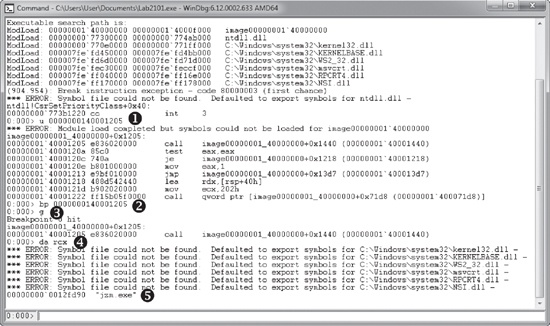
WinDbg output can sometimes be a bit verbose, so we’ll focus on the commands issued. We
can’t set a breakpoint using bp strncmp because WinDbg
doesn’t know the location of strncmp. However, IDA Pro uses
signatures to find strncmp, and from Example C-228, we know that the call to strncmp is at 0000000140001205. As shown in Figure C-69, at ❶, we use the u instruction to verify the
instructions at 0000000140001205, and then set a breakpoint on that location at ❷ and issue the g (go) command at ❸. When the
breakpoint is hit, we enter da
rcx to obtain the string at ❹. At
❺, we see that the string being compared is jzm.exe.
Now that we know how to get the program to run, we can continue analyzing it. We see the
following import calls in order: WSAStartup, WSASocket, gethostbyname, htons, and connect. Without spending
much effort analyzing the actual code, we can tell from the function calls that the program is
connecting to a remote socket. Then we see another function call that we must analyze, as shown in
Example C-229.
Example C-229. A 64-bit function call with an unclear number of parameters
00000001400013BD         mov     rcx, rbx ❶
00000001400013C0         movdqa  oword ptr [rbp+250h+var_160], xmm0
00000001400013C8         call    sub_140001000
At ❶, the RBX register is moved into RCX. We
can’t be sure if this is just normal register movement or if this is a function parameter.
Looking back to see what is stored in RBX, we discover that it stores the socket that was returned
by WSASocket. Once we start to analyze the function at
0x0000000140001000, we see that value used as a parameter to CreateProcessA. The call to CreateProcessA is shown in
Example C-230.
Example C-230. A 64-bit call to CreateProcessA
0000000140001025         mov     [rsp+0E8h+hHandle], rax
000000014000102A         mov     [rsp+0E8h+var_90], rax
000000014000102F         mov     [rsp+0E8h+var_88], rax
0000000140001034         lea     rax, [rsp+0E8h+hHandle]
0000000140001039         xor     r9d, r9d        ; lpThreadAttributes
000000014000103C         xor     r8d, r8d        ; lpProcessAttributes
000000014000103F         mov     [rsp+0E8h+var_A0], rax
0000000140001044         lea     rax, [rsp+0E8h+var_78]
0000000140001049         xor     ecx, ecx        ; lpApplicationName
000000014000104B         mov     [rsp+0E8h+var_A8], rax ❶
0000000140001050         xor     eax, eax
0000000140001052         mov     [rsp+0E8h+var_78], 68h
000000014000105A         mov     [rsp+0E8h+var_B0], rax
000000014000105F         mov     [rsp+0E8h+var_B8], rax
0000000140001064         mov     [rsp+0E8h+var_C0], eax
0000000140001068         mov     [rsp+0E8h+var_C8], 1
0000000140001070         mov     [rsp+0E8h+var_3C], 100h
000000014000107B         mov     [rsp+0E8h+var_28], rbx ❷
0000000140001083         mov     [rsp+0E8h+var_18], rbx ❸
000000014000108B         mov     [rsp+0E8h+var_20], rbx ❹
0000000140001093         call    cs:CreateProcessA
The socket is stored at RBX in code not shown in the listing. All the parameters are moved onto the stack instead of pushed onto the stack, which makes the function call considerably more complicated than the 32-bit version.
Most of the moves onto the stack represent parameters to CreateProcessA, but some do not. For example, the move at ❶ is LPSTARTUPINFO being passed
as a parameter to CreateProcessA. However, the STARTUPINFO structure itself is stored on the stack, starting at var_78. The mov instructions seen at
❷, ❸, and
❹ are values being moved into the STARTUPINFO structure, which happens to be stored on the stack, and not
individual parameters for CreateProcessA.
Because of all the intermingling of function parameters and other stack activity, it’s
difficult to tell how many parameters are passed to a function just by looking at the function call.
However, because CreateProcessA is documented, we know that it
takes exactly 10 parameters.
At this point, we’ve reached the end of the code. We’ve learned that the malware checks to see if the program is jzm.exe, and if so, it creates a reverse shell to a remote computer to enable remote access on the machine.