- Navigate to the ch2-page-header-output folder of the WordPress plugin directory of your development installation.
- Open the file ch2-page-header-output.php in a code editor.
- Add the following line of code to register a function to be called when the plugin is activated:
register_activation_hook( __FILE__,
                          'ch2pho_set_default_options_array' );
- Add the following code section to provide an implementation for the ch2pho_set_default_options_array function:
function ch2pho_set_default_options_array() {
    ch2pho_get_options();
}
- Add the following code to provide an implementation for the ch2pho_get_options function:
function ch2pho_get_options() {
    $options = get_option( 'ch2pho_options', array() );

    $new_options['ga_account_name'] = 'UA-0000000-0';
    $new_options['track_outgoing_links'] = false;

    $merged_options = wp_parse_args( $options, $new_options );

    $compare_options = array_diff_key( $new_options, $options );
    if ( empty( $options ) || !empty( $compare_options ) ) {
        update_option( 'ch2pho_options', $merged_options );
    }
    return $merged_options;
}
- Save and close the plugin file.
- Go to the Plugins section of the administration interface.
- Click on the Deactivate link for the Chapter 2 - Page Header Output plugin, followed by a click on the Activate link to execute the activation function that was just added.
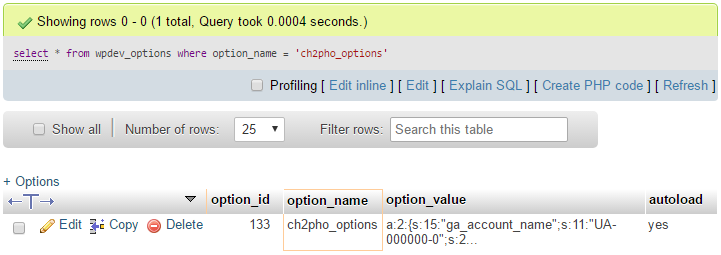
- Using your web server's MySQL database administration tool, query the wpdev_options table of your WordPress installation for an option with the name ch2pho_options:
select * from wpdev_options where option_name = 'ch2pho_options'
- Your query should return a single row with a serialized set of data representing all of the fields in the array: