- Navigate to the WordPress plugin directory of your development installation.
- Navigate to the ch8-bug-tracker directory and edit ch8-bug-tracker.php.
- Find the ch8bt_shortcode_list function and add the following highlighted code after the initial global $wpdb call to check whether a search string was entered by a visitor:
global $wpdb;

if ( !empty( $_GET['searchbt'] ) ) {
    $search_string = sanitize_text_field( $_GET['searchbt'] );
    $search_mode = true;
} else {
    $search_string = "Search...";
    $search_mode = false;
}
- Insert the following highlighted lines of code in the middle of the existing query string to add the where parameters using the user search text, if present:
$bug_query = 'select * from ' . $wpdb->get_blog_prefix();
$bug_query .= 'ch8_bug_data ';

// Add search string in query if present
if ( $search_mode ) {
    $search_term = '%'. $search_string . '%';
    $bug_query .= "where bug_title like '%s' ";
    $bug_query .= "or bug_description like '%s' ";
} else {
    $search_term = '';
}

$bug_query .= 'ORDER by bug_id DESC';
- Locate the following line of code:
$bug_items = $wpdb->get_results( $bug_query, ARRAY_A );
Replace it to the following code:
if ( $search_mode ) {
    $bug_items = $wpdb->get_results( $wpdb->prepare(
                     $bug_query, $search_term, $search_term ),
                     ARRAY_A );
} else {
    $bug_items = $wpdb->get_results( $bug_query, ARRAY_A );
}
- Add the following code block, before the table starts rendering, to display a simple search form:
$output = '';

$output .= '<div class="ch8_bt_search">';
$output .= '<form method="get" id="ch8_bt_search">';
$output .= '<div>Search bugs ';
$output .= '<input type="text" onfocus="this.value=\'\'" ';
$output .= 'value="' . esc_html( $search_string ) . '" ';
$output .= 'name="searchbt" />';
$output .= '<input type="submit" value="Search" />';
$output .= '</div>';
$output .= '</form></div>';

$output .= '<div class="bug-tracker-list"><table>';
- Save and close the plugin file.
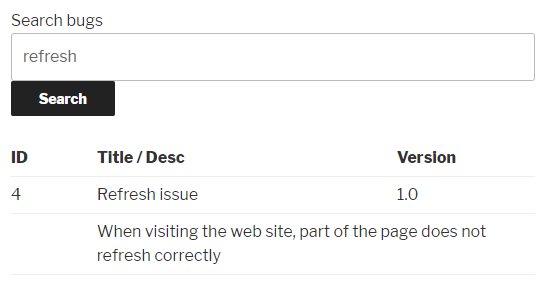
- Visit the bug display page that was previously created to see the new search form. Enter a search string and click on the Search button to see a list of results: