
- Navigate to the ch2-private-item-text folder of the WordPress plugin directory of your development installation.
- Open the ch2-private-item-text.php file in a text editor.
- Add the following lines of code to implement an activation callback to initialize plugin options when it is installed or upgraded:
register_activation_hook( __FILE__, 'ch2pit_get_options' );

function ch2pit_get_options() {
    $options = get_option( 'ch2pit_options', array() );

    $stylesheet_location = plugin_dir_path( __FILE__ ) .
                               'stylesheet.css';
    $new_options['stylesheet'] =
        file_get_contents( $stylesheet_location );

    $merged_options = wp_parse_args( $options, $new_options );
    $compare_options = array_diff_key( $new_options, $options );
    if ( empty( $options ) || !empty( $compare_options ) ) {
        update_option( 'ch2pit_options', $merged_options );
    }
    return $merged_options;
}
- Add the following code segment to register a function to be called when the menu is built to add an additional item under the Settings menu:
add_action( 'admin_menu', 'ch2pit_settings_menu' );

function ch2pit_settings_menu() {
    add_options_page( 'Private Item Text Configuration',
         'Private Item Text', 'manage_options',
         'ch2pit-private-item-text', 'ch2pit_config_page' );
}
- Insert the following code to render the options page.
The line that prints the style sheet in the text area should start at the beginning of a new line to avoid having extra spaces at the beginning of the style sheet editor. Also, make sure you do not lose the hyphen in font-family if you are copying the code from a digital copy of this book.
function ch2pit_config_page() {
    // Retrieve plugin configuration options from database
    $options = ch2pit_get_options(); ?>

    <div id="ch2pit-general" class="wrap">
    <h2>Private Item Text</h2>

    <!-- Code to display confirmation messages when settings
         are saved or reset -->
    <?php if ( isset( $_GET['message'] ) &&
               $_GET['message'] == '1' ) { ?>
        <div id='message' class='updated fade'><p>
            <strong>Settings Saved</strong></p></div>
    <?php } elseif ( isset( $_GET['message'] )
                     && $_GET['message'] == '2' ) { ?>
        <div id='message' class='updated fade'><p>
        <strong>Stylesheet reverted to original</strong></p></div>
    <?php } ?>

    <form name="ch2pit_options_form" method="post"
          action="admin-post.php">
    <input type="hidden" name="action"
           value="save_ch2pit_options" />
    <?php wp_nonce_field( 'ch2pit' ); ?>

    Stylesheet<br />
<textarea name="stylesheet" rows="10" cols="40" style="font-family:Consolas,Monaco,monospace"><?php echo esc_html ( $options['stylesheet'] ); ?></textarea><br />
    <input type="submit" value="Submit" class="button-primary" />
    <input type="submit" value="Reset" name="resetstyle"
           class="button-primary" />
    </form>
    </div>
<?php }
- Add the following block of code to register a function to be called when user options are saved and to provide an implementation for this function:
add_action( 'admin_init', 'ch2pit_admin_init' );

function ch2pit_admin_init() {
    add_action( 'admin_post_save_ch2pit_options',
                'process_ch2pit_options' );
}

function process_ch2pit_options() {
    // Check that user has proper security level
    if ( !current_user_can( 'manage_options' ) ) {
        wp_die( 'Not allowed' );
    }

    // Check if nonce field is present
    check_admin_referer( 'ch2pit' );

    // Retrieve original plugin options array
    $options = ch2pit_get_options();

    if ( isset( $_POST['resetstyle'] ) ) {
        $stylesheet_location = plugin_dir_path( __FILE__ ) .
                                   'stylesheet.css';
        $options['stylesheet'] =
            file_get_contents( $stylesheet_location );
        $message = 2;
    } else {
        // Cycle through all fields and store their values
        // in the options array
        foreach ( array( 'stylesheet' ) as $option_name ) {
            if ( isset( $_POST[$option_name] ) ) {
                $options[$option_name] = $_POST[$option_name];
            }
        }
        $message = 1;
    }

    // Store updated options array to database
    update_option( 'ch2pit_options', $options );

    // Redirect the page to the configuration form
    wp_redirect( add_query_arg(
                     array(
                         'page' => 'ch2pit-private-item-text',
                         'message' => $message ),
                         admin_url( 'options-general.php' ) ) );
    exit;
}
- Delete the call to the add_action function, which associated the function ch2pit_queue_stylesheet with the wp_enqueue_scripts action hook, along with the ch2pit_queue_stylesheet function itself.
- Add the following code to add the user-modifiable style sheet code to the page header:
add_action( 'wp_head', 'ch2pit_page_header_output' );

function ch2pit_page_header_output() { ?>
    <style type='text/css'>
    <?php
        $options = ch2pit_get_options();
        echo $options['stylesheet'];
    ?>
    </style>
<?php }
- Save and close the plugin file.
- Deactivate and then Activate the Chapter 2 - Private Item Text plugin from the administration interface.
- Navigate to the Settings menu and select the Private Item Text submenu item to see the newly created configuration panel, with options to submit changes to the style sheet or reset it to its initial state, as shown in the following screenshot:
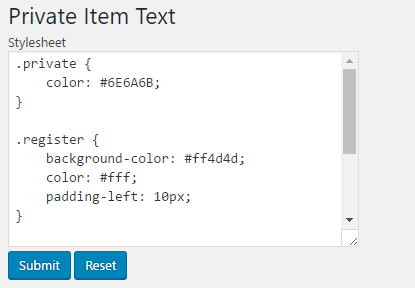
- Visit the website and look at the page source to see that the style sheet data entered in the configuration page shows up in the HTML header:
<style type='text/css'>
.private {
    color: #6E6A6B;
}

.register {
    background-color: #ff4d4d;
    color: #fff;
    padding-left: 10px;
}
</style>