- Navigate to the WordPress plugin directory of your development installation.
- Create a new directory called ch5-post-source-link.
- Navigate to the directory and create a text file called ch5-post-source-link.php.
- Open the new file in a code editor and add an appropriate header at the top of the plugin file, naming the plugin Chapter 5 - Post Source Link.
- Add the following line of code to register a function that will be executed when WordPress is preparing a list of meta boxes for all the administration areas:
add_action( 'add_meta_boxes', 'ch5_psl_register_meta_box' );
- Add the following code segment to provide an implementation for the ch5_psl_register_meta_box function:
function ch5_psl_register_meta_box() {
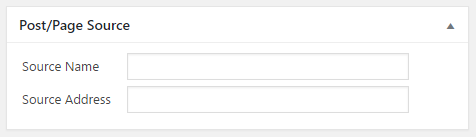
    add_meta_box( 'ch5_psl_source_meta_box', 'Post/Page Source',
                  'ch5_psl_source_meta_box', 'post', 'normal');
    add_meta_box( 'ch5_psl_source_meta_box', 'Post/Page Source',
                  'ch5_psl_source_meta_box', 'page', 'normal');
}
- Insert this code to provide an implementation for the ch5_psl_source_meta_box function, responsible for rendering the meta box contents:
function ch5_psl_source_meta_box( $post ) {
    // Retrieve current source name and address for post
    $post_source_name =
        esc_html( get_post_meta( $post->ID, 'post_source_name',
                                 true ) );
    $post_source_address =
        esc_html( get_post_meta( $post->ID,
                                 'post_source_address',
                                 true ) );
    ?>
    <!-- Display fields to enter source name and address -->
    <table>
        <tr>
            <td style="width: 100px">Source Name</td>
            <td>
                <input type="text" size="40"
                       name="post_source_name"
                       value="<?php echo $post_source_name; ?>" />
            </td>
        </tr>
        <tr>
            <td>Source Address</td>
            <td>
                <input type="text" size="40"
                       name="post_source_address"
                       value="<?php echo $post_source_address; ?>"
                />
            </td>
        </tr>
    </table>
<?php }
- Insert the following block of code to register a function that will be called when any type of post is saved:
add_action( 'save_post', 'ch5_psl_save_source_data', 10, 2 );
- Append the following code section to provide an implementation for the ch5_psl_save_source_data function:
function ch5_psl_save_source_data( $post_id = false,
                                   $post = false ) {
    // Check post type for posts or pages
    if ( 'post' == $post->post_type ||
         'page' == $post->post_type ) {
        // Store data in post meta table if present in post data
        if ( isset( $_POST['post_source_name'] ) ) {
            update_post_meta( $post_id, 'post_source_name',
                sanitize_text_field(
                    $_POST['post_source_name'] ) );
        }

        if ( isset( $_POST['post_source_address'] ) ) {
            update_post_meta( $post_id, 'post_source_address',
                esc_url( $_POST['post_source_address'] ) );
        }
    }
}
- Save and close the plugin file.
- Navigate to the Plugins management page and Activate the Chapter 5 - Post Source Link plugin.
- Go to the Posts section of the administration, click on one of the entries to open the post editor, and see the new Post/Page Source meta box: