
- Navigate to the WordPress plugin directory of your local installation in the file explorer if you are not already there.
- Open the hello.php file in a text editor.
- Edit the plugin name on line 7 to change it from Plugin Name: Hello Dolly to Plugin Name: Goodbye Dolly.
- Save and close the file. You should now notice that the modified file is identified by a red exclamation mark icon in the file explorer, indicating that it has been modified.
- Create a new folder in the plugins directory named chapter1.
- Right-click on the new folder and select the TortoiseSVN | Add... menu item to bring up the Add dialog.
- Click on the OK button to queue the file to be added to the repository when changes are next committed. You will see a blue plus sign appear over the folder name to indicate that it will be added to the repository on the next code commit.
- Navigate to the chapter1 directory and create a new text document named example.txt.
- Navigate back to the plugins directory.
- Right-click on the index.php file and select the TortoiseSVN | Delete menu item. The selected file is immediately deleted and disappears from the file explorer.
- Right-click in an empty part of the plugins directory and select the SVN Commit... menu item. This last step will display the Commit dialog, with a top section to write a message detailing the changes that are being committed, and a bottom section containing a file listing. Notice that all files but one have check marks next to them, since they have either been recognized as being changed by the Subversion client or have been added or deleted through the TortoiseSVN interface. The file that does not have a check mark next to it is the text file that was created but not tagged to be included in the next commit operation using the TortoiseSVN contextual menu:
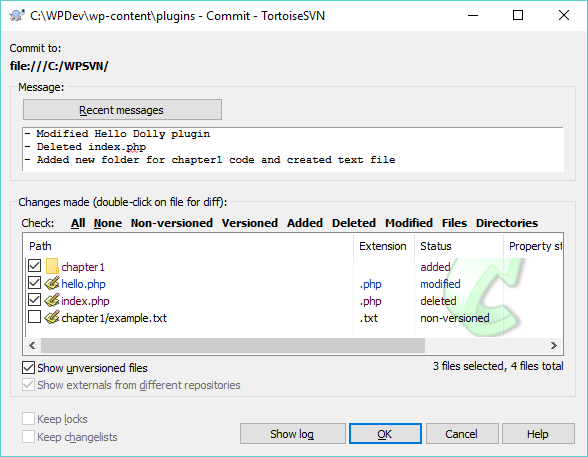
- Type a message in the appropriate field indicating the reason for the operation.
- Right-click on the chapter1/example.txt file and select the Add menu item to add it to the operation.
- Click on the OK button to send all the changes to the Subversion repository.