- Navigate to the WordPress plugin directory of your development installation.
- Navigate to the ch8-bug-tracker directory and edit ch8-bug-tracker.php.
- Locate the ch8bt_shortcode_list function and find the section where the SQL query is being prepared.
- Add an extra line to the query (the highlighted line of code in the following code block) to show only open bugs (bugs with a bug_status field set to 0):
$bug_query = 'select * from ' . $wpdb->get_blog_prefix();
$bug_query .= 'ch8_bug_data ';
$bug_query .= 'where bug_status = 0 ';
- Make the change highlighted in the following code to the code building the search query:
if ( $search_mode ) {
    $search_term = '%' . $search_string . '%';
    $bug_query .= "and ( bug_title like '%s' ";
    $bug_query .= "or bug_description like '%s' ) ";
}
- Find the code responsible for drawing the search form, and add the following highlighted block of code after it to display a link to be clicked to show closed bugs:
$output .= '</form></div>';

$output .= '<div class="show_closed_bugs">';
$output .= 'Show closed bugs';
$output .= '</div>';

$output .= '<div class="bug-tracker-list"><table>';
- Insert this code segment after the bug display table to add the JavaScript responsible for providing the AJAX-based data replacement functionality:
$output .= "<script type='text/javascript'>";
$nonce = wp_create_nonce( 'ch8bt_ajax' );
$output .= "function replacecontent( bug_status )" .
           "{ jQuery.ajax( {" .
           "    type: 'POST', url: ajax_url," .
           "    data: { action: 'ch8bt_buglist_ajax'," .
           "            _ajax_nonce: '" . $nonce . "'," .
           "            bug_status: bug_status }," .
           "    success: function( data ) {" .
           "            jQuery('.bug-tracker-list').html( data );" .
           "            }" .
           "    });" .
           "};";

$output .= "jQuery( document ).ready( function() {";
$output .= "jQuery('.show_closed_bugs').click( function()
                                    { replacecontent( 1 ); } ";
$output .= ")});";
$output .= "</script>";
- Add the following line of code at the end of the plugin file to register a function to add content to the page header:
add_action( 'wp_head', 'ch8bt_declare_ajaxurl' );
- Append the following block of code to provide an implementation for the ch8bt_declare_ajaxurl function:
function ch8bt_declare_ajaxurl() { ?>
    <script type="text/javascript">
        var ajax_url =
            '<?php echo admin_url( 'admin-ajax.php' ); ?>';
    </script>
<?php }
- Insert the following lines of code to register functions that will be called when AJAX requests are received from public or logged in users with an action variable set to ch8bt_buglist_ajax:
add_action( 'wp_ajax_ch8bt_buglist_ajax', 'ch8bt_buglist_ajax' );
add_action( 'wp_ajax_nopriv_ch8bt_buglist_ajax',
            'ch8bt_buglist_ajax' );
- Add the following block of code to provide an implementation for the ch8bt_buglist_ajax function:
function ch8bt_buglist_ajax() {
    check_ajax_referer( 'ch8bt_ajax' );

    if ( isset( $_POST['bug_status'] ) &&
         is_numeric( $_POST['bug_status'] ) ) {
        global $wpdb;

        // Prepare query to retrieve bugs from database
        $bug_query = 'select * from ' . $wpdb->get_blog_prefix();
        $bug_query .= 'ch8_bug_data where bug_status = ';
        $bug_query .= intval( $_POST['bug_status'] );
        $bug_query .= ' ORDER by bug_id DESC';

        $bug_items = $wpdb->get_results(
            $wpdb->prepare( $bug_query ), ARRAY_A );

        // Prepare output to be returned to AJAX requestor
        $output = '<div class="bug-tracker-list"><table>';

        // Check if any bugs were found
        if ( $bug_items ) {
            $output .= '<tr><th style="width: 80px">ID</th>';
            $output .= '<th style="width: 300px">';
            $output .= 'Title / Desc</th><th>Version</th></tr>';

            // Create row in table for each bug
            foreach ( $bug_items as $bug_item ) {
                $output .= '<tr style="background: #FFF">';
                $output .= '<td>' . $bug_item['bug_id'] . '</td>';
                $output .= '<td>' . $bug_item['bug_title'];
                $output .= '</td><td>' . $bug_item['bug_version'];
                $output .= '</td></tr>';
                $output .= '<tr><td></td><td colspan="2">';
                $output .= $bug_item['bug_description'];
                $output .= '</td></tr>';
            }
        } else {
            // Message displayed if no bugs are found
            $output .= '<tr style="background: #FFF">';
            $output .= '<td colspan="3">No Bugs to Display</td>';
        }
        $output .= '</table></div><br />';
        echo $output;
    }
    die();
}
- Add the following line of code to register a function to be called when scripts are being queued up:
add_action( 'wp_enqueue_scripts', 'ch8bt_load_jquery' );
- Insert the following code block to provide an implementation for the ch8bt_load_query function:
function ch8bt_load_jquery() {
    wp_enqueue_script( 'jquery' );
    wp_enqueue_style( 'bug_tracker_css',
                      plugins_url( 'stylesheet.css', __FILE__ ),
                      array(), '1.0' );
}
- Save and close the plugin file.
- Create a new text file named stylesheet.css in the plugin directory and insert the following content in the file:
.show_closed_bugs {
    cursor: pointer;
    color: #00c;
}
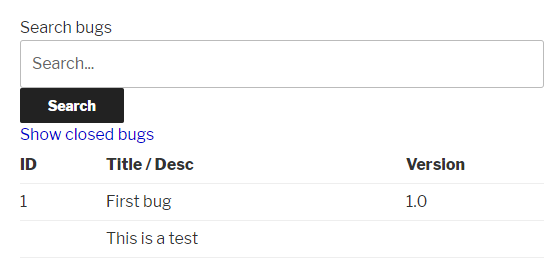
- Visit the bug listing page that was previously created to see that only opened bugs are displayed.
- Click on the link to display closed bugs to see how the list gets quickly replaced with closed issues: