- Navigate to the ch4-book-reviews folder of the WordPress plugin directory of your development installation.
- Open the ch4-book-reviews.php file in a code editor.
- Find the call to the register_taxonomy function within the ch4_br_create_book_post_type function and add a new member to the configuration array named show_in_quick_edit with a value set to false highlighted in bold:
'show_tagcloud' => false,
'meta_box_cb' => false,
'show_in_quick_edit' => false,
'hierarchical' => true,
- Add the following line of code after the existing functions to register a function to be called when WordPress is preparing to render the contents of the Quick Edit section:
add_action( 'quick_edit_custom_box',
            'ch4_br_display_custom_quickedit_link', 10, 2 );
- Add the following code section to provide an implementation for the ch4_br_display_custom_quickedit_link function:
function ch4_br_display_custom_quickedit_link( $column_name,
                                               $post_type ) {
    if ( 'book_reviews' == $post_type ) {
        switch ( $column_name ) {
            case 'book_reviews_author': ?>
                <fieldset class="inline-edit-col-right">
                <div class="inline-edit-col">
                   <label><span class="title">Author</span></label>
                   <input type="text"
                          name='book_reviews_author_input'
                          id='book_reviews_author_input' value="">
                </div>
                <?php break;
            case 'book_reviews_rating': ?>
                <div class="inline-edit-col">
                    <label>
                        <span class="title">Rating</span>
                    </label>
                    <select name='book_reviews_rating_input'
                            id='book_reviews_rating_input'>
                    <?php // Generate all items of drop-down list
                    for ( $rating = 5; $rating >= 1; $rating -- ) {
                    ?>  <option value="<?php echo $rating; ?>">
                        <?php echo $rating; ?> stars
                    <?php } ?>
                    </select>
                </div>
                <?php break;
            case 'book_reviews_type': ?>
                <div class="inline-edit-col">
                    <label><span class="title">Type</span></label>
                    <?php
                    $terms = get_terms( array( 'taxonomy' =>
                                        'book_reviews_book_type',
                                        'hide_empty' => false ) );
                    ?>
                    <select name='book_reviews_type_input'
                            id='book_reviews_type_input'>
                    <?php foreach ($terms as $index => $term) {
                        echo '<option ';
                        echo 'class="book_reviews_type-option"';
                        echo 'value="' . $term->term_id . '"';
                        selected( 0, $index );
                        echo '>' . $term->name. '</option>';
                    } ?>
                    </select>
                </div>
            <?php break;
        }
    }
}
- Add the following line of code to register a function to be called when WordPress is rendering the footer of the administration pages:
add_action( 'admin_footer', 'ch4_br_quick_edit_js' );
- Implement the ch4_br_quick_edit_js function with the following code snippet:
function ch4_br_quick_edit_js() {
    global $current_screen;
    if ( ( 'edit-book_reviews' !== $current_screen->id ) ||
         ( 'book_reviews' !== $current_screen->post_type ) ) {
        return;
    } ?>

    <script type="text/javascript">
    function set_inline_book_reviews( reviewArray ) {
        // revert Quick Edit menu so that it refreshes properly
        inlineEditPost.revert();
        var inputBookAuthor =
            document.getElementById('book_reviews_author_input');
        inputBookAuthor.value = reviewArray[0];

        var inputRating =
            document.getElementById('book_reviews_rating_input');
        for (i = 0; i < inputRating.options.length; i++) {
            if ( inputRating.options[i].value == reviewArray[1] ) {
                inputRating.options[i].setAttribute( 'selected',
                                                     'selected' );
            } else {
                inputRating.options[i].removeAttribute(
                    'selected' );
            }
        }

        var inputBookType =
            document.getElementById('book_reviews_type_input');
        for (i = 0; i < inputBookType.options.length; i++) {
            if ( inputBookType.options[i].value ==
                     reviewArray[2] ) {
                inputBookType.options[i].setAttribute( 'selected',
                    'selected' );
            } else {
                inputBookType.options[i].removeAttribute(
                    'selected' );
            }
        }
    }
</script>
<?php }
- Add the following code to register a function to replace the original Quick Edit code that is generated for each post in the book reviews page:
add_filter( 'post_row_actions', 'ch4_br_quick_edit_link', 10, 2 );
- Add the following block of code to provide an implementation for the ch4_br_quick_edit_link function:
function ch4_br_quick_edit_link( $act, $post ) {
global $current_screen;
$post_id = '';
if ( ( isset( $current_screen ) &&
$current_screen->id != 'edit-book_reviews' &&
$current_screen->post_type != 'book_reviews' )
|| ( isset( $_POST['screen'] ) &&
$_POST['screen'] != 'edit-book_reviews' ) ) {
return $act;
}
if ( !empty( $post->ID ) ) {
$post_id = $post->ID;
} elseif ( isset( $_POST['post_ID'] ) ) {
$post_id = intval( $_POST['post_ID'] );
}
if ( !empty( $post_id ) ) {
$book_author = esc_html( get_post_meta( $post_id,
'book_author', true ) );
$book_rating = esc_html( get_post_meta( $post_id,
'book_rating', true ) );
$book_reviews_types = wp_get_post_terms( $post_id,
'book_reviews_book_type',
array( 'fields' => 'all' ) );
if ( empty( $book_reviews_types ) ) {
$book_reviews_types[0] =
(object) array( 'term_id' => 0 );
}
$idx = 'inline hide-if-no-js';
$act[$idx] = '<a href="#" class="editinline" ';
$act[$idx] .= " onclick=\"var reviewArray = new Array('";
$act[$idx] .= "{$book_author}', '{$book_rating}', ";
$act[$idx] .= "'{$book_reviews_types[0]->term_id}');";
$act[$idx] .= "set_inline_book_reviews( reviewArray )\">";
$act[$idx] .= __( 'Quick Edit' );
$act[$idx] .= '</a>';
}
return $act;
}
- Add the following function call to register a function that will be executed when post data is updated from the Quick Edit section:
add_action( 'save_post', 'ch4_br_save_quick_edit_data', 10, 2 );
- Provide an implementation for the ch4_br_save_quick_edit_data function with the following block of code:
function ch4_br_save_quick_edit_data( $ID = false,
                                      $post = false ) {
    // Do not save if auto-saving, not book reviews, no permissions
    if ( ( defined( 'DOING_AUTOSAVE' ) && DOING_AUTOSAVE ) ||
         ( isset( $_POST['post_type'] )
           && 'book_reviews' != $_POST['post_type'] ) ||
         !current_user_can( 'edit_page', $ID ) ) {
        return $ID;
    }

    $post = get_post( $ID );
    if ( !empty( $post ) && 'revision' != $post->post_type ) {
        if ( isset( $_POST['book_reviews_author_input'] ) ) {
            update_post_meta( $ID, 'book_author',
                sanitize_text_field(
                    $_POST['book_reviews_author_input'] ) );
        }

        if ( isset( $_POST['book_reviews_rating_input'] ) ) {
            update_post_meta( $ID, 'book_rating',
                intval( $_POST['book_reviews_rating_input'] ) );
        }

        if ( isset( $_POST['book_reviews_type_input'] ) ) {
            $term = term_exists(
                intval( $_POST['book_reviews_type_input'] ),
                        'book_reviews_book_type' );
            if ( !empty( $term ) ) {
                wp_set_object_terms( $ID,
                    intval( $_POST['book_reviews_type_input'] ),
                            'book_reviews_book_type' );
            }
        }
    }
}
- Save and close the plugin file.
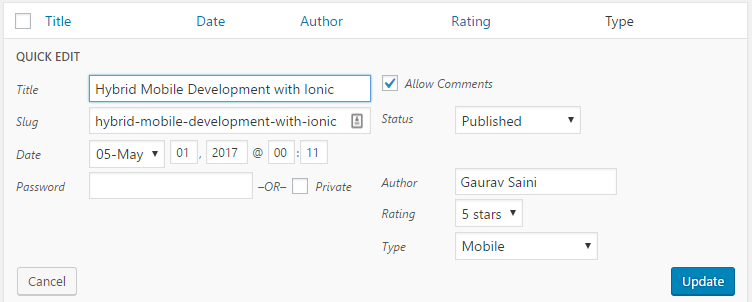
- Visit the Book Reviews listings page and click on Quick Edit to see the newly added Author, Rating, and Type fields.
- Change the values in these fields and save them using the Update button. You will see that the values get updated in the Book Reviews list, accordingly.