
- Navigate to the ch2-page-header-output folder of the WordPress plugin directory of your development installation.
- Create a new file called uninstall.php.
- Open the new file in a text editor and add the following code to it:
<?php
// Check that code was called from WordPress with
// uninstallation constant declared
if ( !defined( 'WP_UNINSTALL_PLUGIN' ) ) {
    exit;
}

// Check if options exist and delete them if present
if ( false != get_option( 'ch2pho_options' ) ) {
    delete_option( 'ch2pho_options' );
}
- Save and close the plugin file.
- Navigate to the administration page of your development WordPress installation.
- Click on Plugins on the left-hand navigation menu.
- Deactivate the Chapter 2 - Page Header Output plugin.
- Make a copy of your plugin and uninstallation files to avoid losing them upon deletion of the plugin in the following steps. The copy should be moved outside of the plugins folder to avoid WordPress seeing two copies of the plugin.
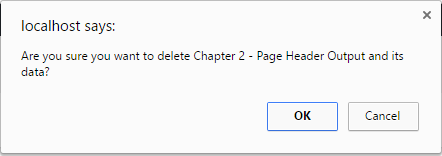
- Click on the Delete link under the Chapter 2 - Page Header Output plugin.
- Click on the OK button to delete all the plugin files.
Depending on the configuration of your development site, you may be prompted to provide FTP credentials before WordPress is able to delete the plugin files.
- Using your web server's MySQL database administration tool, query the wpdev_options table of your WordPress installation for an option with the name ch2pho_options to see that the option has been deleted:
select * from wpdev_options where option_name = 'ch2pho_options'