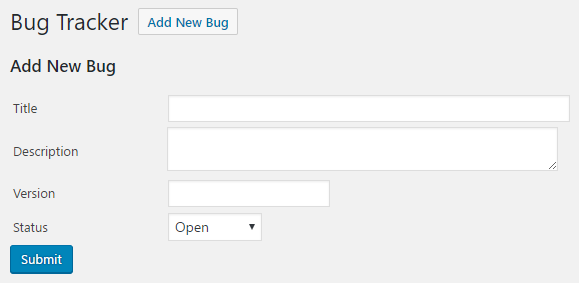
- Navigate to the WordPress plugin directory of your development installation.
- Navigate to the ch8-bug-tracker directory and edit ch8-bug-tracker.php.
- Find the ch8bt_config_page function and locate the bracket that closes out the if statement (<?php } ?>) situated toward the end of its body.
- Insert the following code block right before the closing bracket from the if statement identified in the previous step:
<?php } elseif ( isset( $_GET['id'] ) &&
                 ( 'new' == $_GET['id'] ||
                   is_numeric( $_GET['id'] ) ) ) {
    $bug_id = intval( $_GET['id'] );
    $mode = 'new';

    // Query database if numeric id is present
    if ( $bug_id > 0 ) {
        $bug_query = 'select * from ' . $wpdb->get_blog_prefix();
        $bug_query .= 'ch8_bug_data where bug_id = %d';

        $bug_data =
            $wpdb->get_row( $wpdb->prepare( $bug_query, $bug_id ),
                            ARRAY_A );

        // Set variable to indicate page mode
        if ( $bug_data ) {
            $mode = 'edit';
        }
    }

    if ( 'new' == $mode ) {
        $bug_data = array(
            'bug_title' => '', 'bug_description' => '',
            'bug_version' => '', 'bug_status' => ''
        );
    }

    // Display title based on current mode
    if ( 'new' == $mode ) {
        echo '<h3>Add New Bug</h3>';
    } elseif ( 'edit' == $mode ) {
        echo '<h3>Edit Bug #' . $bug_data['bug_id'] . ' - ';
        echo $bug_data['bug_title'] . '</h3>';
    }
    ?>

    <form method="post"
          action="<?php echo admin_url( 'admin-post.php' ); ?>">
    <input type="hidden" name="action" value="save_ch8bt_bug" />
    <input type="hidden" name="bug_id"
           value="<?php echo $bug_id; ?>" />

    <!-- Adding security through hidden referrer field -->
    <?php wp_nonce_field( 'ch8bt_add_edit' ); ?>

    <!-- Display bug editing form -->
    <table>
        <tr>
            <td style="width: 150px">Title</td>
            <td><input type="text" name="bug_title" size="60"
                       value="<?php echo esc_html(
                       $bug_data['bug_title'] ); ?>"/></td>
        </tr>
        <tr>
            <td>Description</td>
            <td><textarea name="bug_description"
            cols="60"><?php echo
esc_textarea( $bug_data['bug_description'] ); ?></textarea></td>
        </tr>
        <tr>
            <td>Version</td>
            <td><input type="text" name="bug_version"
                       value="<?php echo esc_html(
                       $bug_data['bug_version'] ); ?>" /></td>
        </tr>
        <tr>
            <td>Status</td>
            <td>
                <select name="bug_status">
                <?php
                // Display drop-down list of bug statuses
                $bug_statuses = array( 0 => 'Open', 1 => 'Closed',
                                       2 => 'Not-a-Bug' );
                foreach( $bug_statuses as $status_id => $status ) {
                    // Add selected tag when entry matches
                    echo '<option value="' . $status_id . '" ';
                    selected( $bug_data['bug_status'],
                              $status_id );
                    echo '>' . $status;
                }
                ?>
                </select>
            </td>
        </tr>
    </table>
    <input type="submit" value="Submit" class="button-primary" />
</form>
- Add the following line of code to register a function that will be called on the initialization of the administration page:
add_action( 'admin_init', 'ch8bt_admin_init' );
- Add the following block of code at the end of the plugin file to register a function to be called when bugs are created or updated:
function ch8bt_admin_init() {
    add_action( 'admin_post_save_ch8bt_bug', 'process_ch8bt_bug' );
}
- Append the following block of code to process user-submitted data and store it in the website database:
function process_ch8bt_bug() {
    if ( !current_user_can( 'manage_options' ) ) {
        wp_die( 'Not allowed' );
    }

    // Check if nonce field is present for security
    check_admin_referer( 'ch8bt_add_edit' );
    global $wpdb;

    // Place all user submitted values in an array (or empty
    // strings if no value was sent)
    $bug_data = array();
    $bug_data['bug_title'] = ( isset( $_POST['bug_title'] ) ?
        sanitize_text_field( $_POST['bug_title'] ) : '' );

    $bug_data['bug_description'] =
        ( isset( $_POST['bug_description'] ) ?
          sanitize_text_field( $_POST['bug_description'] ) : '' );

    $bug_data['bug_version'] = ( isset( $_POST['bug_version'] ) ?
        sanitize_text_field( $_POST['bug_version'] ) : '' );

    // Set bug report date as current date
    $bug_data['bug_report_date'] = date( 'Y-m-d' );

    // Set status of all new bugs to 0 (Open)
    $bug_data['bug_status'] = ( isset( $_POST['bug_status'] ) ?
        intval( $_POST['bug_status'] ) : 0 );

    // Call the wpdb insert or update method based on value
    // of hidden bug_id field
    if ( isset( $_POST['bug_id'] ) && 0 == $_POST['bug_id'] ) {
        $wpdb->insert( $wpdb->get_blog_prefix() . 'ch8_bug_data',
                       $bug_data );
    } elseif ( isset( $_POST['bug_id'] ) &&
               $_POST['bug_id'] > 0 ) {
        $wpdb->update( $wpdb->get_blog_prefix() . 'ch8_bug_data',
            $bug_data,
            array( 'bug_id' => intval( $_POST['bug_id'] ) ) );
    }

    // Redirect the page to the user submission form
    wp_redirect( add_query_arg( 'page', 'ch8bt-bug-tracker',
                     admin_url( 'options-general.php' ) ) );
    exit;
}
- Save and close the plugin file.
- Navigate to the new Bug Tracker item under the administration page's Settings menu and click on the Add New Bug link to create an entry:
- Click on Submit to store the new bug in the website database. The newly created bug will appear in the bug listing created in the previous recipe.
- Click on the new entry's name to review its information and update it.