- Navigate to the WordPress plugin directory of your development installation.
- Navigate to the ch8-bug-tracker directory and edit ch8-bug-tracker.php.
- Find the ch8bt_config_page function and add the following highlighted code block at the end of the bug listings section after the end of the existing deletion form:
<input type="submit" value="Delete Selected"
       class="button-primary"/>
</form>

<!-- Form to upload new bugs in csv format -->
<form method="post"
      action="<?php echo admin_url( 'admin-post.php' ); ?>"
      enctype="multipart/form-data">

<input type="hidden" name="action" value="import_ch8bt_bug" />
<!-- Adding security through hidden referrer field -->
<?php wp_nonce_field( 'ch8bt_import' ); ?>

<h3>Import Bugs</h3>
<div class="import_data">Import Bugs from CSV File
    (<a href="<?php echo plugins_url( 'importtemplate.csv',
                                      __FILE__ ); ?>">Template</a>)
    <input name="import_bugs_file" type="file" /></div>
<input type="submit" value="Import" class="button-primary"/>
</form>
- Locate the ch8bt_admin_init function and add the following line of code at the end of its body to register a function to process submissions of the bug import form:
add_action( 'admin_post_import_ch8bt_bug', 'import_ch8bt_bug' );
- Insert the following block of code to provide an implementation for the import_ch8bt_bug function:
function import_ch8bt_bug() {
    // Check that user has proper security level
    if ( !current_user_can( 'manage_options' ) ) {
        wp_die( 'Not allowed' );
    }

    // Check if nonce field is present
    check_admin_referer( 'ch8bt_import' );

    // Check if file has been uploaded
    if( array_key_exists( 'import_bugs_file', $_FILES ) ) {
        // If file exists, open it in read mode
        $handle =
            fopen( $_FILES['import_bugs_file']['tmp_name'], 'r' );

        // If file is successfully open, extract a row of data
        // based on comma separator, and store in $data array
        if ( $handle ) {
            while ( FALSE !==
                    ( $data = fgetcsv( $handle, 5000, ',' ) ) ) {
                $row += 1;

                // If row count is ok and row is not header row
                // Create array and insert in database
                if ( count( $data ) == 4 && $row != 1 ) {
                    $new_bug = array(
                        'bug_title' => $data[0],
                        'bug_description' => $data[1],
                        'bug_version' => $data[2],
                        'bug_status' => $data[3],
                        'bug_report_date' => date( 'Y-m-d' ) );

                    global $wpdb;
                    $wpdb->insert( $wpdb->get_blog_prefix() .
                                   'ch8_bug_data', $new_bug );
                }
            }
        }
    }

    // Redirect the page to the user submission form
    wp_redirect( add_query_arg( 'page', 'ch8bt-bug-tracker',
                     admin_url( 'options-general.php' ) ) );
    exit;
}
- Save and close the plugin file.
- Create a new text file in the plugin directory called importtemplate.csv and open it in a text editor.
- Insert the following text in the newly created file to provide an example bug to import:
"Title","Description","Version","Status"
"Test Import Bug","This is a test import bug","1.0","0"
- Save and close the CSV text file.
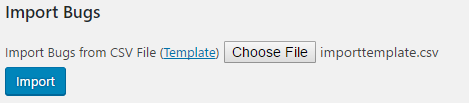
- Navigate to the new Bug Tracker item under the administration page's Settings menu to see the new Import Bugs section.
- Use the file import dialog to locate the importtemplate.csv.
- Import the list of bugs in the system to see its content added to the database: