- Navigate to the ch11-hello-world folder of the WordPress plugin directory of your development installation.
- Open the ch11-hello-world.php file in a text editor.
- Add the following line of code at the end of the file to register a function to be called when the plugin is initialized:
add_action( 'init', 'ch11hw_plugin_init' );
- Add the following code section to provide an implementation for the ch11hw_plugin_init function:
function ch11hw_plugin_init() {
    load_plugin_textdomain( 'ch11hw_hello_world', false,
                            dirname( plugin_basename( __FILE__ ) )
                            . '/languages' );
}
- Locate the ch11hw_set_default_options_array function and add the same call to load_plugin_textdomain at the top of the function before the if statement:
load_plugin_textdomain( 'ch11hw_hello_world', false,
                        dirname( plugin_basename( __FILE__ ) )
                        . '/languages' );
- Save and close the plugin file.
- Navigate to the Reglages menu to see if the plugin's menu item has changed.
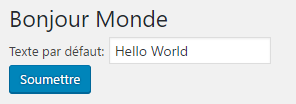
- Select the Bonjour Monde item to see the translated configuration page: