- Navigate to the WordPress plugin directory of your development installation.
- Navigate to the ch8-bug-tracker directory and edit ch8-bug-tracker.php.
- Add the following line of code at the bottom of the file to declare a new shortcode and its associated display function:
add_shortcode( 'bug-tracker-list', 'ch8bt_shortcode_list' );
- Insert the following code block right after the section header to implement the ch8bt_shortcode_list function that is responsible for displaying a bug listing:
function ch8bt_shortcode_list() {
    global $wpdb;

    // Prepare query to retrieve bugs from database
    $bug_query = 'select * from ' . $wpdb->get_blog_prefix();
    $bug_query .= 'ch8_bug_data ';
    $bug_query .= 'ORDER by bug_id DESC';
    $bug_items = $wpdb->get_results( $bug_query, ARRAY_A );

    // Prepare output to be returned to replace shortcode
    $output = '';
    $output .= '<div class="bug-tracker-list"><table>';

    // Check if any bugs were found
    if ( !empty( $bug_items ) ) {
        $output .= '<tr><th style="width: 80px">ID</th>';
        $output .= '<th style="width: 300px">Title / Desc</th>';
        $output .= '<th>Version</th></tr>';

        // Create row in table for each bug
        foreach ( $bug_items as $bug_item ) {
            $output .= '<tr style="background: #FFF">';
            $output .= '<td>' . $bug_item['bug_id'] . '</td>';
            $output .= '<td>' . $bug_item['bug_title'] . '</td>';
            $output .= '<td>' . $bug_item['bug_version'] . '</td>';
            $output .= '</tr><tr><td></td><td colspan="2">';
            $output .= $bug_item['bug_description'];
            $output .= '</td></tr>';
        }
    } else {
        // Message displayed if no bugs are found
        $output .= '<tr style="background: #FFF">';
        $output .= '<td colspan="3">No Bugs to Display</td>';
    }
    $output .= '</table></div>';

    // Return data prepared to replace shortcode on page/post
    return $output;
}
- Save and close the plugin file.
- Create a new page and insert the newly created shortcode [bug-tracker-list] in the page body.
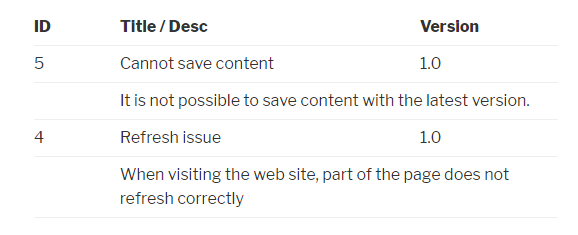
- View the page to see a list of bugs stored in the system: