- Navigate to the ch4-book-reviews folder of the WordPress plugin directory of your development installation.
- Open the ch4-book-reviews.php file in a code editor.
- Add the following line of code after the existing functions to register a function to be called when the Book Reviews listings page is being prepared:
add_filter( 'manage_edit-book_reviews_columns',
            'ch4_br_add_columns' );
- Add the following code section to provide an implementation for the ch4_br_add_columns function:
function ch4_br_add_columns( $columns ) {
    $columns['book_reviews_author'] = 'Author';
    $columns['book_reviews_rating'] = 'Rating';
    $columns['book_reviews_type'] = 'Type';

    unset( $columns['comments'] );

    return $columns;
}
- Add the following line of code to assign a function to be called when the columns data is being retrieved for each row in the post listing:
add_action( 'manage_posts_custom_column',
            'ch4_br_populate_columns' );
- Insert the following code segment to provide an implementation for the ch4_br_populate_columns function:
function ch4_br_populate_columns( $column ) {
    if ( 'book_reviews_author' == $column ) {
        $book_author = esc_html( get_post_meta( get_the_ID(),
                                                'book_author',
                                                true ) );
        echo $book_author;
    } elseif ( 'book_reviews_rating' == $column ) {
        $book_rating = get_post_meta( get_the_ID(), 'book_rating',
                                      true );
        echo $book_rating . ' stars';
    } elseif ( 'book_reviews_type' == $column ) {
        $book_types = wp_get_post_terms( get_the_ID(),
                          'book_reviews_book_type' );
        if ( $book_types ) {
            $book_cat_color = get_term_meta(
                                  $book_types[0]->term_id,
                                  'book_type_color', true );

            if ( '#' != $book_cat_color ) {
                echo '<span style="background-color: ';
                echo $book_cat_color . '; ';
                echo 'color: #fff; padding: 6px;">';
                echo $book_types[0]->name . '</span>';
            } else {
                echo $book_types[0]->name;
            }
        } else {
            echo 'None Assigned';
        }
    }
}
- Save the plugin file and navigate to the Book Reviews listing page to see that the list of columns has been altered and that data stored in the post custom fields is now displayed for each item in the list.
- Back in the code editor, add the following code at the end of the plugin file to register a function to be called when WordPress identifies columns that will be sortable for the Book Reviews custom post type:
add_filter( 'manage_edit-book_reviews_sortable_columns',
            'ch4_br_author_column_sortable' );
- Append the following code to provide an implementation for the ch4_br_author_column_sortable function:
function ch4_br_author_column_sortable( $columns ) {
    $columns['book_reviews_author'] = 'book_reviews_author';
    $columns['book_reviews_rating'] = 'book_reviews_rating';

    return $columns;
}
- Add the following block of code to register a function that will be called when data is requested to display post lists:
add_filter( 'request', 'ch4_br_column_ordering' );
- Insert the following code segment to implement the ch4_br_column_ordering function:
function ch4_br_column_ordering( $vars ) {
    if ( !is_admin() ) {
        return $vars;
    }

    if ( isset( $vars['orderby'] ) &&
         'book_reviews_author' == $vars['orderby'] ) {
        $vars = array_merge( $vars, array(
            'meta_key' => 'book_author',
            'orderby' => 'meta_value' ) );
    } elseif ( isset( $vars['orderby'] ) &&
               'book_reviews_rating' == $vars['orderby'] ) {
        $vars = array_merge( $vars, array(
                                 'meta_key' => 'book_rating',
                                 'orderby' => 'meta_value_num' ) );
    }
    return $vars;
}
- Save and close the plugin file.
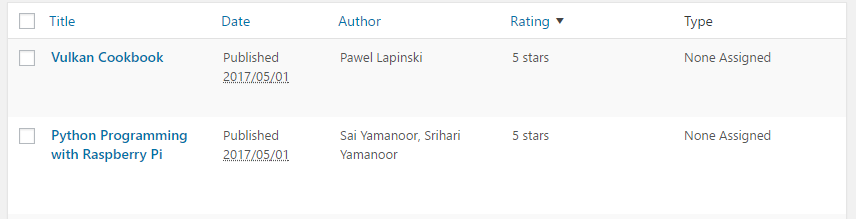
- Refresh the Book Reviews listing to see that the Author and Rating column headers are links that can be clicked to sort these columns: