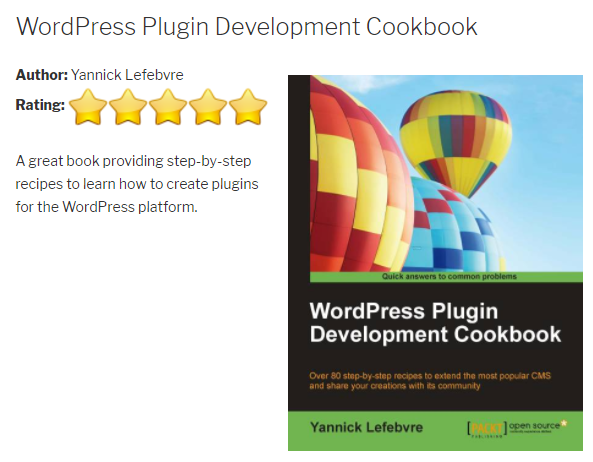
- Navigate to the ch4-book-reviews folder of the WordPress plugin directory of your development installation.
- Open the ch4-book-reviews.php file in a code editor.
- Add the following line of code after the existing functions to register a function to be called when WordPress is deciding which theme template to use to render content:
add_filter( 'template_include', 'ch4_br_template_include', 1 );
- Add the following code section to provide an implementation for the ch4_br_template_include function:
function ch4_br_template_include( $template_path ) {
    if ( 'book_reviews' == get_post_type() ) {
        if ( is_single() ) {
            // checks if the file exists in the theme first,
            // otherwise install content filter
            if ( $theme_file = locate_template( array
                 ( 'single-book_reviews.php' ) ) ) {
                $template_path = $theme_file;
            } else {
                add_filter( 'the_content',
                            'ch4_br_display_single_book_review',
                            20 );
            }
        }
    }
    return $template_path;
}
- Add the following code section to implement the ch4_br_display_single_book_review function to display Book Reviews, including their custom fields:
function ch4_br_display_single_book_review( $content ) {
    if ( !empty( get_the_ID() ) ) {
        // Display featured image in right-aligned floating div
        $content = '<div style="float: right; margin: 10px">';
        $content .= get_the_post_thumbnail( get_the_ID(),
                                            'medium' );
        $content .= '</div>';

        $content .= '<div class="entry-content">';

        // Display Author Name
        $content .= '<strong>Author: </strong>';
        $content .= esc_html( get_post_meta( get_the_ID(),
                                             'book_author',
                                             true ) );
        $content .= '<br />';

        // Display yellow stars based on rating -->
        $content .= '<strong>Rating: </strong>';

        $nb_stars = intval( get_post_meta( get_the_ID(),
                                           'book_rating',
                                           true ) );

        for ( $star_counter = 1; $star_counter <= 5;
                  $star_counter++ ) {
            if ( $star_counter <= $nb_stars ) {
                $content .= '<img src="' .
                            plugins_url( 'star-icon.png',
                                         __FILE__ ) . '"
                            />';
            } else {
                $content .= '<img src="' .
                            plugins_url( 'star-icon-grey.png',
                                         __FILE__ )
                            . '" />';
            }
        }

        // Display book review contents
        $content .= '<br /><br />';
        $content .= get_the_content( get_the_ID() );
        $content .= '</div>';

        return $content;
    }
}
- Save and close the plugin file.
- Find and download a PNG format pixel star icon measuring 32 x 32 pixels from a site such as IconArchive (http://www.iconarchive.com), and save it as star-icon.png in the plugin directory.
- Create a grayscale version of the star icon using any graphic processing tool (for example, the free multi-platform XnViewMP tool, found at http://www.xnview.com/en/) and save it as star-icon-grey.png.
- Go to the Book Reviews management page and click on the View link under the existing entry created in the previous recipe to see the content rendered using the new template.