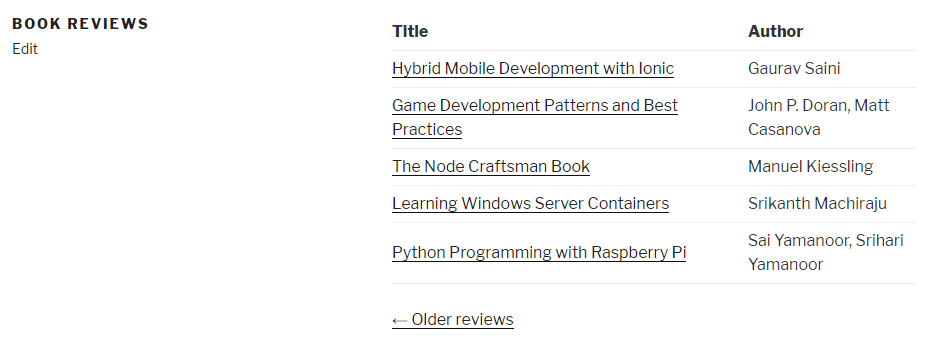
- Navigate to the ch4-book-reviews folder of the WordPress plugin directory of your development installation.
- Open the ch4-book-reviews.php file in a code editor.
- Add the following line of code after the existing functions to register a function that declares the new shortcode:
add_shortcode( 'book-review-list', 'ch4_br_book_review_list' );
- Add the following code section to provide an implementation for the ch4_br_book_review_list function:
function ch4_br_book_review_list() {
// Preparation of query array to retrieve 5 book reviews
$query_params = array( 'post_type' => 'book_reviews',
'post_status' => 'publish',
'posts_per_page' => 5 );
// Execution of post query
$book_review_query = new WP_Query;
$book_review_query->query( $query_params );
// Check if any posts were returned by the query
if ( $book_review_query->have_posts() ) {
// Display posts in table layout
$output = '<table>';
$output .= '<tr><th style="width: 350px"><strong>';
$output .= 'Title</strong></th>';
$output .= '<th><strong>Author</strong></th></tr>';
// Cycle through all items retrieved
while ( $book_review_query->have_posts() ) {
$book_review_query->the_post();
$output .= '<tr><td><a href="' . get_permalink();
$output .= '">';
$output .= get_the_title( get_the_ID() ) . '</a></td>';
$output .= '<td>';
$output .= esc_html( get_post_meta( get_the_ID(),
'book_author',
true ) );
$output .= '</td></tr>';
}
$output .= '</table>';
// Display page navigation links
if ( $book_review_query->max_num_pages > 1 ) {
$output .= '<nav id="nav-below">';
$output .= '<div class="nav-previous">';
$output .= get_next_posts_link (
'<span class="meta-nav">←</span>' .
' Older reviews',
$book_review_query->max_num_pages );
$output .= '</div>';
$output .= '<div class="nav-next">';
$output .= get_previous_posts_link(
'Newer reviews ' .
'<span class="meta-nav">→</span>',
$book_review_query->max_num_pages );
$output .= '</div>';
$output .= '</nav>';
}
// Reset post data query
wp_reset_postdata();
}
return $output;
}
- Save the plugin file.
- Create a new page and insert the shortcode [book-review-list].
- Publish and View the page to see that a list of Book Reviews will be displayed in place of the shortcode.
- If more than five Book Reviews exist in the system, click on the navigation links that are displayed. You will see that the URL in the browser address bar changes, but the list of entries shows the same first five items as before.
- Back in the ch4-book-reviews.php file, add the following highlighted code near the top of ch4_br_book_review_list, right after the line initializing the value of the $query_params variable:
// Preparation of query string to retrieve 5 book reviews
$query_params = array( 'post_type' => 'book_reviews',
                       'post_status' => 'publish',
                       'posts_per_page' => 5 );

// Retrieve page query variable, if present
$page_num = ( get_query_var( 'paged' ) ?
              get_query_var( 'paged' ) : 1 );

// If page number is higher than 1, add to query array
if ( $page_num != 1 ) {
    $query_params['paged'] = $page_num;
}
- Save and close the plugin file. Refresh the page that includes our new shortcode and use the navigation links to see that the list of items now changes properly.