- Navigate to the ch11-hello-world folder of the WordPress plugin directory of your development installation.
- Open the ch11-hello-world.php file in a text editor.
- Add the following line of code at the end of the file to register a function to be called when WordPress is building the administration page's menu:
add_action( 'admin_menu', 'ch11hw_settings_menu' );
- Add the following code section to provide an implementation for the ch11hw_settings_menu function:
function ch11hw_settings_menu() {
    add_options_page(
        __( 'Hello World Configuration', 'ch11hw_hello_world' ),
        __( 'Hello World', 'ch11hw_hello_world' ),
       'manage_options',
       'ch11hw-hello-world', 'ch11hw_config_page' );
}
- Insert the following block of code to create the ch11hw_config_page function declared in the call to add_options_page:
function ch11hw_config_page() {
    $options = get_option( 'ch11hw_options' );
    ?>

    <div id="ch11hw-general" class="wrap">
    <!-- Echo translation for "Hello World" to the browser -->
    <h2><?php _e( 'Hello World', 'ch11hw_hello_world' ); ?></h2>

    <form method="post" action="admin-post.php">
    <input type="hidden" name="action"
           value="save_ch11hw_options" />
    <?php wp_nonce_field( 'ch11hw' ); ?>

    <!-- Echo translation for "Hello World" to the browser -->
    <?php _e( 'Default Text', 'ch11hw_hello_world' ); ?>:
    <input type="text" name="default_text"
           value="<?php echo
                   esc_html( $options['default_text'] ); ?>"/>
    <br />
    <input type="submit" value="<?php _e( 'Submit',
        'ch11hw_hello_world' ); ?>" class="button-primary"/>
    </form>
    </div>
<?php }
- Add the following line of code to register a function to be executed when the administration panel is being prepared to be displayed:
add_action( 'admin_init', 'ch11hw_admin_init' );
- Append the following code segment to provide an implementation for the ch11hw_admin_init function:
function ch11hw_admin_init() {
     add_action( 'admin_post_save_ch11hw_options',
                 'process_ch11hw_options' );
}
- Provide code for the process_ch11hw_options function, declared in the previous step, by inserting the following code:
function process_ch11hw_options() {
    if ( !current_user_can( 'manage_options' ) ) {
          wp_die( 'Not allowed' );
    }

    check_admin_referer( 'ch11hw' );

    $options = get_option( 'ch11hw_options' );
    $options['default_text'] = $_POST['default_text'];

    update_option( 'ch11hw_options', $options );
    wp_redirect( add_query_arg( 'page', 'ch11hw-hello-world',
                     admin_url( 'options-general.php' ) ) );
    exit;
}
- Save and close the plugin file.
- Navigate to the administration page of your development WordPress installation.
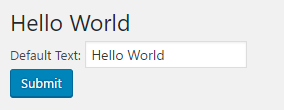
- Click on the Reglages (Settings in French) section on the left-hand navigation menu to expand it. You will see a new menu item called Hello World in the tree. Selecting the new entry displays the plugin's simple configuration form, as shown in the following screenshot: