- Navigate to the WordPress plugin directory of your development installation.
- Create a new directory called ch3-settings-api.
- Navigate to this directory and create a new text file called ch3-settings-api.php.
- Open the new file in a code editor and add an appropriate header at the top of the plugin file, naming the plugin Chapter 3 - Settings API.
- Add the following line of code to register a function that will be called when WordPress activates the plugin:
register_activation_hook( __FILE__,
                          'ch3sapi_set_default_options' );
- Add the following code section to provide an implementation for the ch3sapi_set_default_options function to set default plugin options:
function ch3sapi_set_default_options() {
    ch3sapi_get_options();
}
- Add the following code to provide an implementation for the ch3sapi_get_options function:
function ch3sapi_get_options() {
    $options = get_option( 'ch3sapi_options', array() );

    $new_options['ga_account_name'] = 'UA-0000000-0';
    $new_options['track_outgoing_links'] = false;

    $merged_options = wp_parse_args( $options, $new_options );

    $compare_options = array_diff_key( $new_options, $options );
    if ( empty( $options ) || !empty( $compare_options ) ) {
        update_option( 'ch3sapi_options', $merged_options );
    }
    return $merged_options;
}
- Add the following registration function to associate a callback with the admin_init action hook:
add_action( 'admin_init', 'ch3sapi_admin_init' );
- Add an implementation for the ch3sapi_admin_init function, creating the settings group for the plugin and defining its contents:
function ch3sapi_admin_init() {
    // Register a setting group with a validation function
    // so that post data handling is done automatically for us
    register_setting( 'ch3sapi_settings',
        'ch3sapi_options', 'ch3sapi_validate_options' );

    // Add a new settings section within the group
    add_settings_section( 'ch3sapi_main_section', 'Main Settings',
        'ch3sapi_main_setting_section_callback',
        'ch3sapi_settings_section' );

    // Add each field with its name and function to use for
    // our new settings, put them in our new section
    add_settings_field( 'ga_account_name', 'Account Name',
        'ch3sapi_display_text_field', 'ch3sapi_settings_section',
        'ch3sapi_main_section',
        array( 'name' => 'ga_account_name' ) );

    add_settings_field( 'track_outgoing_links',
        'Track Outgoing Links', 'ch3sapi_display_check_box',
        'ch3sapi_settings_section', 'ch3sapi_main_section',
        array( 'name' => 'track_outgoing_links' ) );
}
- Declare a body for the ch3sapi_validate_options function, which was declared when registering the settings in the previous section:
function ch3sapi_validate_options( $input ) {
    foreach ( array( 'ga_account_name' ) as $option_name ) {
        if ( isset( $input[$option_name] ) ) {
            $input[$option_name] =
                sanitize_text_field( $input[$option_name] );
        }
    }

    foreach ( array( 'track_outgoing_links' ) as $option_name ) {
        if ( isset( $input[$option_name] ) ) {
            $input[$option_name] = true;
        } else {
            $input[$option_name] = false;
        }
    }
    return $input;
}
- Declare a body for the ch3sapi_main_setting_section_callback function, declared when the settings section was created:
function ch3sapi_main_setting_section_callback() { ?>
    <p>This is the main configuration section.</p>
<?php }
- Provide an implementation for the ch3sapi_display_text_field function, declared when a text field was added to the settings section:
function ch3sapi_display_text_field( $data = array() ) {
    extract( $data );
    $options = ch3sapi_get_options();
    ?>
    <input type="text" name="ch3sapi_options[<?php echo $name; ?>]"
           value="<?php echo esc_html( $options[$name] ); ?>"/>
    <br />
<?php }
- Declare and define the ch3sapi_display_check_box function, declared when a checkbox was added to the settings section:
function ch3sapi_display_check_box( $data = array() ) {
    extract ( $data );
    $options = ch3sapi_get_options();
    ?>
    <input type="checkbox"
           name="ch3sapi_options[<?php echo $name;  ?>]"
           <?php checked( $options[$name] ); ?>/>
<?php }
- Add the following line of code to register a function that will be called when WordPress is preparing data to display the site's administration menu:
add_action( 'admin_menu', 'ch3sapi_settings_menu' );
- Provide code for the implementation of the ch3sapi_settings_menu function:
function ch3sapi_settings_menu() {
    add_options_page( 'My Google Analytics Configuration',
        'My Google Analytics - Settings API', 'manage_options',
        'ch3sapi-my-google-analytics', 'ch3sapi_config_page' );
}
- Add a definition for the ch3sapi_config_page function, defined when the new options page was declared:
function ch3sapi_config_page() { ?>
    <div id="ch3sapi-general" class="wrap">
    <h2>My Google Analytics - Settings API</h2>

    <form name="ch3sapi_options_form_settings_api" method="post"
          action="options.php">

    <?php settings_fields( 'ch3sapi_settings' ); ?>
    <?php do_settings_sections( 'ch3sapi_settings_section' ); ?>

    <input type="submit" value="Submit" class="button-primary" />
    </form></div>
<?php }
- Save and close the plugin file.
- Navigate to the Plugins menu of the administration area.
- Activate your new plugin.
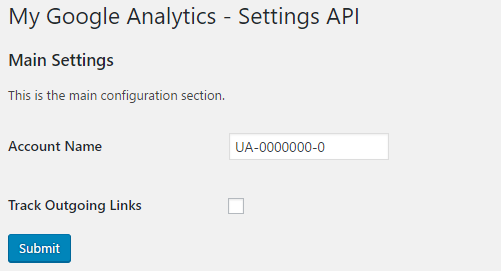
- Navigate to the Settings menu and click on the My Google Analytics - Settings API menu item to see the configuration page for this plugin.
- Make a change to the options and submit them to see that they are automatically handled by WordPress without having written express code to save options.