- Navigate to the ch4-book-reviews folder of the WordPress plugin directory of your development installation.
- Open the ch4-book-reviews.php file in a code editor.
- Find the ch4_br_create_book_post_type function and add the following code after the existing call to register_post_type to create the new taxonomy:
register_taxonomy(
    'book_reviews_book_type',
    'book_reviews',
    array(
        'labels' => array(
            'name' => 'Book Type',
            'add_new_item' => 'Add New Book Type',
            'new_item_name' => 'New Book Type Name'
        ),
        'show_ui' => true,
        'show_tagcloud' => false,
        'hierarchical' => true
    )
);
- Save and close the plugin file.
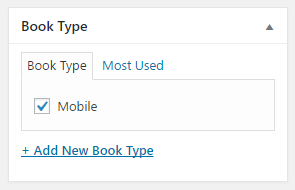
- Open the previously created Book Reviews to see the newly added Book Type meta box on the right-hand side of the post editor.
- Click on the + Add New Book Type link to create a new item and assign it as the current item's type. Click on the Update button in the top-right section of the post editor to save the review:
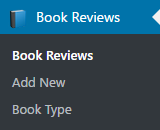
- Look at the left-hand administration menu to see that a new menu item was added to manage book types, leading to an editor similar to the post and page category editor:
- Back in the plugin file, add the following code to the ch4_br_display_single_book_review function after the section displaying the rating to display the book type:
$book_types = wp_get_post_terms( get_the_ID(),
                                'book_reviews_book_type' );

$content .= '<br /><strong>Type: </strong>';

if ( $book_types ) {
    $first_entry = true;
    for ( $i = 0; $i < count( $book_types ); $i++ ) {
        if ( !$first_entry ) {
            $content .= ', ';
        }
        $content .= $book_types[$i]->name;
        $first_entry = false;
    }
} else {
    $content .= 'None Assigned';
}
- Save and close the template file.
- Visit a Book Review page to see the book type displayed under the rating.