- Navigate to the WordPress plugin directory of your development installation.
- Navigate to the ch8-bug-tracker directory and edit ch8-bug-tracker.php.
- Insert the following line of code to register a function to be called when the administration menu is being built:
add_action( 'admin_menu', 'ch8bt_settings_menu' );
- Add the following code to provide an implementation for the ch8bt_settings_menu function:
function ch8bt_settings_menu() {
    add_options_page( 'Bug Tracker Data Management',
                      'Bug Tracker',
                      'manage_options', 'ch8bt-bug-tracker',
                      'ch8bt_config_page' );
}
- Append the following block of code to provide an implementation for the ch8bt_config_page function responsible to render the configuration page:
function ch8bt_config_page() {
    global $wpdb;
    ?>

    <!-- Top-level menu -->
    <div id="ch8bt-general" class="wrap">
    <h2>Bug Tracker <a class="add-new-h2" href="<?php echo
         add_query_arg( array( 'page' => 'ch8bt-bug-tracker',
                               'id' => 'new' ),
                        admin_url('options-general.php') ); ?>">
    Add New Bug</a></h2>

    <!-- Display bug list if no parameter sent in URL -->
    <?php if ( empty( $_GET['id'] ) ) {
        $bug_query = 'select * from ' . $wpdb->get_blog_prefix();
        $bug_query .= 'ch8_bug_data ORDER by bug_report_date DESC';
        $bug_items = $wpdb->get_results( $bug_query, ARRAY_A );
    ?>

    <h3>Manage Bug Entries</h3>

    <table class="wp-list-table widefat fixed">
    <thead><tr><th style="width: 80px">ID</th>
    <th style="width: 300px">Title</th>
    <th>Version</th></tr></thead>

    <?php
        // Display bugs if query returned results
        if ( $bug_items ) {
            foreach ( $bug_items as $bug_item ) {
                echo '<tr style="background: #FFF">';
                echo '<td>' . $bug_item['bug_id'] . '</td>';
                echo '<td><a href="';
                echo add_query_arg( array(
                    'page' => 'ch8bt-bug-tracker',
                    'id' => $bug_item['bug_id'] ),
                    admin_url( 'options-general.php' ) );
                echo '">' . $bug_item['bug_title'] . '</a></td>';
                echo '<td>' . $bug_item['bug_version'];
                echo '</td></tr>';
            }
        } else {
            echo '<tr style="background: #FFF">';
            echo '<td colspan="3">No Bug Found</td></tr>';
        }
    ?>
    </table><br />
    <?php } ?>
    </div>
<?php }
- Save and close the plugin file.
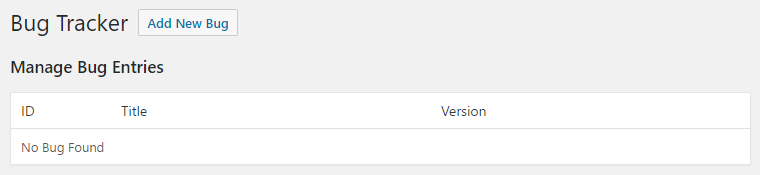
- Navigate to the new Bug Tracker item under the administration page's Settings menu to see the newly created page, showing that there are currently no bugs stored in the system: