- Navigate to the ch2-page-header-output folder of the WordPress plugin directory of your development installation.
- Open the ch2-page-header-output.php file in a text editor.
- Find the ch2pho_settings_menu function in the existing code.
- Modify the code to store the return value of the add_options_page function call to a variable:
$options_page =
    add_options_page( 'My Google Analytics Configuration',
                      'My Google Analytics',
                      'manage_options',
                      'ch2pho-my-google-analytics',
                      'ch2pho_config_page' );
- Add the following block of code to the ch2pho_settings_menu function to register an action that will be called when the plugin's options page is loaded:
if ( !empty( $options_page ) ) {
    add_action( 'load-' . $options_page, 'ch2pho_help_tabs' );
}
- Add the following code at the end of the plugin file to implement the newly declared ch2pho_help_tabs function:
function ch2pho_help_tabs() {
    $screen = get_current_screen();
    $screen->add_help_tab( array(
            'id'       => 'ch2pho-plugin-help-instructions',
            'title'    => 'Instructions',
            'callback' => 'ch2pho_plugin_help_instructions',
        ) );

    $screen->add_help_tab( array(
             'id'       => 'ch2pho-plugin-help-faq',
             'title'    => 'FAQ',
             'callback' => 'ch2pho_plugin_help_faq',
        ) );

    $screen->set_help_sidebar( '<p>This is the sidebar
        content</p>' );
}
- Add the following code section to provide an implementation for the ch2pho_plugin_help_instructions function:
function ch2pho_plugin_help_instructions() { ?>
    <p>These are instructions explaining how to use this
       plugin.</p>
<?php }
- Add the following code section to provide an implementation for the ch2pho_plugin_help_faq function:
function ch2pho_plugin_help_faq() { ?>
    <p>These are the most frequently asked questions on the use of
       this plugin.</p>
<?php }
- Save and close the plugin file.
- Click on the Settings section of the administration menu.
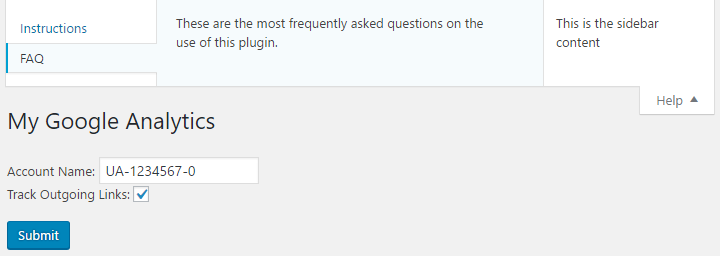
- Click on the My Google Analytics menu to display the plugin configuration page. You will now see a Help tab appear in the top-right corner of the page.
- Click on the Help tab to see all of the help content that has been added to the plugin.