- Navigate to the WordPress plugin directory of your development installation.
- Navigate to the ch8-bug-tracker directory and edit ch8-bug-tracker.php.
- Locate the ch8bt_create_table function.
- Remove the IF NOT EXISTS text on the first line of the table creation query.
- Add an extra line to the table creation code to add a field to hold the bug title, shown as follows in bold:
$creation_query = 'CREATE TABLE ' . $prefix .
                  'ch8_bug_data (
                  `bug_id` int(20) NOT NULL AUTO_INCREMENT,
                  `bug_description` text,
                  `bug_version` varchar(10) DEFAULT NULL,
                  `bug_report_date` date DEFAULT NULL,
                  `bug_status` int(3) NOT NULL DEFAULT 0,
                  `bug_title` VARCHAR( 128 ) NULL,
                  PRIMARY KEY (`bug_id`)
                  );';
- Locate the following lines of code:
global $wpdb;
wpdb->query( $creation_query );
They should be replaced with the following lines of code:
require_once( ABSPATH . 'wp-admin/includes/upgrade.php' );
dbDelta( $creation_query );
- Save and close the plugin file.
- Navigate to the Plugins management page.
- Deactivate and re-Activate the Chapter 8 - Bug Tracker plugin.
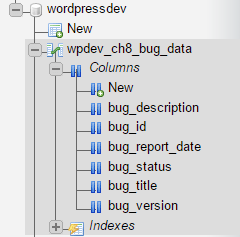
- Using phpMyAdmin, connect to your MySQL database to see that the new bug_title field has been added to the bug storage table: