- Navigate to the ch2-page-header-output folder of the WordPress plugin directory of your development installation.
- Open the ch2-page-header-output.php file in a text editor.
- Modify the implementation of the ch2pho_get_options function to replace both option functions with network-level versions. The code section shows the two lines that need to be changed with modifications in bold:
$options = get_site_option( 'ch2pho_options', array() );

update_site_option( 'ch2pho_options', $merged_options );
- Locate the add_action function call that adds a callback to populate the admin menu and add code to check whether the installation is a single site or multisite before registering callbacks. The following code shows new elements in bold:
if ( is_multisite() ) {
    add_action( 'network_admin_menu', 'ch2pho_settings_menu' );
} else {
    add_action( 'admin_menu', 'ch2pho_settings_menu' );
}
- Modify the ch2pho_settings_menu function to add new items to different menus based on whether the site is a regular site or a multisite with the new sections identified in bold:
function ch2pho_settings_menu() {
    if ( is_multisite() ) {
        $options_page = add_submenu_page( 'settings.php',
            'My Google Analytics Configuration',
            'My Google Analytics',
            'manage_options', 'ch2pho-my-google-analytics',
            'ch2pho_config_page' );
    } else {
        $options_page = add_submenu_page( 'options-general.php',
            'My Google Analytics Configuration',
            'My Google Analytics',
            'manage_options', 'ch2pho-my-google-analytics',
            'ch2pho_config_page' );
    }
    if ( !empty( $options_page ) ) {
        add_action( 'load-' . $options_page, 'ch2pho_help_tabs' );
    }
}
- In the process_ch2pho_options function, replace the call to update_option with a call to update_site_option:
update_site_option( 'ch2pho_options', $options );
- Still in the process_ch2pho_options function, make the following changes around the wp_redirect function call with new elements shown in bold:
if ( is_multisite() ) {
    $redirect_page = '/network/settings.php';
} else {
    $redirect_page = 'options-general.php';
}

wp_redirect( add_query_arg(
             array( 'page' => 'ch2pho-my-google-analytics',
                    'message' => '1' ),
             admin_url( $redirect_page ) ) );
- Modify the ch2pho_config page function to modify the form action so that it finds admin-post.php in the multisite installations with the new code shown in bold:
<form method="post"
      action="<?php echo admin_url( 'admin-post.php' ); ?>">
- Save and close the plugin file.
- In a Network installation of WordPress, visit the Plugins section of Network Admin.
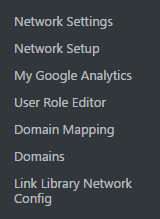
- Network Activate the Chapter 2 - Page Header Output plugin. You will see that a new item is now available under the Settings menu.
- Visit any site in the network and look at the page source to see that the Google Analytics code is added to the page header with the user account configured on our administration page.