- Navigate to the ch2-twitter-embed folder of the WordPress plugin directory of your development installation.
- Open the ch2-twitter-embed.php file in a text editor.
- Add the following lines of code to implement an activation callback to initialize plugin options when it is installed or upgraded:
register_activation_hook( __FILE__,
                          'ch2te_set_default_options_array' );

function ch2te_set_default_options_array() {
    ch2te_get_options();
}

function ch2te_get_options( $id = 1 ) {
    $options = get_option( 'ch2te_options_' . $id, array() );

    $new_options['setting_name'] = 'Default';
    $new_options['width'] = 560;
    $new_options['number_of_tweets'] = 3;

    $merged_options = wp_parse_args( $options, $new_options );
    $compare_options = array_diff_key( $new_options, $options );
    if ( empty( $options ) || !empty( $compare_options ) ) {
        update_option( 'ch2te_options_' . $id, $merged_options );
    }
    return $merged_options;
}
- Insert the following code segment to register a function to be called when the administration menu is put together. When this happens, the callback function adds an item to the Settings menu and specifies the function to be called to render the configuration page:
// Assign function to be called when admin menu is constructed
add_action( 'admin_menu', 'ch2te_settings_menu' );

// Function to add item to Settings menu and
// specify function to display options page content
function ch2te_settings_menu() {
    add_options_page( 'Twitter Embed Configuration',
                      'Twitter Embed', 'manage_options',
                      'ch2te-twitter-embed', 'ch2te_config_page' );
}
- Add the following code to implement the configuration page rendering function:
// Function to display options page content
function ch2te_config_page() {
    // Retrieve plugin configuration options from database
    if ( isset( $_GET['option_id'] ) ) {
        $option_id = intval( $_GET['option_id'] );
    } elseif ( isset( $_POST['option_id'] ) ) {
        $option_id = intval( $_POST['option_id'] );
    } else {
        $option_id = 1;
    }

    $options = ch2te_get_options( $option_id ); ?>

    <div id="ch2te-general" class="wrap">
    <h2>Twitter Embed</h2>

    <!-- Display message when settings are saved -->
    <?php if ( isset( $_GET['message'] ) &&
               $_GET['message'] == '1' ) { ?>
        <div id='message' class='updated fade'>
            <p><strong>Settings Saved</strong></p></div>
    <?php } ?>

    <!-- Option selector -->
    <div id="icon-themes" class="icon32"><br></div>
    <h2 class="nav-tab-wrapper">
    <?php for ( $counter = 1; $counter <= 5; $counter++ ) {
        $temp_options = ch2te_get_options( $counter );
        $class = ( $counter == $option_id ) ?
                 ' nav-tab-active' : ''; ?>

    <a class="nav-tab<?php echo $class; ?>" href="<?php echo
      add_query_arg( array( 'page' => 'ch2te-twitter-embed', 'option_id' => $counter ), admin_url(  'options-general.php' ) ); ?>"><?php echo $counter; ?><?php if ( $temp_options !== false ) echo ' (' .  $temp_options['setting_name'] . ')'; else echo ' (Empty)'; ?></a>
    <?php } ?>
    </h2><br />

    <!-- Main options form -->
    <form name="ch2te_options_form" method="post"
          action="admin-post.php">
    <input type="hidden" name="action"
           value="save_ch2te_options" />
    <input type="hidden" name="option_id"
                         value="<?php echo $option_id; ?>" />
    <?php wp_nonce_field( 'ch2te' ); ?>
    <table>
        <tr><td>Setting name</td>
            <td><input type="text" name="setting_name"
      value="<?php echo esc_html( $options['setting_name'] ); ?>"/>
            </td>
        </tr>
        <tr><td>Feed width</td>
            <td><input type="text" name="width"
        value="<?php echo esc_html( $options['width'] ); ?>"/></td>
        </tr>
        <tr><td>Number of Tweets to display</td>
            <td><input type="text" name="number_of_tweets" value=
        "<?php echo esc_html( $options['number_of_tweets'] ); ?>"
            /></td>
        </tr>
    </table><br />
    <input type="submit" value="Submit" class="button-primary" />
    </form>
    </div>
<?php }
- Add the following block of code to register a function that will process user options when submitted to the site:
add_action( 'admin_init', 'ch2te_admin_init' );

function ch2te_admin_init() {
    add_action( 'admin_post_save_ch2te_options',
                'process_ch2te_options' );
}
- Add the following code to implement the process_ch2te_options function, declared in the previous block of code:
// Function to process user data submission
function process_ch2te_options() {
    // Check that user has proper security level
    if ( !current_user_can( 'manage_options' ) ) {
        wp_die( 'Not allowed' );
    }

    // Check that nonce field is present
    check_admin_referer( 'ch2te' );

    // Check if option_id field was present
    if ( isset( $_POST['option_id'] ) ) {
        $option_id = intval( $_POST['option_id'] );
    } else {
        $option_id = 1;
    }

    // Build option name and retrieve options
    $options = ch2te_get_options( $option_id );

    // Cycle through all text fields and store their values
    foreach ( array( 'setting_name' ) as $param_name ) {
        if ( isset( $_POST[$param_name] ) ) {
            $options[$param_name] = sanitize_text_field(
                                        $_POST[$param_name] );
        }
    }

    // Cycle through all numeric fields, convert to int and store
    foreach( array( 'width',
                    'number_of_tweets' ) as $param_name ) {
        if ( isset( $_POST[$param_name] ) ) {
            $options[$param_name] = intval( $_POST[$param_name] );
        }
    }

    // Store updated options array to database
    $options_name = 'ch2te_options_' . $option_id;
    update_option( $options_name, $options );

    $clean_address = add_query_arg( array( 'message' => 1,
                         'option_id' => $option_id,
                         'page' => 'ch2te-twitter-embed' ),
                         admin_url( 'options-general.php' ) );
    wp_redirect( $clean_address );
    exit;
}
- Find the ch2te_twitter_embed_shortcode function and modify it as follows to accept the new option_id parameter and load the plugin options to produce the desired output. The changes are identified in bold within the recipe:
function ch2te_twitter_embed_shortcode( $atts ) {
    extract( shortcode_atts( array(
                'user_name' => 'ylefebvre',
                'option_id' => '1'
           ), $atts ) );

    if ( intval( $option_id ) < 1 || intval( $option_id ) > 5 ) {
        $option_id = 1;
    }
    $options = ch2te_get_options( $option_id );

    if ( !empty( $user_name ) ) {
        $output = '<a class="twitter-timeline" href="';
        $output .= esc_url( 'https://twitter.com/' . $user_name );
        $output .= '" data-width="' . $options['width'] . '" ';
        $output .= 'data-tweet-limit="';
        $output .= $options['number_of_tweets'];
        $output .= '">Tweets by ' . esc_html( $user_name );
        $output .= '</a><script async ';
        $output .= 'src="//platform.twitter.com/widgets.js"';
        $output .= ' charset="utf-8"></script>';
    } else {
        $output = '';
    }
    return $output;
}
- Save and close the plugin file.
- Deactivate and then Activate the Chapter 2 - Twitter Embed plugin from the administration interface to execute its activation function and create default settings.
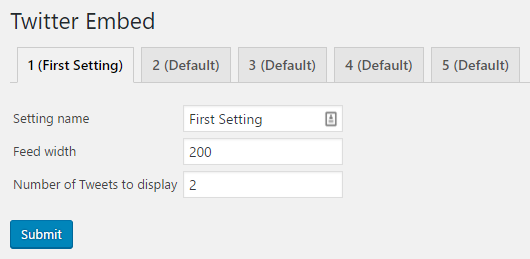
- Navigate to the Settings menu and select the Twitter Embed submenu item to see the newly created configuration panel with the first set of options being displayed and more sets of options accessible through the drop-down list shown at the top of the page.
- To select the set of options to be used, add the parameter option_id to the shortcode used to display a Twitter feed, as follows:
[twitterfeed user_name="WordPress" option_id="1"]