- Navigate to the WordPress plugin directory of your development installation.
- Create a new directory called ch6-book-review-user-submission and open it.
- Create a text file called ch6-book-review-user-submission.php.
- Open the new file in a code editor and add an appropriate header at the top of the plugin file, naming the plugin Chapter 6 - Book Review User Submission.
- Add the following line of code to declare a new shortcode and its associated function:
add_shortcode( 'submit-book-review', 'ch6_brus_book_review_form' );
- Add the following code segment to provide an implementation for the ch6_brus_book_review_form function:
function ch6_brus_book_review_form() {
    // make sure user is logged in
    if ( !is_user_logged_in() ) {
        echo '<p>You need to be a website member to be able to ';
        echo 'submit book reviews. Sign up to gain access!</p>';
        return;
    }
    ?>

    <form method="post" id="add_book_review" action="">

    <!-- Nonce fields to verify visitor provenance -->
    <?php wp_nonce_field( 'add_review_form', 'br_user_form' ); ?>

    <table>
        <tr>
            <td>Book Title</td>
            <td><input type="text" name="book_title" /></td>
        </tr>
        <tr>
            <td>Book Author</td>
            <td><input type="text" name="book_author" /></td>
        </tr>
        <tr>
            <td>Review</td>
            <td><textarea name="book_review_text"></textarea></td>
        </tr>
        <tr>
          <td>Rating</td>
            <td><select name="book_review_rating">
            <?php
            // Generate all rating items in drop-down list
            for ( $rating = 5; $rating >= 1; $rating-- ) { ?>
                <option value="<?php echo $rating; ?>">
                               <?php echo $rating; ?> stars
            <?php } ?>
            </select>
            </td>
        </tr>
        <tr>
            <td>Book Type</td>
            <td>
            <?php
            // Retrieve array of all book types in system
            $book_types = get_terms( 'book_reviews_book_type',
                                 array( 'orderby' => 'name',
                                        'hide_empty' => 0 ) );

            // Check if book types were found
            if ( !is_wp_error( $book_types ) &&
                 !empty( $book_types ) ) {

                echo '<select name="book_review_book_type">';

                // Display all book types
                foreach ( $book_types as $book_type ) {
                     echo '<option value="' . $book_type->term_id;
                     echo '">' . $book_type->name . '</option>';
               }

               echo '</select>';
            } ?>
            </td>
        </tr>
    </table>

    <input type="submit" name="submit" value="Submit Review" />
    </form>
<?php }
- Save and close the plugin file.
- Activate the Chapter 6 - Book Review User Submission plugin.
- Create a new page and insert the newly created [submit-book-review] shortcode in the item's content.
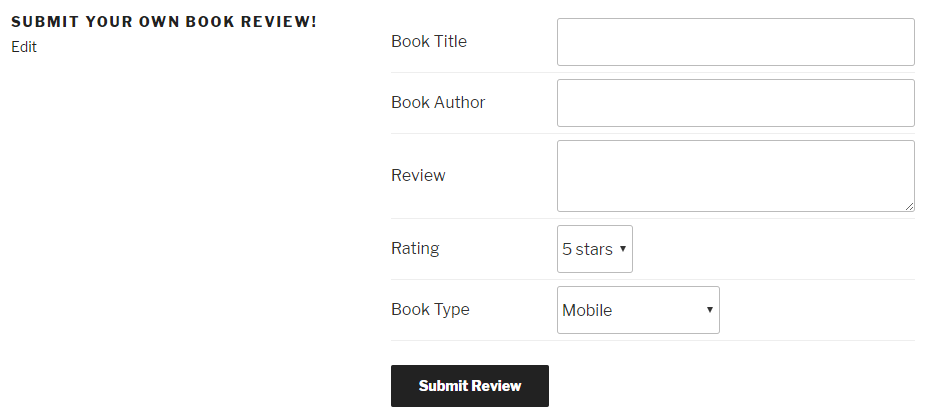
- Publish and view the page to see the form. If you submit the form, nothing will happen at the moment, since we have not implemented a processing function to parse and save the submitted data: