- Navigate to the WordPress plugin directory of your development installation.
- Navigate to the ch10-book-review-widget directory and edit ch10-book-review-widget.php.
- Find the Book_Reviews class and add the following block of code within the class to define the form method:
function form( $instance ) {
    // Retrieve previous values from instance
    // or set default values if not present
    $render_widget = ( !empty( $instance['render_widget'] ) ?
                       $instance['render_widget'] : 'true' );

    $nb_book_reviews = ( !empty( $instance['nb_book_reviews'] ) ?
                         $instance['nb_book_reviews'] : 5 );

    $widget_title = ( !empty( $instance['widget_title'] ) ?
                      esc_attr( $instance['widget_title'] ) :
                      'Book Reviews' );
    ?>

    <!-- Display fields to specify title and item count -->
    <p>
        <label for="<?php echo
                    $this->get_field_id( 'render_widget' ); ?>">
        <?php echo 'Display Widget'; ?>
        <select id="<?php echo
                     $this->get_field_id( 'render_widget' ); ?>"
                name="<?php echo
                $this->get_field_name( 'render_widget' ); ?>">
            <option value="true"
                <?php selected( $render_widget, 'true' ); ?>>
            Yes</option>
            <option value="false"
                <?php selected( $render_widget, 'false' ); ?>>
            No</option>
        </select>
        </label>
    </p>
    <p>
        <label for="<?php echo
                    $this->get_field_id( 'widget_title' ); ?>">
        <?php echo 'Widget Title:'; ?>
        <input type="text"
               id="<?php echo
                    $this->get_field_id( 'widget_title' );?>"
               name="<?php
               echo $this->get_field_name( 'widget_title' ); ?>"
               value="<?php echo $widget_title; ?>" />
        </label>
    </p>
    <p>
        <label for="<?php echo
                    $this->get_field_id( 'nb_book_reviews' ); ?>">
        <?php echo 'Number of reviews to display:'; ?>
        <input type="text"
               id="<?php echo
                   $this->get_field_id( 'nb_book_reviews' ); ?>"
               name="<?php echo
               $this->get_field_name( 'nb_book_reviews' ); ?>"
               value="<?php echo $nb_book_reviews; ?>" />
        </label>
    </p>
<?php }
- Save and close the plugin file.
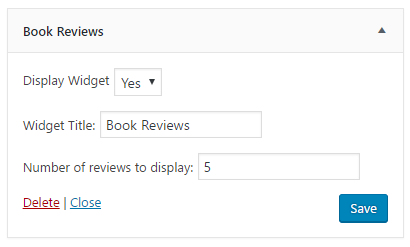
- Refresh the Appearance | Widgets administration page and expand the Book Reviews widget instance to see the newly created options.
- Change the widget options and click on Save to update its configuration: