- Navigate to the ch3-multi-level-menu folder of the WordPress plugin directory of your development installation.
- Open the ch3-multi-level-menu.php file in a text editor.
- Add the following lines of code at the end of the ch3mlm_admin_menu function after the two calls to add_submenu_page:
   global $submenu;
   $url = 'https://www.packtpub.com/books/info/packt/faq';
   $submenu['ch3mlm-main-menu'][] = array( 'FAQ', 'manage_options', $url );
- Save and close the plugin file.
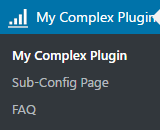
- Refresh the administration page of your development WordPress installation to see the new submenu item under the My Complex Plugin menu: