- First, download one week's worth of active fire data (hotspots) from the EOSDIS website. For example, Firedata from EOSDIS can be found in this link: https://earthdata.nasa.gov/earth-observation-data/near-real-time/firms/active-fire-data. A copy of this shapefile is included in the book code bundle. Use that if you want to use the SQL and WMS parameters that have been used in the following steps.
- Extract the shapefile from the Global_7d.zip archive to the working/chp09 directory and import this shapefile in PostGIS using the shp2pgsql command, as follows:
      $ shp2pgsql -s 4326 -g the_geom -I
      MODIS_C6_Global_7d.shp chp09.hotspots > hotspots.sql
      $ psql -U me -d postgis_cookbook -f hotspots.sql
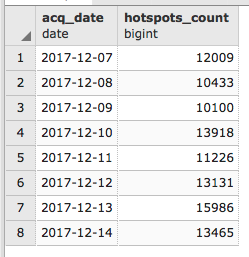
- When the import is completed, check the point fire data (hotspots) you just imported in PostGIS. Each hotspot contains a bunch of useful information, most notably the geometry and the acquisition date and time stored in the acq_date and acq_time fields. You can easily see that the features loaded from the shapefile span eight consecutive days using the following command:
      postgis_cookbook=# SELECT acq_date, count(*) AS hotspots_count
      FROM chp09.hotspots GROUP BY acq_date ORDER BY acq_date;
The previous command will produce the following output: