The steps you need to take to complete this recipe are as follows:
- All functions and tables associated with the topology module are installed in a schema named topology, so let's add it to the search path to avoid prefixing it before every topology function or object:
postgis_cookbook=# SET search_path TO chp03, topology, public;
- Now you will use the CreateTopology function to create a new topology schema named hu_topo in which you will import the 20 administrative areas from the hungary table. In PostGIS topology, all the topology entities and relations needed for one topology schema are stored in a single PostgreSQL schema using the same spatial reference system. You will name this schema hu_topo and use the EPSG:3857 spatial reference (the one used in the original shapefile):
postgis_cookbook=# SELECT CreateTopology('hu_topo', 3857);
- Note how a record has been added to the topology.topology table in the following code:
postgis_cookbook=# SELECT * FROM topology.topology;

(1 rows)
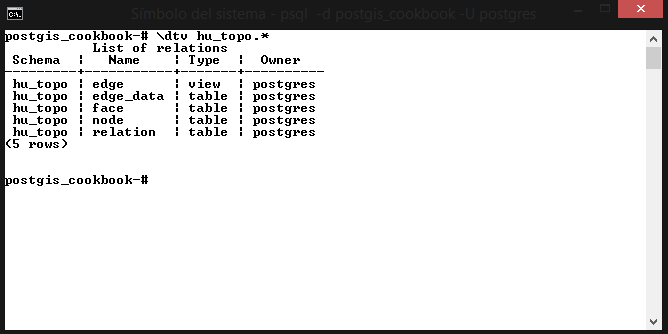
- Also note that four tables and one view, which are needed for storing and managing the topology, have been generated in the schema named hu_topo, created from the CreateTopology function:
postgis_cookbook=# \dtv hu_topo.*
(5 rows)
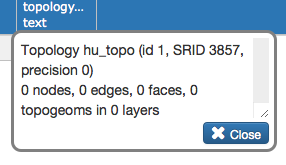
- Check the initial information for the created topology using the topologysummary function, as follows; still, none of the topologic entities (nodes, edges, faces, and so on) are initialized:
postgis_cookbook=# SELECT topologysummary('hu_topo');
(1 row)
- Create a new PostGIS table as follows for storing the topological administrative boundaries:
      postgis_cookbook=# CREATE TABLE
        chp03.hu_topo_polygons(gid serial primary key, name_1 varchar(75));
- Add a topological geometry column to this table as follows, using the AddTopoGeometryColumn function:
      postgis_cookbook=# SELECT
        AddTopoGeometryColumn('hu_topo', 'chp03', 'hu_topo_polygons',
       'the_geom_topo', 'MULTIPOLYGON') As layer_id;
- Insert the polygons from the non-topological hungary spatial table to the topological table, using the toTopoGeom function:
      postgis_cookbook=> INSERT INTO
      chp03.hu_topo_polygons(name_1, the_geom_topo)
        SELECT name_1, toTopoGeom(the_geom, 'hu_topo', 1)
        FROM chp03.hungary;
        Query returned successfully: 20 rows affected,
                                     10598 ms execution time.
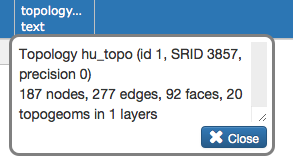
- Now run the following code to check out how the content of the topology schema has been modified by the toTopoGeom function; you would expect to have 20 faces, one for each Hungarian administrative area, but instead there are 92:
postgis_cookbook=# SELECT topologysummary('hu_topo');
- The problem is easily identifiable by analyzing the hu_topo.face table or using a desktop GIS. If you sort the polygons from this table by area, using the ST_Area function, you will notice after the details of the first polygon, which has 1 null area (used by the topology screenshot in the next step) and 20 large areas (each representing one administrative area), that there are 77 very small polygons generated by topological anomalies (polygon overlaps and holes):
      postgis_cookbook=# SELECT row_number() OVER
      (ORDER BY ST_Area(mbr) DESC) as rownum, ST_Area(mbr)/100000
      AS area FROM hu_topo.face ORDER BY area DESC;
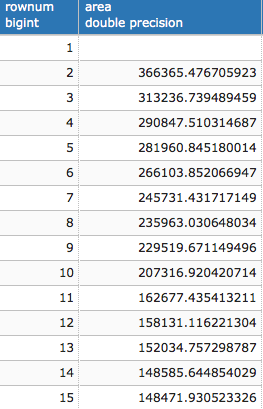
(93 rows)
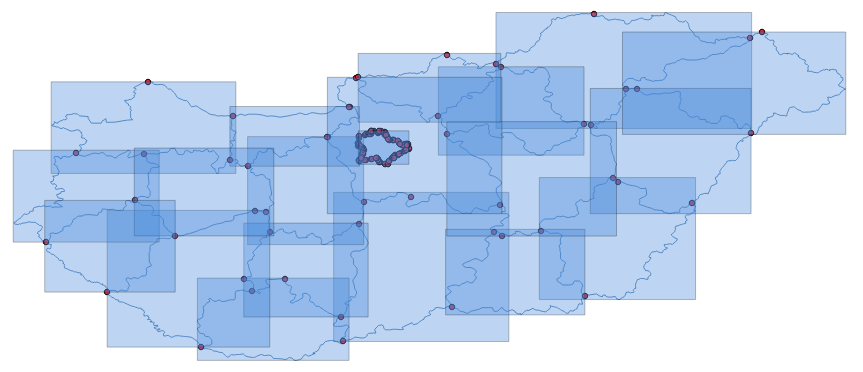
- You can eventually look at the built topology elements (nodes, edges, faces, and topological geometries, or topogeoms) using a desktop GIS. The following screenshot shows how they look in QGIS:
- Now you will rebuild the topology using a small tolerance value—1 meter—as an additional parameter to the CreateTopology function, in order to get rid of the unnecessary faces (the tolerance will collapse the vertex together, eliminating the small polygons). First, drop your topology schema with the DropTopology function and the topological table with the DROP TABLE command, and rebuild both of them using a topology tolerance of 1 meter, as follows:
      postgis_cookbook=# SELECT DropTopology('hu_topo');
      postgis_cookbook=# DROP TABLE chp03.hu_topo_polygons;
      postgis_cookbook=# SELECT CreateTopology('hu_topo', 3857, 1);
      postgis_cookbook=# CREATE TABLE chp03.hu_topo_polygons(
        gid serial primary key, name_1 varchar(75));
      postgis_cookbook=# SELECT AddTopoGeometryColumn('hu_topo',
        'chp03', 'hu_topo_polygons', 'the_geom_topo',
        'MULTIPOLYGON') As layer_id;
      postgis_cookbook=# INSERT INTO
      chp03.hu_topo_polygons(name_1, the_geom_topo)
        SELECT name_1, toTopoGeom(the_geom, 'hu_topo', 1)
        FROM chp03.hungary;
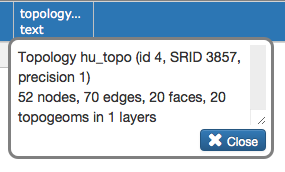
- Now, if you check the information related to the topology using the topologysummary function as follows, you can see that there is one face per administrative boundary and the previous 72 faces generated by topological anomalies have been eliminated, leaving only 20:
postgis_cookbook=# SELECT topologysummary('hu_topo');
(1 row)
- Finally, simplify the polygons of the topo_polygons table using a tolerance of 500 meters, as follows:
      postgis_cookbook=# SELECT ST_ChangeEdgeGeom('hu_topo',
        edge_id, ST_SimplifyPreserveTopology(geom, 500))
        FROM hu_topo.edge;
- Now it's time to update the original hungary table using a join with the hu_topo_polygons table by running the following commands:
      postgis_cookbook=# UPDATE chp03.hungary hu
        SET the_geom = hut.the_geom_topo
        FROM chp03.hu_topo_polygons hut
        WHERE hu.name_1 = hut.name_1;
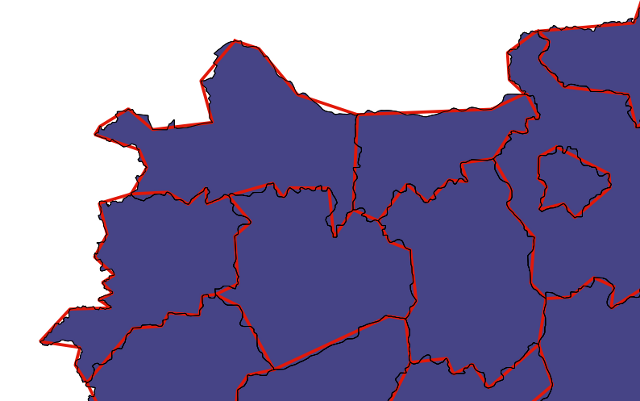
- The simplification process should have worked smoothly and produced a valid topological dataset. The following screenshot shows how the reduced topology looks (in red) compared to the original one (in black):