Table of Contents for
PostGIS Cookbook - Second Edition

Version ebook / Retour

Cover image for bash Cookbook, 2nd Edition PostGIS Cookbook - Second Edition by Thomas J Kraft Published by Packt Publishing, 2018
  1. PostGIS Cookbook, Second Edition
  2. Title Page
  3. Copyright and Credits
  4. PostGIS Cookbook Second Edition
  5. Packt Upsell
  6. Why subscribe?
  7. PacktPub.com
  8. Contributors
  9. About the authors
  10. Packt is searching for authors like you
  11. Table of Contents
  12. Preface
  13. Who this book is for
  14. What this book covers
  15. To get the most out of this book
  16. Download the example code files
  17. Download the color images
  18. Conventions used
  19. Sections
  20. Getting ready
  21. How to do it…
  22. How it works…
  23. There's more…
  24. See also
  25. Get in touch
  26. Reviews
  27. Moving Data In and Out of PostGIS
  28. Introduction
  29. Importing nonspatial tabular data (CSV) using PostGIS functions
  30. Getting ready
  31. How to do it...
  32. How it works...
  33. Importing nonspatial tabular data (CSV) using GDAL
  34. Getting ready
  35. How to do it...
  36. How it works...
  37. Importing shapefiles with shp2pgsql
  38. How to do it...
  39. How it works...
  40. There's more...
  41. Importing and exporting data with the ogr2ogr GDAL command
  42. How to do it...
  43. How it works...
  44. See also
  45. Handling batch importing and exporting of datasets
  46. Getting ready
  47. How to do it...
  48. How it works...
  49. Exporting data to a shapefile with the pgsql2shp PostGIS command
  50. How to do it...
  51. How it works...
  52. Importing OpenStreetMap data with the osm2pgsql command
  53. Getting ready
  54. How to do it...
  55. How it works...
  56. Importing raster data with the raster2pgsql PostGIS command
  57. Getting ready
  58. How to do it...
  59. How it works...
  60. Importing multiple rasters at a time
  61. Getting ready
  62. How to do it...
  63. How it works...
  64. Exporting rasters with the gdal_translate and gdalwarp GDAL commands
  65. Getting ready
  66. How to do it...
  67. How it works...
  68. See also
  69. Structures That Work
  70. Introduction
  71. Using geospatial views
  72. Getting ready
  73. How to do it...
  74. How it works...
  75. There's more...
  76. See also
  77. Using triggers to populate the geometry column
  78. Getting ready
  79. How to do it...
  80. There's more...
  81. Extending further...
  82. See also
  83. Structuring spatial data with table inheritance
  84. Getting ready
  85. How to do it...
  86. How it works...
  87. See also
  88. Extending inheritance – table partitioning
  89. Getting ready
  90. How to do it...
  91. How it works...
  92. See also
  93. Normalizing imports
  94. Getting ready
  95. How to do it...
  96. How it works...
  97. There's more...
  98. Normalizing internal overlays
  99. Getting ready
  100. How to do it...
  101. How it works...
  102. There's more...
  103. Using polygon overlays for proportional census estimates
  104. Getting ready
  105. How to do it...
  106. How it works...
  107. Working with Vector Data – The Basics
  108. Introduction
  109. Working with GPS data
  110. Getting ready
  111. How to do it...
  112. How it works...
  113. Fixing invalid geometries
  114. Getting ready
  115. How to do it...
  116. How it works...
  117. GIS analysis with spatial joins
  118. Getting ready
  119. How to do it...
  120. How it works...
  121. Simplifying geometries
  122. How to do it...
  123. How it works...
  124. Measuring distances
  125. Getting ready
  126. How to do it...
  127. How it works...
  128. Merging polygons using a common attribute
  129. Getting ready
  130. How to do it...
  131. How it works...
  132. Computing intersections
  133. Getting ready
  134. How to do it...
  135. How it works...
  136. Clipping geometries to deploy data
  137. Getting ready
  138. How to do it...
  139. How it works...
  140. Simplifying geometries with PostGIS topology
  141. Getting ready
  142. How to do it...
  143. How it works...
  144. Working with Vector Data – Advanced Recipes
  145. Introduction
  146. Improving proximity filtering with KNN
  147. Getting ready
  148. How to do it...
  149. How it works...
  150. See also
  151. Improving proximity filtering with KNN – advanced
  152. Getting ready
  153. How to do it...
  154. How it works...
  155. See also
  156. Rotating geometries
  157. Getting ready
  158. How to do it...
  159. How it works...
  160. See also
  161. Improving ST_Polygonize
  162. Getting ready
  163. How to do it...
  164. See also
  165. Translating, scaling, and rotating geometries – advanced
  166. Getting ready
  167. How to do it...
  168. How it works...
  169. See also
  170. Detailed building footprints from LiDAR
  171. Getting ready
  172. How to do it...
  173. How it works...
  174. Creating a fixed number of clusters from a set of points
  175. Getting ready
  176. How to do it...
  177. Calculating Voronoi diagrams
  178. Getting ready
  179. How to do it...
  180. Working with Raster Data
  181. Introduction
  182. Getting and loading rasters
  183. Getting ready
  184. How to do it...
  185. How it works...
  186. Working with basic raster information and analysis
  187. Getting ready
  188. How to do it...
  189. How it works...
  190. Performing simple map-algebra operations
  191. Getting ready
  192. How to do it...
  193. How it works...
  194. Combining geometries with rasters for analysis
  195. Getting ready
  196. How to do it...
  197. How it works...
  198. Converting between rasters and geometries
  199. Getting ready
  200. How to do it...
  201. How it works...
  202. Processing and loading rasters with GDAL VRT
  203. Getting ready
  204. How to do it...
  205. How it works...
  206. Warping and resampling rasters
  207. Getting ready
  208. How to do it...
  209. How it works...
  210. Performing advanced map-algebra operations
  211. Getting ready
  212. How to do it...
  213. How it works...
  214. Executing DEM operations
  215. Getting ready
  216. How to do it...
  217. How it works...
  218. Sharing and visualizing rasters through SQL
  219. Getting ready
  220. How to do it...
  221. How it works...
  222. Working with pgRouting
  223. Introduction
  224. Startup – Dijkstra routing
  225. Getting ready
  226. How to do it...
  227. Loading data from OpenStreetMap and finding the shortest path using A*
  228. Getting ready
  229. How to do it...
  230. How it works...
  231. Calculating the driving distance/service area
  232. Getting ready
  233. How to do it...
  234. See also
  235. Calculating the driving distance with demographics
  236. Getting ready
  237. How to do it...
  238. Extracting the centerlines of polygons
  239. Getting ready
  240. How to do it...
  241. There's more...
  242. Into the Nth Dimension
  243. Introduction
  244. Importing LiDAR data
  245. Getting ready
  246. How to do it...
  247. See also
  248. Performing 3D queries on a LiDAR point cloud
  249. How to do it...
  250. Constructing and serving buildings 2.5D
  251. Getting ready
  252. How to do it...
  253. Using ST_Extrude to extrude building footprints
  254. How to do it...
  255. Creating arbitrary 3D objects for PostGIS
  256. Getting ready
  257. How to do it...
  258. Exporting models as X3D for the web
  259. Getting ready
  260. How to do it...
  261. There's more...
  262. Reconstructing Unmanned Aerial Vehicle (UAV) image footprints with PostGIS 3D
  263. Getting started
  264. How to do it...
  265. UAV photogrammetry in PostGIS – point cloud
  266. Getting ready
  267. How to do it...
  268. UAV photogrammetry in PostGIS – DSM creation
  269. Getting ready
  270. How to do it...
  271. PostGIS Programming
  272. Introduction
  273. Writing PostGIS vector data with Psycopg
  274. Getting ready
  275. How to do it...
  276. How it works...
  277. Writing PostGIS vector data with OGR Python bindings
  278. Getting ready
  279. How to do it...
  280. How it works...
  281. Writing PostGIS functions with PL/Python
  282. Getting ready
  283. How to do it...
  284. How it works...
  285. Geocoding and reverse geocoding using the GeoNames datasets
  286. Getting ready
  287. How to do it...
  288. How it works...
  289. Geocoding using the OSM datasets with trigrams
  290. Getting ready
  291. How to do it...
  292. How it works...
  293. Geocoding with geopy and PL/Python
  294. Getting ready
  295. How to do it...
  296. How it works...
  297. Importing NetCDF datasets with Python and GDAL
  298. Getting ready
  299. How to do it...
  300. How it works...
  301. PostGIS and the Web
  302. Introduction
  303. Creating WMS and WFS services with MapServer
  304. Getting ready
  305. How to do it...
  306. How it works...
  307. See also
  308. Creating WMS and WFS services with GeoServer
  309. Getting ready
  310. How to do it...
  311. How it works...
  312. See also
  313. Creating a WMS Time service with MapServer
  314. Getting ready
  315. How to do it...
  316. How it works...
  317. Consuming WMS services with OpenLayers
  318. Getting ready
  319. How to do it...
  320. How it works..
  321. Consuming WMS services with Leaflet
  322. How to do it...
  323. How it works...
  324. Consuming WFS-T services with OpenLayers
  325. Getting ready
  326. How to do it...
  327. How it works...
  328. Developing web applications with GeoDjango – part 1
  329. Getting ready
  330. How to do it...
  331. How it works...
  332. Developing web applications with GeoDjango – part 2
  333. Getting ready
  334. How to do it...
  335. How it works...
  336. Developing a web GPX viewer with Mapbox
  337. How to do it...
  338. How it works...
  339. Maintenance, Optimization, and Performance Tuning
  340. Introduction
  341. Organizing the database
  342. Getting ready
  343. How to do it...
  344. How it works...
  345. Setting up the correct data privilege mechanism
  346. Getting ready
  347. How to do it...
  348. How it works...
  349. Backing up the database
  350. Getting ready
  351. How to do it...
  352. How it works...
  353. Using indexes
  354. Getting ready
  355. How to do it...
  356. How it works...
  357. Clustering for efficiency
  358. Getting ready
  359. How to do it...
  360. How it works...
  361. Optimizing SQL queries
  362. Getting ready
  363. How to do it...
  364. How it works...
  365. Migrating a PostGIS database to a different server
  366. Getting ready
  367. How to do it...
  368. How it works...
  369. Replicating a PostGIS database with streaming replication
  370. Getting ready
  371. How to do it...
  372. How it works...
  373. Geospatial sharding
  374. Getting ready
  375. How to do it...
  376. How it works...
  377. Paralellizing in PosgtreSQL
  378. Getting ready
  379. How to do it...
  380. How it works...
  381. Using Desktop Clients
  382. Introduction
  383. Adding PostGIS layers – QGIS
  384. Getting ready
  385. How to do it...
  386. How it works...
  387. Using the Database Manager plugin – QGIS
  388. Getting ready
  389. How to do it...
  390. How it works...
  391. Adding PostGIS layers – OpenJUMP GIS
  392. Getting ready
  393. How to do it...
  394. How it works...
  395. Running database queries – OpenJUMP GIS
  396. Getting ready
  397. How to do it...
  398. How it works...
  399. Adding PostGIS layers – gvSIG
  400. Getting ready
  401. How to do it...
  402. How it works...
  403. Adding PostGIS layers – uDig
  404. How to do it...
  405. How it works...
  406. Introduction to Location Privacy Protection Mechanisms
  407. Introduction
  408. Definition of Location Privacy Protection Mechanisms – LPPMs
  409. Classifying LPPMs
  410. Adding noise to protect location data
  411. Getting ready
  412. How to do it...
  413. How it works...
  414. Creating redundancy in geographical query results
  415. Getting ready
  416. How to do it...
  417. How it works...
  418. References
  419. Other Books You May Enjoy
  420. Leave a review - let other readers know what you think

How to do it...

PostGIS includes the raster_columns view to provide a high-level summary of all the raster columns found in the database. This view is similar to the geometry_columns and geography_columns views in function and form.

Let's run the following SQL query in the raster_columns view to see what information is available in the prism table:

SELECT 
  r_table_name, 
  r_raster_column, 
  srid, 
  scale_x, 
  scale_y, 
  blocksize_x, 
  blocksize_y, 
  same_alignment, 
  regular_blocking, 
  num_bands, 
  pixel_types, 
  nodata_values, 
  out_db, 
  ST_AsText(extent) AS extent FROM raster_columns WHERE r_table_name = 'prism'; 

The SQL query returns a record similar to the following:

(1 row)

If you look back at the gdalinfo output for one of the PRISM rasters, you'll see that the values for the scales (the pixel size) match. The flags passed to raster2pgsql, specifying tile size and SRID, worked.

Let's see what the metadata of a single raster tile looks like. We will use the ST_Metadata() function:

SELECT  rid,  (ST_Metadata(rast)).* 
FROM chp05.prism 
WHERE month_year = '2017-03-01'::date 
LIMIT 1; 

The output will look similar to the following:

Use ST_BandMetadata() to examine the first and only band of raster tiles at the record ID 54:

SELECT  rid,  (ST_BandMetadata(rast, 1)).* 
FROM chp05.prism 
WHERE rid = 54; 

The results indicate that the band is of pixel type 32BF, and has a NODATA value of -9999. The NODATA value is the value assigned to an empty pixel:

Now, to do something a bit more useful, run some basic statistic functions on this raster tile.

First, let's compute the summary statistics (count, mean, standard deviation, min, and max) with ST_SummaryStats() for an specific raster, in this case, number 54:

WITH stats AS (SELECT (ST_SummaryStats(rast, 1)).*  FROM prism  WHERE rid = 54) 
SELECT  count,  sum,  round(mean::numeric, 2) AS mean,  round(stddev::numeric, 2) AS stddev,  min,  max 
FROM stats; 

The output of the preceding code will be as follows:

In the summary statistics, if the count indicates less than 10,000 (1002), it means that the raster is 10,000-count/100. In this case, the raster tile is about 0% NODATA.

Let's see how the values of the raster tile are distributed with ST_Histogram():

WITH hist AS ( 
  SELECT (ST_Histogram(rast, 1)).* FROM chp05.prism WHERE rid = 54 
) 
SELECT round(min::numeric, 2) AS min, round(max::numeric, 2) AS max, count, round(percent::numeric, 2) AS percent FROM hist 
ORDER BY min; 

The output will look as follows:
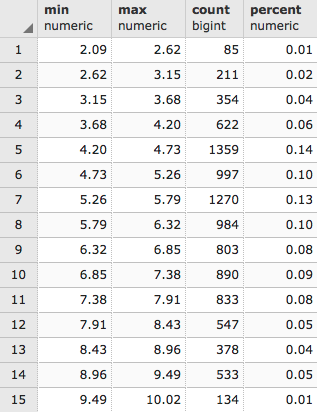
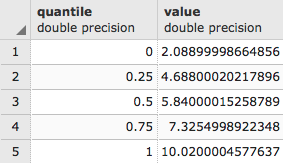
It looks like about 78% of all of the values are at or below 1370.50. Another way to see how the pixel values are distributed is to use ST_Quantile():

SELECT (ST_Quantile(rast, 1)).* 
FROM chp05.prism 
WHERE rid = 54; 

The output of the preceding code is as follows:
Let's see what the top 10 occurring values are in the raster tile with ST_ValueCount():

SELECT (ST_ValueCount(rast, 1)).* 
FROM chp05.prism WHERE rid = 54 
ORDER BY count DESC, value 
LIMIT 10; 

The output of the code is as follows:
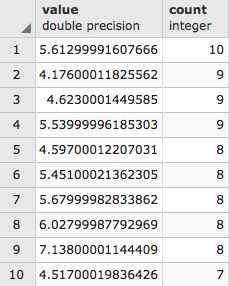
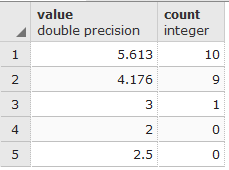
The ST_ValueCount allows other combinations of parameters that will allow rounding up of the values in order to aggregate some of the results, but a previous subset of values to look for must be defined; for example, the following code will count the appearance of values 2, 3, 2.5, 5.612999 and 4.176 rounded to the fifth decimal point 0.00001:

SELECT (ST_ValueCount(rast, 1, true, ARRAY[2,3,2.5,5.612999,4.176]::double precision[] ,0.0001)).* 
FROM chp05.prism 
WHERE rid = 54 
ORDER BY count DESC, value 
LIMIT 10; 

The results show the number of elements that appear similar to the rounded-up values in the array. The two values borrowed from the results on the previous figure, confirm the counting: