
The steps you need to perform to complete this recipe are as follows:
- First, investigate whether or not any geometry is invalid in the imported table. As you can see in the following query, using the ST_IsValid and ST_IsValidReason functions, we find four invalid geometries that are all invalid for the same reason—ring self-intersection:
      postgis_cookbook=# SELECT gid, name, ST_IsValidReason(the_geom)
        FROM chp03.countries
        WHERE ST_IsValid(the_geom)=false;
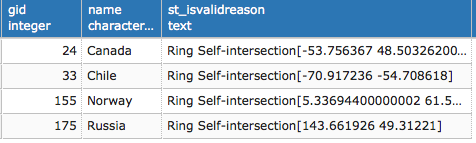
(4 rows)
- Now concentrate on just one of the invalid geometries, for example, in the multipolygon geometry representing Russia. Create a table containing just the ring generating the invalidity, selecting the table using the point coordinates given in the ST_IsValidReason response in the previous step:
      postgis_cookbook=# SELECT * INTO chp03.invalid_geometries FROM (
        SELECT 'broken'::varchar(10) as status,
        ST_GeometryN(the_geom, generate_series(
          1, ST_NRings(the_geom)))::geometry(Polygon,4326)
        as the_geom FROM chp03.countries
        WHERE name = 'Russia') AS foo
        WHERE ST_Intersects(the_geom,
          ST_SetSRID(ST_Point(143.661926,49.31221), 4326));
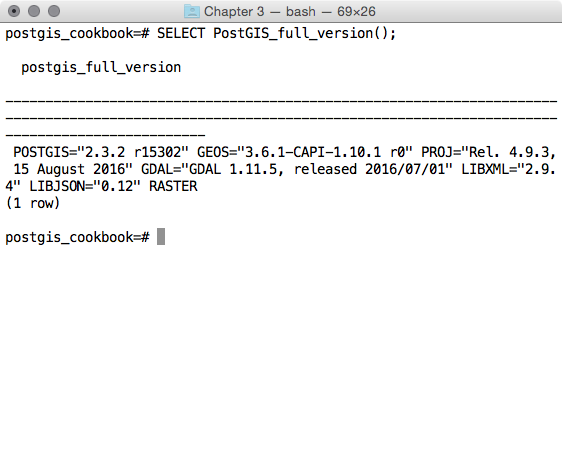
ST_MakeValid requires GEOS 3.3.0 or higher; check whether or not your system supports it using the PostGIS_full_version function as follows:
- Now, using the ST_MakeValid function, add a new record in the previously created table with the valid version of the same geometry:
      postgis_cookbook=# INSERT INTO chp03.invalid_geometries
      VALUES ('repaired', (SELECT ST_MakeValid(the_geom)
      FROM chp03.invalid_geometries));
- Open this geometry on your desktop GIS; the invalid geometry has just one self-intersecting ring that produces a hole in its internal. While this is accepted in the ESRI shapefile format specification (that was the original dataset you imported), the OGC standard does not allow for the self-intersecting ring, so neither does PostGIS:

- Now, in the invalid_geometries table, you have the invalid and valid versions of the polygon. It is easy to figure out that the self-intersecting ring was removed by ST_MakeValid adding one supplementary ring to the original polygon, which resulted in a valid geometry, according to the OGC standard:
      postgis_cookbook=# SELECT status, ST_NRings(the_geom)
      FROM chp03.invalid_geometries;
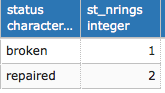
(2 rows)
- Now that you have identified the problem and its solution, don't forget to fix all the other invalid geometries in the countries table by executing the following code:
      postgis_cookbook=# UPDATE chp03.countries
      SET the_geom = ST_MakeValid(the_geom)
      WHERE ST_IsValid(the_geom) = false;
A smart way to not have invalid geometries in the database at all is by adding a CHECK constraint on the table to check for validity. This will increase the computation time when updating or inserting new geometries, but will keep your dataset valid. For example, in the countries table, this can be implemented as follows:
ALTER TABLE chp03.countries
ADD CONSTRAINT geometry_valid_check
CHECK (ST_IsValid(the_geom));
Many times in real use cases, though, you will need to remove such a constraint in order to be able to import records from a different source. After making validations with the ST_MakeValid function, you can safely add the constraint again.
ALTER TABLE chp03.countries
ADD CONSTRAINT geometry_valid_check
CHECK (ST_IsValid(the_geom));
Many times in real use cases, though, you will need to remove such a constraint in order to be able to import records from a different source. After making validations with the ST_MakeValid function, you can safely add the constraint again.