
In the preceding recipe, we imported several rasters and shapefiles to their respective tables. By default, access to those tables is restricted to only the user who performed the import operation, also known as the owner. The following steps permit other users to access those tables:
- We need to create several groups and users in order for this recipe to demonstrate and test the privileges set in the chapter10 database by executing the following commands:
      CREATE ROLE group1 NOLOGIN;
      CREATE ROLE group2 NOLOGIN;
      CREATE ROLE user1 LOGIN PASSWORD 'pass1' IN ROLE group1;
      CREATE ROLE user2 LOGIN PASSWORD 'pass2' IN ROLE group1;
      CREATE ROLE user3 LOGIN PASSWORD 'pass3' IN ROLE group2;
The first two CREATE ROLE statements create the groups group1 and group2. The last three CREATE ROLE statements create three users, with the user1 and user2 users assigned to group1 and the user3 user assigned to group2.
- We want group1 and group2 to have access to the chapter10 database. We want group1 to be permitted to connect to the database and create temporary tables, while group2 should be granted all database-level privileges, so we use the GRANT statement as follows:
      GRANT CONNECT, TEMP ON DATABASE chapter10 TO GROUP group1;
      GRANT ALL ON DATABASE chapter10 TO GROUP group2;
- Let's check whether or not the GRANT statement worked by executing the following commands:
> psql -U me -d chapter10
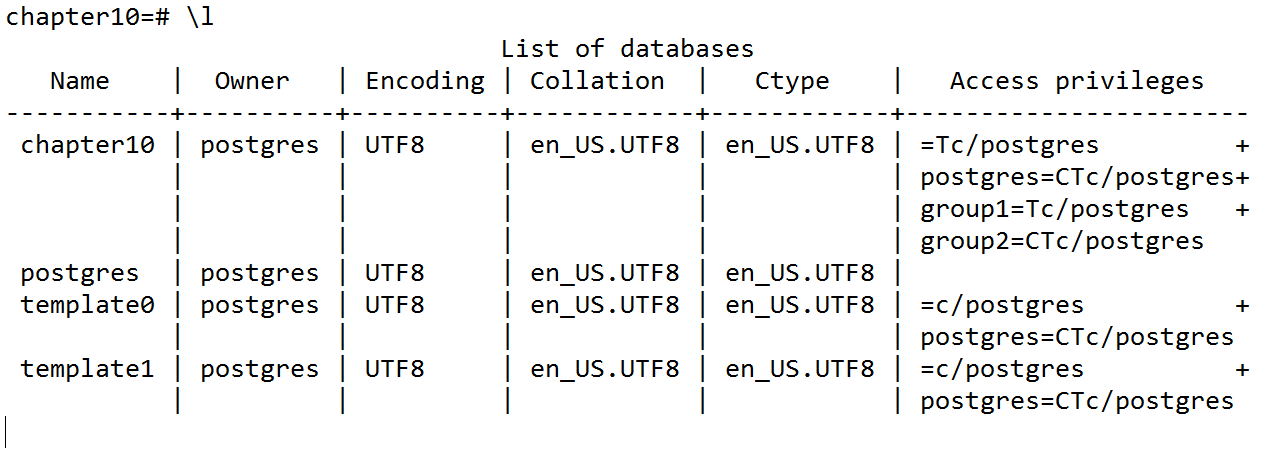
As you can see, group1 and group2 are present in the Access privileges column of the chapter10 database:
      group1=Tc/postgres
      group2=CTc/postgres
- There is one thing in the privileges of chapter10 that may be of concern to us:
=Tc/postgres
Unlike the privilege listings for group1 and group2, this listing has no value before the equal sign (=). This listing is for the special metagroup public, which is built into PostgreSQL and to which all users and groups automatically belong.
- We don't want everyone to have access to the chapter10 database, so we need to use the REVOKE statement to remove privileges from the public metagroup by executing the following command:
REVOKE ALL ON DATABASE chapter10 FROM public;
- Let's see what the initial privileges are for the schemas of the chapter10 database by executing the following command:
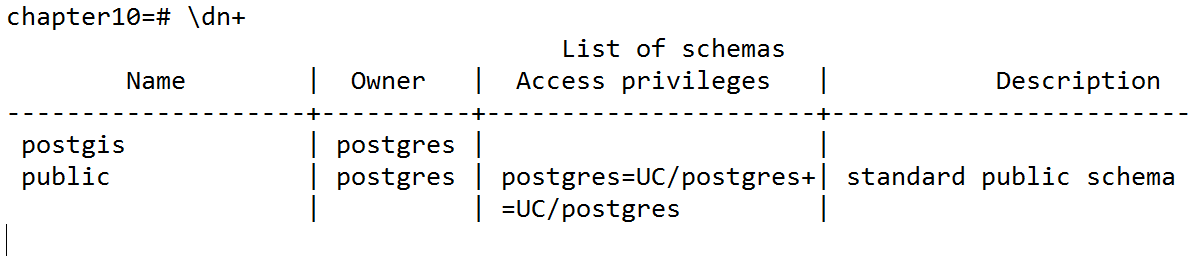
- The postgis schema has no privileges listed. However, this does not mean that no one can access the postgis schema. Only the owner of the schema -postgres, in this case - can access it. We will grant access to the postgis schema to both group1 and group2 by executing the following command:
GRANT USAGE ON SCHEMA postgis TO group1, group2;
We generally do not want to grant the CREATE privilege in the postgis schema to any user or group. New objects (such as functions, views, and tables) should not be added to the postgis schema.
- If we want all users and groups to have access to the postgis schema, we can grant the USAGE privilege to the metagroup public by executing the following command:
GRANT USAGE ON SCHEMA postgis TO public;
If you want to revoke this privilege, use the following command:
REVOKE USAGE ON SCHEMA postgis FROM public;
- Before continuing further, we should check that our privileges have been reflected in the database:
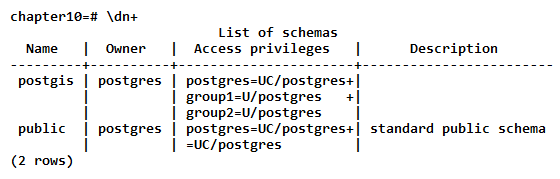
Granting the USAGE privilege to a schema does not allow the granted users and groups to use any objects in the schema. The USAGE privilege only permits the users and groups to view the schema's child objects. Each child object has its own set of privileges, which we establish in the remaining steps.
PostGIS comes with more than 1,000 functions. It would be unreasonable to individually set privileges for each of those functions. Instead, we grant the EXECUTE privilege to the metagroup public and then grant and/or revoke privileges to specific functions, such as management functions.
- First, grant the EXECUTE privilege to the metagroup public by executing the following command:
GRANT EXECUTE ON ALL FUNCTIONS IN SCHEMA postgis TO public;
- Now, revoke the EXECUTE privileges of the public metagroup for some functions, such as postgis_full_version(), by executing the following command:
REVOKE ALL ON FUNCTION postgis_full_version() FROM public;
If there are problems accessing the functions on the postgis schema, use the following command:
REVOKE ALL ON FUNCTION postgis.postgis_full_version() FROM public;
The GRANT and REVOKE statements do not differentiate between tables and views, so care must be taken to ensure that the applied privileges are appropriate for the object.
- We will grant the SELECT, REFERENCES, and TRIGGER privileges to the public metagroup on all postgis tables and views by executing the following command; none of these privileges gives the public metagroup the ability to alter the tables' or views' contents:
      GRANT SELECT, REFERENCES, TRIGGER
      ON ALL TABLES IN SCHEMA postgis TO public;
- We want to allow group1 to be able to insert new records into the spatial_ref_sys table, so we must execute the following command:
GRANT INSERT ON spatial_ref_sys TO group1;
Groups and users that are not part of group1 (such as group2) can only use the SELECT statements on spatial_ref_sys. Groups and users that are part of group1 can now use the INSERT statement to add new spatial reference systems.
- Let's give user2, which is a member of group1, the ability to use the UPDATE and DELETE statements on spatial_ref_sys by executing the following command; we are not going to give anyone the privilege to use the TRUNCATE statement on spatial_ref_sys:
GRANT UPDATE, DELETE ON spatial_ref_sys TO user2;
- After establishing the privileges, it is always good practice to check that they actually work. The best way to do so is by logging into the database as one of the users. We will use the user3 user to do this by executing the following command:
> psql -d chapter10 -u user3
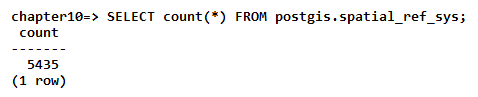
- Now, check that we can run a SELECT statement on the spatial_ref_sys table by executing the following commands:
chapter10=# SELECT count(*) FROM spatial_ref_sys;
Of if the schema need to be defined, use the following sentence:
- Let's try inserting a new record in spatial_ref_sys by executing the following commands:
      chapter10=# INSERT INTO spatial_ref_sys
      VALUES (99999, 'test', 99999, '', '');
      ERROR:  permission denied for relation spatial_ref_sys
- Excellent! Now update the records in spatial_ref_sys by executing the following commands:
      chapter10=# UPDATE spatial_ref_sys SET srtext = 'Lorum ipsum';
      ERROR:  permission denied for relation spatial_ref_sys
- Run a final check on the postgis_full_version() function by executing the following commands:
      chapter10=# SELECT postgis_full_version();
      ERROR:  permission denied for function postgis_full_version