
Carry out the following steps:
- First, test the web services and their JSON output yourself with the following request (change the q and username parameters as you wish): http://api.geonames.org/wikipediaSearchJSON?formatted=true&q=london&maxRows=10&username=postgis&style=full.
You should get the following JSON output:
        {
          "geonames": [
            {
              "summary": "London is the capital and most populous city of
                 England and United Kingdom. Standing on the River Thames,
                 London has been a major settlement for two millennia,
                 its history going back to its founding by the Romans,
                 who named it Londinium (...)",
              "elevation": 8,
              "geoNameId": 2643743,
              "feature": "city",
              "lng": -0.11832,
              "countryCode": "GB",
              "rank": 100,
              "thumbnailImg": "http://www.geonames.org/img/wikipedia/
                               43000/thumb-42715-100.jpg",
              "lang": "en",
              "title": "London",
              "lat": 51.50939,
              "wikipediaUrl": "en.wikipedia.org/wiki/London"
            },
            {
              "summary": "New London is a city and a port of entry on the
                 northeast coast of the United States. It is located at
                 the mouth of the Thames River in New London County,
                 southeastern Connecticut. New London is located about from
                 the state capital of Hartford,
                 from Boston, Massachusetts, from Providence, Rhode (...)",
              "elevation": 27,
              "feature": "landmark",
              "lng": -72.10083333333333,
              "countryCode": "US",
              "rank": 100,
              "thumbnailImg": "http://www.geonames.org/img/wikipedia/
                              160000/thumb-159123-100.jpg",
              "lang": "en",
              "title": "New London, Connecticut",
              "lat": 41.355555555555554,
              "wikipediaUrl": "en.wikipedia.org/wiki/
                               New_London%2C_Connecticut"
            },...
          ]
        }
- As you can see from the JSON output for the GeoNames web service, for a given query string (a location name), you get a list of Wikipedia pages related to that location in JSON format. For each JSON object representing a Wikipedia page, you can get access to the attributes, such as the page title, summary, url, and the coordinates of the location.
- Now, create a text file named working/chp08/names.txt with the names of places you would like to geocode from the Wikipedia Fulltext Search web services. Add some place names, for example (in Windows, use a text editor such as Notepad):
      $ vi names.txt

      London
      Rome
      Boston
      Chicago
      Madrid
      Paris
      ...
- Now, create a file named import_places.py under working/chp08/ and add to it the Python script for this recipe. The following is how the script should look (you should be able to follow it by reading the inline comments and the How it works... section):
        import sys
        import requests
        import simplejson as json
        from osgeo import ogr, osr

        MAXROWS = 10
        USERNAME = 'postgis' #enter your username here

        def CreatePGLayer():
          """
            Create the PostGIS table.
          """
          driver = ogr.GetDriverByName('PostgreSQL')
          srs = osr.SpatialReference()
          srs.ImportFromEPSG(4326)
          ogr.UseExceptions()
          pg_ds = ogr.Open("PG:dbname='postgis_cookbook' host='localhost'
             port='5432' user='me' password='password'", update = 1)
          pg_layer = pg_ds.CreateLayer('wikiplaces', srs = srs,
                geom_type=ogr.wkbPoint, options = [
            'DIM=3',
             # we want to store the elevation value in point z coordinate
            'GEOMETRY_NAME=the_geom',
            'OVERWRITE=YES',
            # this will drop and recreate the table every time
            'SCHEMA=chp08',
          ])
          # add the fields
          fd_title = ogr.FieldDefn('title', ogr.OFTString)
          pg_layer.CreateField(fd_title)
          fd_countrycode = ogr.FieldDefn('countrycode', ogr.OFTString)
          pg_layer.CreateField(fd_countrycode)
          fd_feature = ogr.FieldDefn('feature', ogr.OFTString)
          pg_layer.CreateField(fd_feature)
          fd_thumbnail = ogr.FieldDefn('thumbnail', ogr.OFTString)
          pg_layer.CreateField(fd_thumbnail)
          fd_wikipediaurl = ogr.FieldDefn('wikipediaurl', ogr.OFTString)
          pg_layer.CreateField(fd_wikipediaurl)
          return pg_ds, pg_layer

        def AddPlacesToLayer(places):
        """
          Read the places dictionary list and add features in the
          PostGIS table for each place.
        """
        # iterate every place dictionary in the list
        print "places: ", places
        for place in places:
          lng = place['lng']
          lat = place['lat']
          z = place.get('elevation') if 'elevation' in place else 0
          # we generate a point representation in wkt,
          # and create an ogr geometry
          point_wkt = 'POINT(%s %s %s)' % (lng, lat, z)
          point = ogr.CreateGeometryFromWkt(point_wkt)
          # we create a LayerDefn for the feature using the one
          # from the layer
          featureDefn = pg_layer.GetLayerDefn()
          feature = ogr.Feature(featureDefn)
          # now time to assign the geometry and all the
          # other feature's fields, if the keys are contained
          # in the dictionary (not always the GeoNames
          # Wikipedia Fulltext Search contains all of the information)
          feature.SetGeometry(point)
          feature.SetField('title',
            place['title'].encode("utf-8") if 'title' in place else '')
          feature.SetField('countrycode',
            place['countryCode'] if 'countryCode' in place else '')
          feature.SetField('feature',
            place['feature'] if 'feature' in place else '')
          feature.SetField('thumbnail',
            place['thumbnailImg'] if 'thumbnailImg' in place else '')
          feature.SetField('wikipediaurl',
            place['wikipediaUrl'] if 'wikipediaUrl' in place else '')
          # here we create the feature (the INSERT SQL is issued here)
          pg_layer.CreateFeature(feature)
          print 'Created a places titled %s.' % place['title']

        def GetPlaces(placename):
          """
            Get the places list for a given placename.
          """
          # uri to access the JSON GeoNames Wikipedia Fulltext Search
          # web service
          uri = ('http://api.geonames.org/wikipediaSearchJSON?
              formatted=true&q=%s&maxRows=%s&username=%s&style=full'
              % (placename, MAXROWS, USERNAME))
          data = requests.get(uri)
          js_data = json.loads(data.text)
          return js_data['geonames']

        def GetNamesList(filepath):
          """
            Open a file with a given filepath containing place names
            and return a list.
          """
          f = open(filepath, 'r')
          return f.read().splitlines()

        # first we need to create a PostGIS table to contains the places
        # we must keep the PostGIS OGR dataset and layer global,
        # for the reasons
        # described here: http://trac.osgeo.org/gdal/wiki/PythonGotchas
        from osgeo import gdal
        gdal.UseExceptions()
        pg_ds, pg_layer = CreatePGLayer()
        try:
          # query geonames for each name and store found
          # places in the table
          names = GetNamesList('names.txt')
          print names
            for name in names:
            AddPlacesToLayer(GetPlaces(name))
        except Exception as e:
          print(e)
          print sys.exc_info()[0]
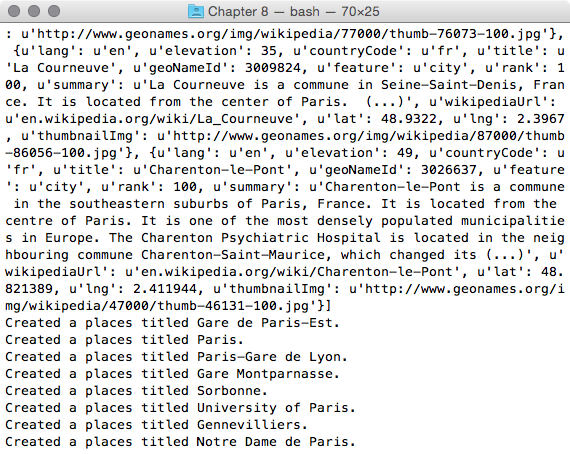
- Now, execute the Python script:
(postgis-cb-env)$ python import_places.py
- Test whether the table was correctly created and populated using SQL and use your favorite GIS desktop tool to display the layer:
      postgis_cookbook=# select ST_AsText(the_geom), title,
        countrycode, feature from chp08.wikiplaces;
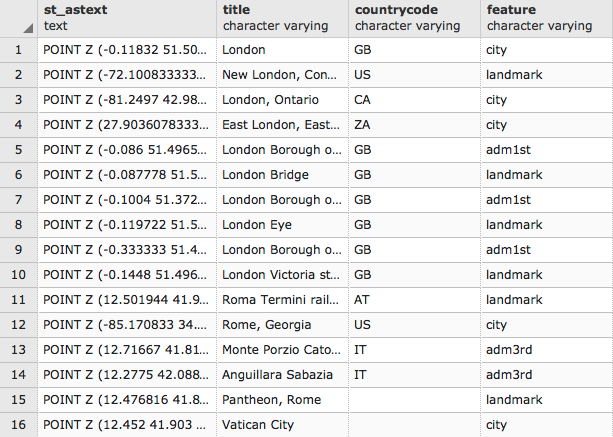
(60 rows)