In the preceding recipe, we created temporary tables to store original data, as well as tables containing MaPIR information to be queried later by users. The following steps allow other users to access those tables:
- First, create the table supermarkets to store the information extracted from the dataset, and the table supermarkets_mapir to store the MaPIR-related information for each supermarket register. Execute the following command:
      CREATE TABLE chp12.supermarkets (
        sup_id serial,
        the_geom geometry(Point,4326),
        latitude numeric,
        longitude numeric,
        PRIMARY KEY (sup_id)
      );
      CREATE TABLE chp12.supermarkets_mapir (
        sup_id int REFERENCES chp12.supermarkets (sup_id),
        cellid int,
        levelid int
      );
- Now, create a trigger function that will be applied to all the new registers inserted in the table supermarkets, so that the new registers will be inserted in the supermarkets_mapir table, calculating the cellid and levelid values. The following code will create the function:
      CREATE OR REPLACE FUNCTION __trigger_supermarkets_after_insert(
      ) RETURNS trigger AS $__$
      DECLARE
      tempcelliD integer;
      BEGIN
        FOR i IN -2..6
        LOOP
          tempcellid = mod((mod(CAST(TRUNC(ABS(NEW.latitude)*POWER(10,i))
          as int),10)+1) * (mod(CAST(TRUNC(ABS(NEW.longitude)*POWER(10,i))
          as int),10)+1), 11)-1;
          INSERT INTO chp12.supermarkets_mapir (sup_id, cellid, levelid)
          VALUES (NEW.sup_id, tempcellid, i);
        END LOOP;
      Return NEW;
      END;
      $__$ LANGUAGE plpgsql;
      CREATE TRIGGER supermarkets_after_insert
      AFTER INSERT ON chp12.supermarkets FOR EACH ROW
      EXECUTE PROCEDURE __trigger_supermarkets_after_insert ();
- Given that the dataset is not properly organized, we extracted the location information of the supermarkets and built the following query. After the execution, both tables supermarkets and supermarkets_mapir should be populated. Execute the following command:
      INSERT INTO chp12.supermarkets (the_geom, longitude, latitude) VALUES
        (ST_GEOMFROMTEXT('POINT(-76.304202 3.8992)',4326),
          -76.304202, 3.8992),
        (ST_GEOMFROMTEXT('POINT(-76.308476 3.894591)',4326),
          -76.308476, 3.894591),
        (ST_GEOMFROMTEXT('POINT(-76.297893 3.890615)',4326),
          -76.297893, 3.890615),
        (ST_GEOMFROMTEXT('POINT(-76.299017 3.901726)',4326),
          -76.299017, 3.901726),
        (ST_GEOMFROMTEXT('POINT(-76.292027 3.909094)',4326),
          -76.292027, 3.909094),
        (ST_GEOMFROMTEXT('POINT(-76.299687 3.888735)',4326),
          -76.299687, 3.888735),
        (ST_GEOMFROMTEXT('POINT(-76.307102 3.899181)',4326),
          -76.307102, 3.899181),
        (ST_GEOMFROMTEXT('POINT(-76.310342 3.90145)',4326),
          -76.310342, 3.90145),
        (ST_GEOMFROMTEXT('POINT(-76.297366 3.889721)',4326),
          -76.297366, 3.889721),
        (ST_GEOMFROMTEXT('POINT(-76.293296 3.906171)',4326),
          -76.293296, 3.906171),
        (ST_GEOMFROMTEXT('POINT(-76.300154 3.901235)',4326),
          -76.300154, 3.901235),
        (ST_GEOMFROMTEXT('POINT(-76.299755 3.899361)',4326),
          -76.299755, 3.899361),
        (ST_GEOMFROMTEXT('POINT(-76.303509 3.911253)',4326),
          -76.303509, 3.911253),
        (ST_GEOMFROMTEXT('POINT(-76.300152 3.901175)',4326),
          -76.300152, 3.901175),
        (ST_GEOMFROMTEXT('POINT(-76.299286 3.900895)',4326),
          -76.299286, 3.900895),
        (ST_GEOMFROMTEXT('POINT(-76.309937 3.912021)',4326),
          -76.309937, 3.912021);
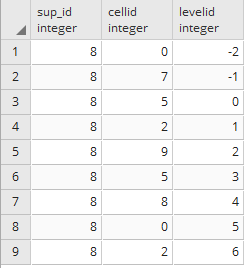
- Now, all the supermarkets inserted in the supermarket table will have their MaPIR-related information in the supermarkets_mapir table. The following query will illustrate the information stored in the supermarkets_mapir table for a given register:
SELECT * FROM supermarkets_mapir WHERE sup_id = 8;
The result of the query is shown in the following table:
- Now that the supermarket data is ready, assume that a user is at the coordinates (-76.299017, 3.901726), which matches the location of one of the supermarkets, and that they want to use the scale 2 (the second decimal digit corresponding to a grid cell size of approximately 1 km² by the Equator).
- The mobile app should generate a query asking for levelid = 2 and a cellid = 9, calculated from the second decimal digit from latitude = 0, and longitude = 9 on the second decimal digit. This calculation can be verified on the mapping table previously shown, with Lat Nth +1 = 1 and Long Nth + 1 = 10:
      SELECT sm.the_geom AS the_geom
      FROM chp12.supermarkets_mapir AS smm, chp12.supermarkets AS sm
      WHERE smm.levelid = 2 AND smm.cellid = 9 AND smm.sup_id = sm.sup_id;
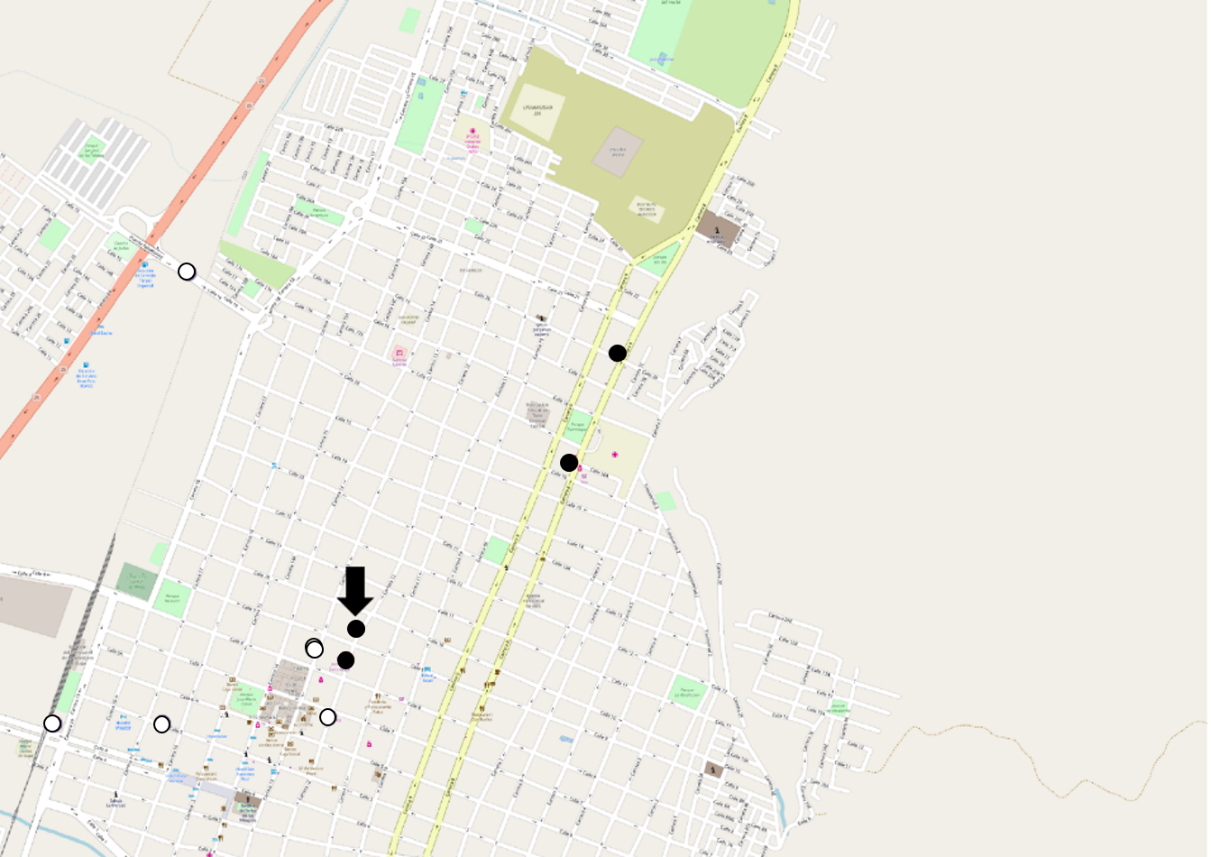
Note that there is no need for any geographical information in the query anymore, because the mapping was done during the pre-processing stage. This reduces the query time, because it does not require the use of complex internal functions to determine distance; however, mapping cannot guarantee that all nearby results will be returned, as results in adjacent cells with different IDs may not appear. In the following figure, you can see that the supermarkets from the previous query (in black) do not include some of the supermarkets that are near the user's location (in white near the arrow). Some possible counter-measures can be applied to tackle this, such as double-mapping some of the elements close to the edges of the grid cells: