
The following steps will guide you through the iterative process required to improve query performance:
- To find a school's nearest police station and the distance between each school in San Francisco and its nearest station, we will start by executing the following query:
      SELECT
        di.school,
        police_address,
        distance
      FROM ( -- for each school, get the minimum distance to a
            -- police station
        SELECT
          gid,
          school,
          min(distance) AS distance
        FROM ( -- get distance between every school and every police
               -- station in San Francisco
          SELECT
            sc.gid,
            sc.name AS school,
            po.address AS police_address,
            ST_Distance(po.geom_3310, sc.geom_3310) AS distance
          FROM ( -- get schools in San Francisco
            SELECT
              ca.gid,
              ca.name,
              ST_Transform(ca.geom, 3310) AS geom_3310
            FROM sfpoly sf
            JOIN caschools ca
              ON ST_Intersects(sf.geom, ST_Transform(ca.geom, 3310))
          ) sc
          CROSS JOIN ( -- get police stations in San Francisco
            SELECT
              ca.address,
              ST_Transform(ca.geom, 3310) AS geom_3310
            FROM sfpoly sf
            JOIN capolice ca
              ON ST_Intersects(sf.geom, ST_Transform(ca.geom, 3310))
          ) po ORDER BY 1, 2, 4
        ) scpo
        GROUP BY 1, 2
        ORDER BY 2
    ) di JOIN ( -- for each school, collect the police station
               -- addresses ordered by distance
      SELECT
        gid,
        school,
        (array_agg(police_address))[1] AS police_address
      FROM (-- get distance between every school and
            every police station in San Francisco
        SELECT
          sc.gid,
          sc.name AS school,
          po.address AS police_address,
          ST_Distance(po.geom_3310, sc.geom_3310) AS distance
        FROM ( -- get schools in San Francisco
          SELECT
            ca.gid,
            ca.name,
            ST_Transform(ca.geom, 3310) AS geom_3310
          FROM sfpoly sf
          JOIN caschools ca
            ON ST_Intersects(sf.geom, ST_Transform(ca.geom, 3310))
        ) sc
        CROSS JOIN ( -- get police stations in San Francisco
          SELECT
            ca.address,
            ST_Transform(ca.geom, 3310) AS geom_3310
          FROM sfpoly sf JOIN capolice ca
          ON ST_Intersects(sf.geom, ST_Transform(ca.geom, 3310))
        ) po
        ORDER BY 1, 2, 4
      ) scpo
      GROUP BY 1, 2
      ORDER BY 2
      ) po
        ON di.gid = po.gid
      ORDER BY di.school;
- Generally speaking, this is a crude and simplistic query. The subquery scpo occurs twice in the query because it needs to compute the shortest distance from a school to its nearest police station and the name of the police station closest to each school. If each instance of scpo took 10 seconds to compute, two instances of scpo would take 20 seconds. This is very detrimental to performance.
Note: the time may vary substantially between experiments, depending on the machine configuration, database usage, and so on. However, the changes in the duration of the experiments will be noticeable and should follow the same improvement ratio presented in this section.
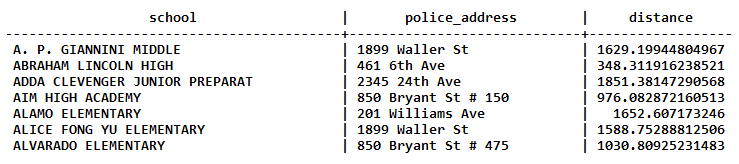
The query output looks as follows:
...

- The query results provide the addresses of the schools in San Francisco, the addresses of the closest police station to each of those schools, and the distance from each school to its closest police station. However, we are also interested in getting the answer as fast as possible. With timing turned on in psql, we get the following performance numbers for three runs of the query:
      Time: 5076.363 ms
      Time: 4974.282 ms
      Time: 5027.721 ms
- Just by looking at the query in step 1, we can see that there are redundant subqueries. Let's get rid of those duplicates using common table expressions (CTEs), introduced in PostgreSQL 8.4. CTEs are used to logically and syntactically separate a block of SQL from subsequent parts of the query. Since CTEs are logically separated, they are run at the start of the query execution and their results are cached for subsequent use:
      WITH scpo AS ( -- get distance between every school and every
                    -- police station in San Francisco
      SELECT
        sc.gid,
        sc.name AS school,
        po.address AS police_address,
        ST_Distance(po.geom_3310, sc.geom_3310) AS distance
      FROM ( -- get schools in San Francisco
        SELECT
          ca.*,
          ST_Transform(ca.geom, 3310) AS geom_3310
        FROM sfpoly sf
        JOIN caschools ca
          ON ST_Intersects(sf.geom, ST_Transform(ca.geom, 3310))
      ) sc
      CROSS JOIN ( -- get police stations in San Francisco
        SELECT
          ca.*,
          ST_Transform(ca.geom, 3310) AS geom_3310
        FROM sfpoly sf
        JOIN capolice ca
          ON ST_Intersects(sf.geom, ST_Transform(ca.geom, 3310))
      ) po
      ORDER BY 1, 2, 4
      )

      SELECT
        di.school,
        police_address,
        distance
      FROM ( -- for each school, get the minimum distance to a
             -- police station
        SELECT
          gid,
          school,
          min(distance) AS distance
        FROM scpo
        GROUP BY 1, 2
        ORDER BY 2
      ) di
      JOIN ( -- for each school, collect the police station
             -- addresses ordered by distance
        SELECT
          gid,
          school,
          (array_agg(police_address))[1] AS police_address
        FROM scpo
        GROUP BY 1, 2
        ORDER BY 2
      ) po
        ON di.gid = po.gid
      ORDER BY 1;
- Not only is the query syntactically cleaner, but the performance is improved, as shown here:
      Time: 2803.923 ms
      Time: 2798.105 ms
      Time: 2796.481 ms
The execution times went from more than 5 seconds to less than 3 seconds.
- Though some may stop optimizing this query at this point, we will continue to improve the query performance. We can use the window functions, which are another PostgreSQL capability introduced in v8.4. Using the window functions as follows, we can get rid of the JOIN expression:
      WITH scpo AS ( -- get distance between every school and every
                     -- police station in San Francisco
        SELECT
          sc.name AS school,
          po.address AS police_address,
          ST_Distance(po.geom_3310, sc.geom_3310) AS distance
        FROM ( -- get schools in San Francisco
          SELECT
            ca.name,
            ST_Transform(ca.geom, 3310) AS geom_3310
          FROM sfpoly sf
          JOIN caschools ca
            ON ST_Intersects(sf.geom, ST_Transform(ca.geom, 3310))
        ) sc
        CROSS JOIN ( -- get police stations in San Francisco
          SELECT
            ca.address,
            ST_Transform(ca.geom, 3310) AS geom_3310
          FROM sfpoly sf
          JOIN capolice ca
            ON ST_Intersects(sf.geom, ST_Transform(ca.geom, 3310))
        ) po
        ORDER BY 1, 3, 2
      )
      SELECT
        DISTINCT school,
        first_value(police_address)
          OVER (PARTITION BY school ORDER BY distance),
        first_value(distance)
          OVER (PARTITION BY school ORDER BY distance)
      FROM scpo
      ORDER BY 1;
- We use the first_value() window function to extract the first police_address and distance values for each school sorted by the distance between the school and a police station. The improvement is considerable, reducing from almost 3 seconds to around 1.2 seconds:
      Time: 1261.473 ms
      Time: 1217.843 ms
      Time: 1215.086 ms
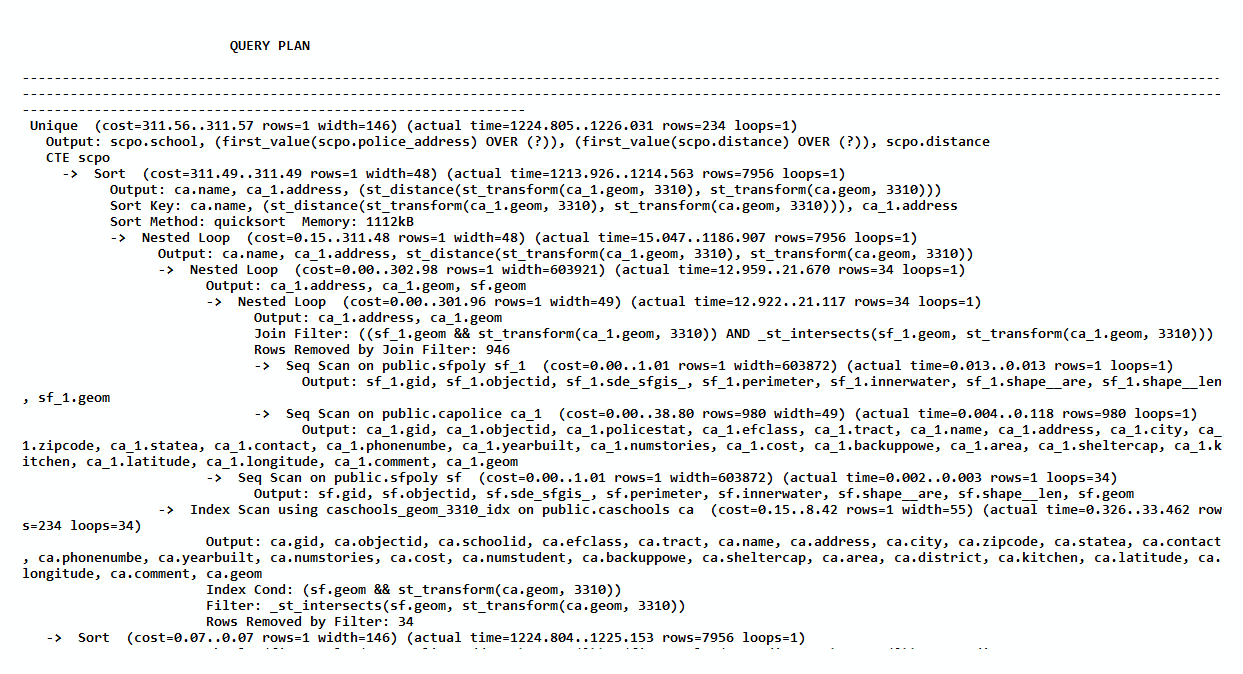
- However, it is worth to inspect the execution plan with EXPLAIN ANALYZE VERBOSE to see what is decreasing the query performance. Because of the verbosity of the output, we've trimmed it to just the following lines of interest:
      ...

      ->  Nested Loop  (cost=0.15..311.48 rows=1 width=48)
          (actual time=15.047..1186.907 rows=7956 loops=1)
          Output: ca.name, ca_1.address,
          st_distance(st_transform(ca_1.geom, 3310),
          st_transform(ca.geom, 3310))
- In the EXPLAIN ANALYZE VERBOSE output, we want to inspect the values for the actual time, which provide the actual start and end times for that part of the query. Of all the actual time ranges, the actual time value of 15.047..1186.907 for the Nested Loop (highlighted in the preceding output) is the worst. This query step consumes at least 80 percent of the total execution time, so any work done to improve performance must be done in this step.
- The columns returned from the slow Nested Loop utility are found in the value for the output. Of these columns, st_distance() is present only in this step and not in any inner step. This means we will need to mitigate the number of calls to ST_Distance().
- At this step, further query improvements are not possible without running PostgreSQL 9.1 or a later version. PostgreSQL 9.1 introduced indexed nearest-neighbor searches using the <-> and <#> operators to compare the geometries' convex hulls and bounding boxes, respectively. For point geometries, both operators result in the same answer.
- Let's rewrite the query to take advantage of the <-> operator. The following query still uses the CTEs and window functions:
      WITH sc AS ( -- get schools in San Francisco
        SELECT
          ca.gid,
          ca.name,
          ca.geom
        FROM sfpoly sf
        JOIN caschools ca
          ON ST_Intersects(sf.geom, ST_Transform(ca.geom, 3310))
      ), po AS ( -- get police stations in San Francisco
        SELECT
          ca.gid,
          ca.address,
          ca.geom
        FROM sfpoly sf
        JOIN capolice ca
          ON ST_Intersects(sf.geom, ST_Transform(ca.geom, 3310))
      )
      SELECT
        school,
        police_address,
        ST_Distance(ST_Transform(school_geom, 3310),
        ST_Transform(police_geom, 3310)) AS distance
      FROM ( -- for each school, number and order the police
             -- stations by how close each station is to the school
        SELECT
          ROW_NUMBER() OVER (
            PARTITION BY sc.gid ORDER BY sc.geom <-> po.geom
          ) AS r,
          sc.name AS school,
          sc.geom AS school_geom,
          po.address AS police_address,
          po.geom AS police_geom
        FROM sc
        CROSS JOIN po
      ) scpo
      WHERE r < 2
      ORDER BY 1;
- The query has the following performance numbers:
      Time: 83.002 ms
      Time: 82.586 ms
      Time: 83.327 ms
Wow! Using indexed nearest-neighbor searches with the <-> operator, we reduced our initial query from one second to less than a tenth of a second.