
On the command line, navigate to the MODIS directory:
> cd C:\postgis_cookbook\data\chap05\MODIS
In the MODIS directory, there should be several files. One of these files has the name srs.sql and contains the INSERT statement needed for the MODIS Sinusoidal projection. Run the INSERT statement:
> psql -d postgis_cookbook -f srs.sql
The main file has the extension HDF. Let's check the metadata of that HDF file:
> gdalinfo MYD09A1.A2012161.h08v05.005.2012170065756.hdf
When run, gdalinfo outputs a lot of information. We are looking for the list of subdatasets found in the Subdatasets section:
Subdatasets:
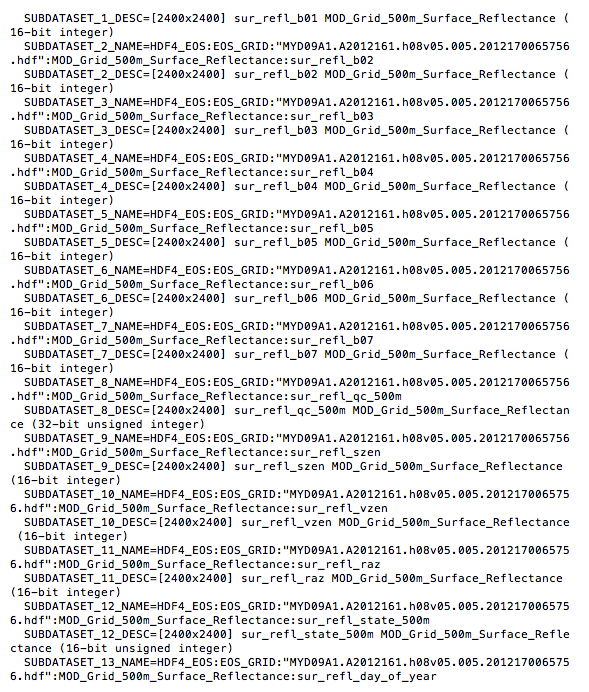
Each subdataset is one variable of the MODIS raster included in the source code for this chapter. For our purposes, we only need the first four subdatasets, which are as follows:
- Subdataset 1: 620 - 670 nm (red)
- Subdataset 2: 841 - 876 nm (near infrared or NIR)
- Subdataset 3: 459 - 479 nm (blue)
- Subdataset 4: 545 - 565 nm (green)
The VRT format allows us to select the subdatasets to be included in the VRT raster as well as change the order of the subdatasets. We want to rearrange the subdatasets so that they are in the RGB order.
Let's call gdalbuildvrt to create a VRT file for our MODIS raster. Do not run the following!
> gdalbuildvrt -separate  modis.vrt
 HDF4_EOS:EOS_GRID:"MYD09A1.A2012161.h08v05.005.2012170065756.hdf":MOD_Grid_500m_Surface_Reflectance:sur_refl_b01
 HDF4_EOS:EOS_GRID:"MYD09A1.A2012161.h08v05.005.2012170065756.hdf":MOD_Grid_500m_Surface_Reflectance:sur_refl_b04
 HDF4_EOS:EOS_GRID:"MYD09A1.A2012161.h08v05.005.2012170065756.hdf":MOD_Grid_500m_Surface_Reflectance:sur_refl_b03
 HDF4_EOS:EOS_GRID:"MYD09A1.A2012161.h08v05.005.2012170065756.hdf":MOD_Grid_500m_Surface_Reflectance:sur_refl_b02
We really hope you did not run the preceding code. The command does work but is too long and cumbersome. It would be better if we can pass a file indicating the subdatasets to include and their order in the VRT. Thankfully, gdalbuildvrt provides such an option with the -input_file_list flag.
In the MODIS directory, the modis.txt file can be passed to gdalbuildvrt with the -input_file_list flag. Each line of the modis.txt file is the name of a subdataset. The order of the subdatasets in the text file dictates the placement of each subdataset in the VRT:
HDF4_EOS:EOS_GRID:"MYD09A1.A2012161.h08v05.005.2012170065756.hdf":MOD_Grid_500m_Surface_Reflectance:sur_refl_b01
HDF4_EOS:EOS_GRID:"MYD09A1.A2012161.h08v05.005.2012170065756.hdf":MOD_Grid_500m_Surface_Reflectance:sur_refl_b04
HDF4_EOS:EOS_GRID:"MYD09A1.A2012161.h08v05.005.2012170065756.hdf":MOD_Grid_500m_Surface_Reflectance:sur_refl_b03
HDF4_EOS:EOS_GRID:"MYD09A1.A2012161.h08v05.005.2012170065756.hdf":MOD_Grid_500m_Surface_Reflectance:sur_refl_b02
Now, call gdalbuildvrt with modis.txt in the following manner:
> gdalbuildvrt -separate -input_file_list modis.txt modis.vrt
Feel free to inspect the generated modis.vrt VRT file in your favorite text editor. Since the contents of the VRT file are just XML tags, it is easy to make additions, changes, and deletions.
We will do one last thing before importing our processed MODIS raster into PostGIS. We will convert the VRT file to a GeoTIFF file with the gdal_translate utility, because not all applications have built-in support for HDF4, HDF5, NetCDF, or VRT, and the superior portability of GeoTIFF:
> gdal_translate -of GTiff modis.vrt modis.tif
Finally, import modis.tif with raster2pgsql:
> raster2pgsql -s 96974 -F -I -C -Y modis.tif chp05.modis | psql -d postgis_cookbook
The raster2pgsql supports a long list of input formats. You can call the command with the option -G to see the complete list.