Carry out the following steps:
- Unzip the IT.zip file to the working/chp08 directory. Two files will be extracted: the readme.txt file that contains information on the GeoNames database structure—you can read it to get some more information—and the IT.txt file, which is a .csv file containing all the GeoNames entities for Italy. As suggested in the readme.txt file, the content of the CSV file is composed of records with the following attributes:
      geonameid         : integer id of record in geonames  database
      name              : name of geographical point (utf8) varchar(200)
      asciiname         : name of geographical point in  plain
                          ascii characters, varchar(200)
      alternatenames    : alternatenames, comma separated varchar(5000)
      latitude          : latitude in decimal degrees (wgs84)
      longitude         : longitude in decimal degrees (wgs84)
      ...
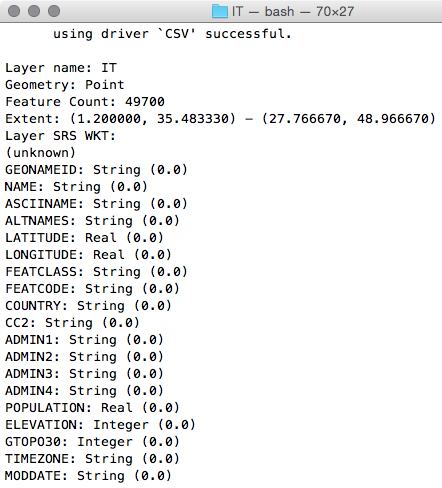
- Get an overview of this CSV dataset, using ogrinfo:
$ ogrinfo CSV:IT.txt IT -al -so
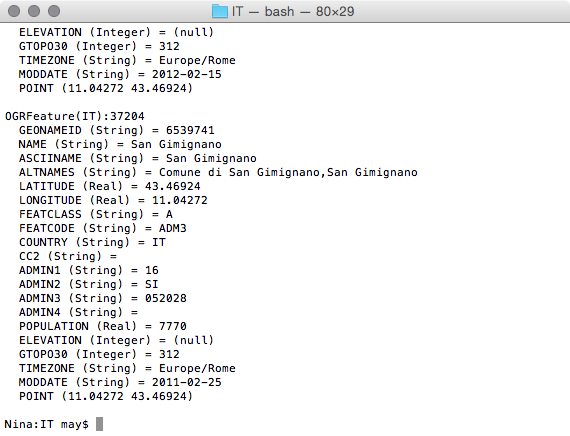
- You could query the IT.txt file as an OGR entity. For example, analyze one of the dataset features, as shown in the following code:
$ ogrinfo CSV:IT.txt IT -where "NAME = 'San Gimignano'"
- For your purpose, you just need the name, asciiname, latitude, and longitude attributes. You will import the file to PostGIS using the CSV OGR driver (http://www.gdal.org/drv_csv.html). Use the ogr2ogr command to import this GeoNames dataset in PostGIS:
      $ ogr2ogr -f PostgreSQL -s_srs EPSG:4326 -t_srs EPSG:4326
      -lco GEOMETRY_NAME=the_geom -nln chp08.geonames
      PG:"dbname='postgis_cookbook' user='me' password='mypassword'"
      CSV:IT.txt -sql "SELECT NAME, ASCIINAME FROM IT"
- Try to query the new geonames table in PostGIS to see if the process works correctly:
      postgis_cookbook=# SELECT ST_AsText(the_geom), name
      FROM chp08.geonames LIMIT 10;
- Now, create a PL/PostgreSQL function that will return the five place names closest to the given point and their coordinates (reverse geocoding):
      CREATE OR REPLACE FUNCTION chp08.Get_Closest_PlaceNames(
        in_geom geometry, num_results int DEFAULT 5,
        OUT geom geometry, OUT place_name character varying)
      RETURNS SETOF RECORD AS $$
      BEGIN
        RETURN QUERY
        SELECT the_geom as geom, name as place_name
        FROM chp08.geonames
        ORDER BY the_geom <-> ST_Centroid(in_geom) LIMIT num_results;
      END;
      $$ LANGUAGE plpgsql;
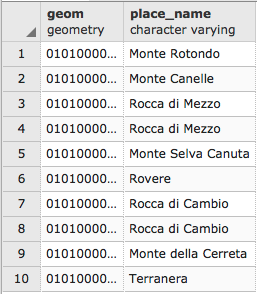
- Query the new function. You can specify the number of results you want by passing the optional num_results input parameter:
      postgis_cookbook=# SELECT * FROM chp08.Get_Closest_PlaceNames(
        ST_PointFromText('POINT(13.5 42.19)', 4326), 10);
The following is the output for this query:
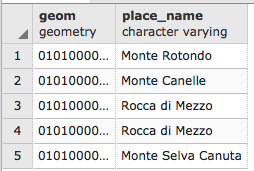
- If you don't specify the num_results optional parameter, it will default to five results:
      postgis_cookbook=# SELECT * FROM chp08.Get_Closest_PlaceNames(
      ST_PointFromText('POINT(13.5 42.19)', 4326));
And you will get the following rows:
- Now, create a PL/pgSQL function that will return a list of place names and geometries containing a text search in their name field (geocoding):
      CREATE OR REPLACE FUNCTION chp08.Find_PlaceNames(search_string text,
        num_results int DEFAULT 5,
        OUT geom geometry,
        OUT place_name character varying)
      RETURNS SETOF RECORD AS $$
      BEGIN
        RETURN QUERY
        SELECT the_geom as geom, name as place_name
        FROM chp08.geonames
        WHERE name @@ to_tsquery(search_string)
        LIMIT num_results;
      END;
      $$ LANGUAGE plpgsql;
- Query this second function to check if it is working properly:
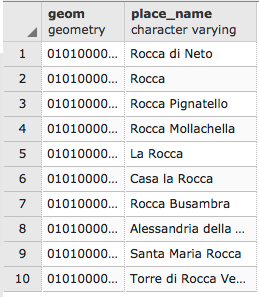
postgis_cookbook=# SELECT * FROM chp08.Find_PlaceNames('Rocca', 10);