
Our source data will be in the LAS format, which we will insert into our database using the PDAL library, available at https://www.pdal.io/. This tool is available for Linux/UNIX and Mac users; for Windows, it is available with the OSGeo4W package (https://www.pdal.io/workshop/osgeo4w.html).
LAS data can contain a lot of interesting data, not just X, Y, and Z values. It can include the intensity of the return from the object sensed and the classification of the object (ground versus vegetation versus buildings). When we place our LAS file in our PostGIS database, we can optionally collect any of this information. Furthermore, PDAL internally constructs a pipeline to translate data for reading, processing, and writing.
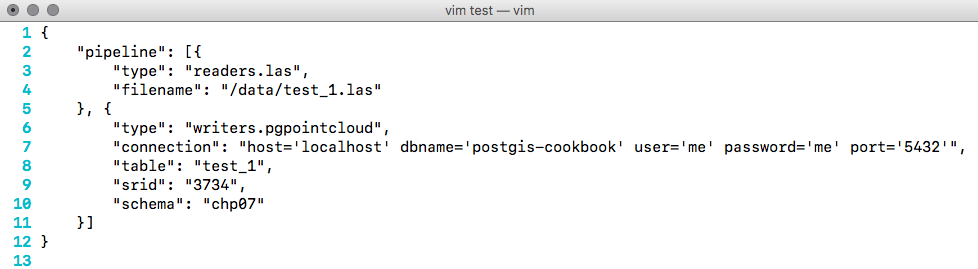
In preparation for this, we need to create a JSON file that represents the PDAL processing pipeline. For each LAS file, we create a JSON file to configure the reader and the writer to use the postgres-pointcloud option. We also need to write the database connection parameters. For the test file test_1.las, the code is as follows:
Now, we can download our data. It is recommended to either download it from http://gis5.oit.ohio.gov/geodatadownload/ or to download the sample dataset we have for your use, available at http://www.packtpub.com/support.