
The best way to see how a query can be affected by an index is by running the query before and after the addition of an index. In this recipe, in order to avoid the need to define the schema, all the tables are assumed to be on the public schema. The following steps will guide you through the process of optimizing a query with an index:
- Run the following query, which returns the names of all the schools found in San Francisco:
      SELECT schoolid FROM caschools sc JOIN sfpoly sf
      ON ST_Intersects(sf.geom, ST_Transform(sc.geom, 3310));
- The results from the query do not matter. We are more interested in the time it took to run the query. When we run the query three times, it runs with the following elapsed times; your numbers may be different from these numbers:
      Time: 136.643 ms
      Time: 140.863 ms
      Time: 135.859 ms
- The query ran quickly. But, if the query needs to be run many times (say 1,000 times), it will take more than 500 seconds to run it that number of times. Can the query run faster? Use EXPLAIN ANALYZE to see how PostgreSQL runs the query, as follows:
      EXPLAIN ANALYZE
      SELECT schoolid FROM caschools sc JOIN sfpoly sf
      ON ST_Intersects(sf.geom, ST_Transform(sc.geom, 3310));
Adding EXPLAIN ANALYZE before the query instructs PostgreSQL to return the actual plan used to execute the query, as follows:
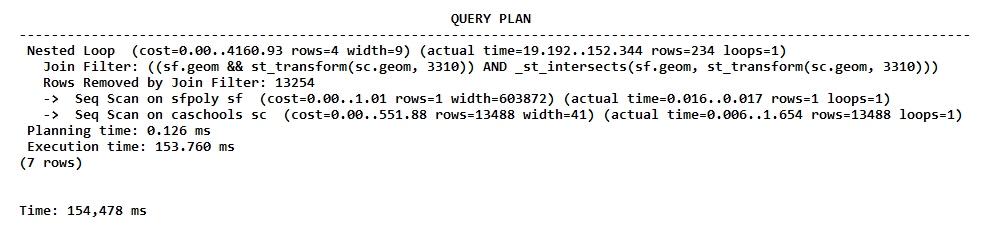
What is significant in the preceding QUERY PLAN is Join Filter, which has consumed most of the execution time. This may be happening because the caschools table does not have a spatial index on the geom column.
- Add a spatial index to the geom column, as follows:
      CREATE INDEX caschools_geom_idx ON caschools
      USING gist (geom);
- Rerun the query from step 1 three times so as to minimize runtime variations. With a spatial index, the query ran with the following elapsed query times:
      Time: 95.807 ms
      Time: 101.626 ms
      Time: 103.748 ms
The query did not run much faster with the spatial index. What happened? We need to check the QUERY PLAN.
- You can see whether or not, or even how the QUERY PLAN changed in PostgreSQL using EXPLAIN ANALYZE, as follows:
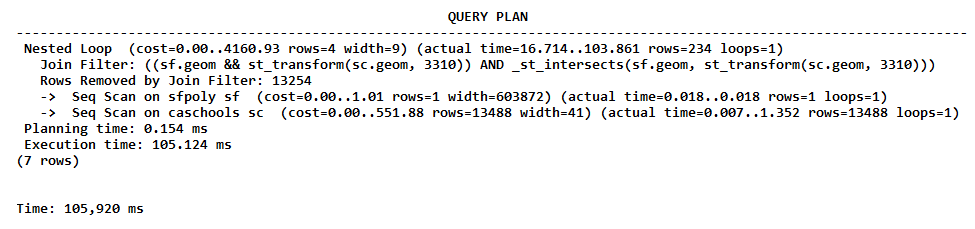
The QUERY PLAN table is the same as that found in step 4. The query is not using the spatial index. Why?
If you look at the query, we used ST_Transform() to reproject caschools.geom on the spatial reference system of sfpoly.geom. The ST_Transform() geometries used in the ST_Intersects() spatial test were in SRID 3310, but the geometries used for the caschools_geom_idx index were in SRID 4269. This difference in spatial reference systems prevented the use of the index in the query.
- We can create a spatial index that uses geometries projected in the desired spatial reference system. An index that uses a function is known as a functional index. It can be created as follows:
      CREATE INDEX caschools_geom_3310_idx ON caschools
      USING gist (ST_Transform(geom, 3310));
- Rerun the query from step 1 three times to get the following output :
      Time: 63.359 ms
      Time: 64.611 ms
      Time: 56.485 ms
That's better! The duration of the process has decreased from about 135 ms to 60 ms.
- Check the QUERY PLAN table as follows:
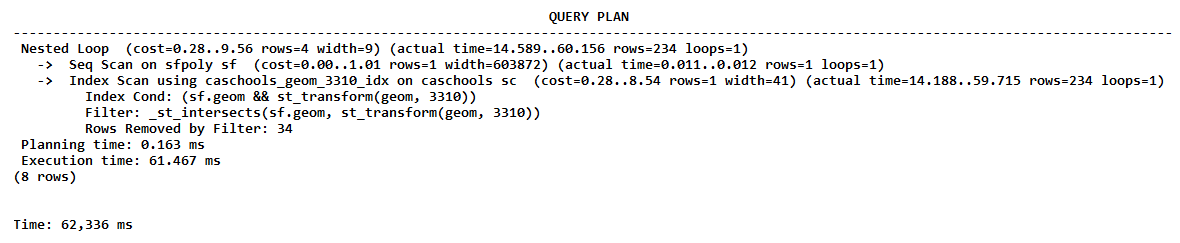
The plan shows that the query used the caschools_geom_3310_idx index. The Index Scan command was significantly faster than the previously used Join Filter command.