
With any operation that is going to take a while and/or modify a stored raster, it is best to test that operation to ensure there are no mistakes and the output looks correct.
Let's run ST_MapAlgebra() on one raster tile, and compare the summary statistics before and after the map-algebra operation:
WITH stats AS (
  SELECT
    'before' AS state,
    (ST_SummaryStats(rast, 1)).*
  FROM chp05.prism
  WHERE rid = 54
  UNION ALL
  SELECT
    'after' AS state, (ST_SummaryStats(ST_MapAlgebra(rast, 1, '32BF', '([rast]*9/5)+32', -9999), 1 )).*
  FROM chp05.prism
  WHERE rid = 54
)
SELECT
  state,
  count,
  round(sum::numeric, 2) AS sum,
  round(mean::numeric, 2) AS mean,
  round(stddev::numeric, 2) AS stddev,
  round(min::numeric, 2) AS min,
  round(max::numeric, 2) AS max
FROM stats ORDER BY state DESC;
The output looks as follows:

In the ST_MapAlgebra() function, we indicate that the output raster's band will have a pixel type of 32BF and a NODATA value of -9999. We use the expression '([rast]*9/5)+32' to convert each pixel value to its new value in Fahrenheit. Before ST_MapAlgebra() evaluates the expression, the pixel value replaces the placeholder '[rast]'. There are several other placeholders available, and they can be found in the ST_MapAlgebra() documentation.
Looking at the summary statistics and comparing the before and after processing, we see that the map-algebra operation works correctly. So, let's correct the entire table. We will append the band created from ST_MapAlgebra() to the existing raster:
UPDATE chp05.prism SET  rast = ST_AddBand(rast, ST_MapAlgebra(rast, 1, '32BF', '([rast]*9/5)+32', -999), 1    );
ERROR:  new row for relation "prism" violates check constraint " enforce_nodata_values_rast"
The SQL query will not work. Why? If you remember, when we loaded the PRISM rasters, we instructed raster2pgsql to add the standard constraints with the -C flag. It looks like we violated at least one of those constraints.
When installed, the standard constraints enforce a set of rules on each value of a raster column in the table. These rules guarantee that each raster column value has the same (or appropriate) attributes. The standard constraints comprise the following rules:
- Width and height: This rule states that all the rasters must have the same width and height
- Scale X and Y: This rule states that all the rasters must have the same scale X and Y
- SRID: This rule states that all rasters must have the same SRID
- Same alignment: This rule states that all rasters must be aligned to one another
- Maximum extent: This rule states that all rasters must be within the table's maximum extent
- Number of bands: This rule states that all rasters must have the same number of bands
- NODATA values: This rule states that all raster bands at a specific index must have the same NODATA value
- Out-db: This rule states that all raster bands at a specific index must be in-db or out-db, not both
- Pixel type: This rule states that all raster bands at a specific index must be of the same pixel type
The error message indicates that we violated the out-db constraint. But we can't accept the error message as it is, because we are not doing anything related to out-db. All we are doing is adding a second band to the raster. Adding the second band violates the out-db constraint, because the constraint is prepared only for one band in the raster, not a raster with two bands.
We will have to drop the constraints, make our changes, and reapply the constraints:
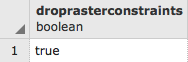
SELECT DropRasterConstraints('chp05', 'prism', 'rast'::name);
After this command, we will have the following output showing the constraints were dropped:
UPDATE chp05.prism SET rast = ST_AddBand(rast, ST_MapAlgebra(rast, 1, '32BF', ' ([rast]*9/5)+32', -9999), 1);
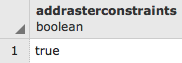
SELECT AddRasterConstraints('chp05', 'prism', 'rast'::name);
The UPDATE will take some time, and the output will look as follows, showing that the constraints were added again:
There is not much information provided in the output, so we will inspect the rasters. We will look at one raster tile:
SELECT (ST_Metadata(rast)).numbands
FROM chp05.prism
WHERE rid = 54;
The output is as follows:
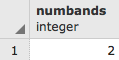
The raster has two bands. The following are the details of these two bands:
SELECT 1 AS bandnum, (ST_BandMetadata(rast, 1)).*
FROM chp05.prism
WHERE rid = 54
UNION ALL
SELECT 2 AS bandnum, (ST_BandMetadata(rast, 2)).*
FROM chp05.prism
WHERE rid = 54
ORDER BY bandnum;
The output looks as follows:
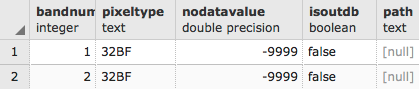
The first band is the same as the new second band with the correct attributes (the 32BF pixel type, and the NODATA value of -9999) that we specified in the call to ST_MapAlgebra().The real test, though, is to look at the summary statistics:
WITH stats AS (
  SELECT
    1 AS bandnum,
    (ST_SummaryStats(rast, 1)).*
  FROM chp05.prism
  WHERE rid = 54
  UNION ALL
  SELECT
    2 AS bandnum,
    (ST_SummaryStats(rast, 2)).*
  FROM chp05.prism
  WHERE rid = 54
)
SELECT
  bandnum,
  count,
  round(sum::numeric, 2) AS sum,
  round(mean::numeric, 2) AS mean,
  round(stddev::numeric, 2) AS stddev,
  round(min::numeric, 2) AS min,
  round(max::numeric, 2) AS max
FROM stats ORDER BY bandnum;
The output is as follows:

The summary statistics show that band 2 is correct after the values from band 1 were transformed into Fahrenheit; that is, the mean temperature is 6.05 of band 1 in degrees Celsius, and 42.90 in degrees Fahrenheit in band 2).