The steps you need to take to complete this recipe are as follows:
- First, you will create a view to clip the river geometries for each country using the ST_Intersection and ST_Intersects functions. Name the view rivers_clipped_by_country:
       postgis_cookbook=> CREATE VIEW chp03.rivers_clipped_by_country AS
         SELECT r.name, c.iso2, ST_Intersection(r.the_geom,
           c.the_geom)::geometry(Geometry,4326) AS the_geom
         FROM chp03.countries AS c
         JOIN chp03.rivers AS r
         ON ST_Intersects(r.the_geom, c.the_geom);
- Create a directory named rivers as follows:
mkdir working/chp03/rivers
- Create the following scripts to export a rivers shapefile for each country.
The following is the Linux version (name it export_rivers.sh):
        #!/bin/bash
        for f in `ogrinfo PG:"dbname='postgis_cookbook' user='me'
        password='mypassword'" -sql "SELECT DISTINCT(iso2)
        FROM chp03.countries ORDER BY iso2" | grep iso2 | awk '{print $4}'`
        do
          echo "Exporting river shapefile for $f country..."
          ogr2ogr rivers/rivers_$f.shp PG:"dbname='postgis_cookbook'
          user='me' password='mypassword'"
          -sql "SELECT * FROM chp03.rivers_clipped_by_country
          WHERE iso2 = '$f'"
        done
The following is the Windows version (name it export_rivers.bat):
        FOR /F "tokens=*" %%f IN ('ogrinfo
        PG:"dbname=postgis_cookbook user=me password=password"
        -sql "SELECT DISTINCT(iso2) FROM chp03.countries
         ORDER BY iso2" ^| grep iso2 ^| gawk "{print $4}"') DO (
           echo "Exporting river shapefile for %%f country..."
           ogr2ogr rivers/rivers_%%f.shp PG:"dbname='postgis_cookbook'
           user='me' password='password'"
           -sql "SELECT * FROM chp03.rivers_clipped_by_country
           WHERE iso2 = '%%f'"
        )
For Windows users
The script uses the grep and awk Linux commands, so you will need to download their Windows versions from http://unxutils.sourceforge.net/. The script was tested with the UnxUpdates.zip file (which includes gawk, but not awk), but you are welcome to download the full version available at https://sourceforge.net/projects/unxutils/. Also remember to include the folder with the executable files on the Windows path. There's a chance that you already have them installed in your system if you have installed OSGeo4W, a binary distribution of a broad set of open source, geospatial software for win32 environments. You can find it at http://trac.osgeo.org/osgeo4w/.
The script uses the grep and awk Linux commands, so you will need to download their Windows versions from http://unxutils.sourceforge.net/. The script was tested with the UnxUpdates.zip file (which includes gawk, but not awk), but you are welcome to download the full version available at https://sourceforge.net/projects/unxutils/. Also remember to include the folder with the executable files on the Windows path. There's a chance that you already have them installed in your system if you have installed OSGeo4W, a binary distribution of a broad set of open source, geospatial software for win32 environments. You can find it at http://trac.osgeo.org/osgeo4w/.
- In Windows, run the batch file:
C:\export_rivers.bat
- Now, run the following script (in Linux or macOS, you need to assign execute permissions to the script before running the shell file):
      $ chmod 775 export_rivers.sh
      $ ./export_rivers.sh
      Exporting river shapefile for AD country...
      Exporting river shapefile for AE country...
      ...
      Exporting river shapefile for ZM country...
      Exporting river shapefile for ZW country...
You could eventually skip the creation of the rivers_clipped_by_country view by replacing the ogr2ogr statement in the previous script with the following command (ogr2ogr passes the content of the -sql option directly to PostGIS); use %%f for Windows:
ogr2ogr rivers/rivers_$f.shp PG:"dbname='postgis_cookbook' user='me' password='mypassword'" -sql "SELECT r.name, c.iso2, ST_Intersection(r.the_geom, c.the_geom) AS the_geom FROM chp03.countries AS c JOIN chp03.rivers AS r ON ST_Intersects(r.the_geom, c.the_geom) WHERE c.iso2 = '$f'"
ogr2ogr rivers/rivers_$f.shp PG:"dbname='postgis_cookbook' user='me' password='mypassword'" -sql "SELECT r.name, c.iso2, ST_Intersection(r.the_geom, c.the_geom) AS the_geom FROM chp03.countries AS c JOIN chp03.rivers AS r ON ST_Intersects(r.the_geom, c.the_geom) WHERE c.iso2 = '$f'"
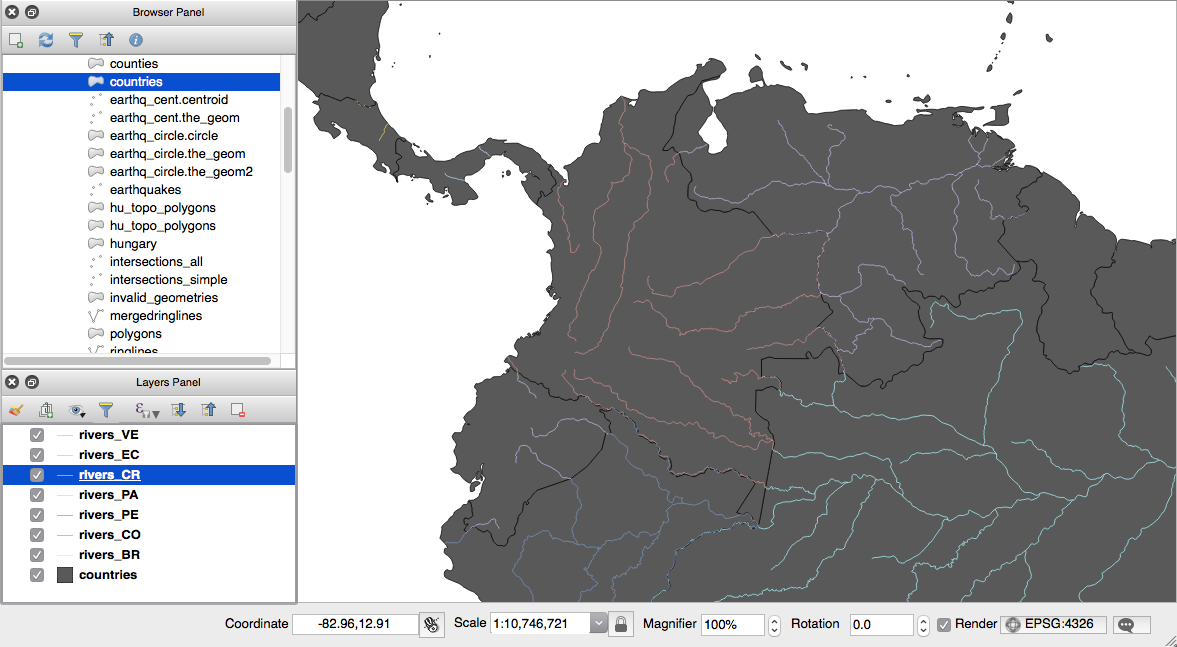
- Check the output with ogrinfo or a desktop GIS. The following screenshot shows how the output looks in QGIS; we have added the original PostGIS chp03.rivers layer and a couple of the generated shapefiles: