
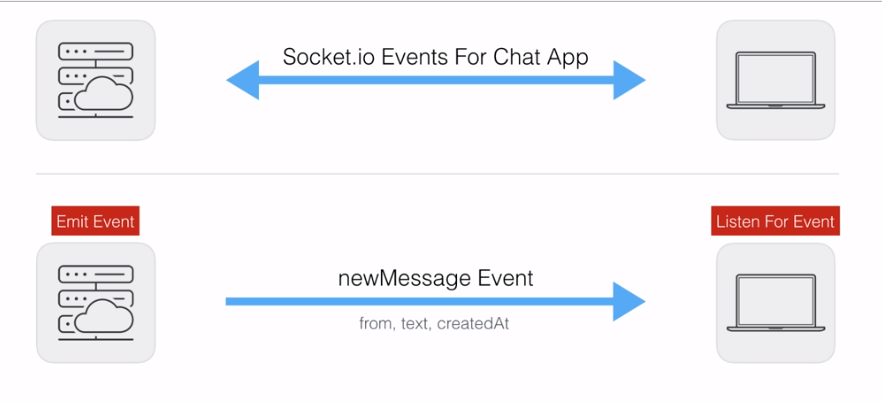
In this section you're going to learn how to use event acknowledgments. That's a fantastic feature inside Socket.io. In order to illustrate exactly what they are and why you'd ever want to use them, we're going to quickly run through the diagram for the chat app. These are the two events that we actually have in our application, if you remember the first one is the newMessage Event, it gets emitted by the server and it gets listened to by the client, it sends across the from, text, and createdAt properties, all of which are required to render the message to the screen:
Now the event that we're going to be updating is the createMessage Event. This one gets emitted by the client and listened to by the server:
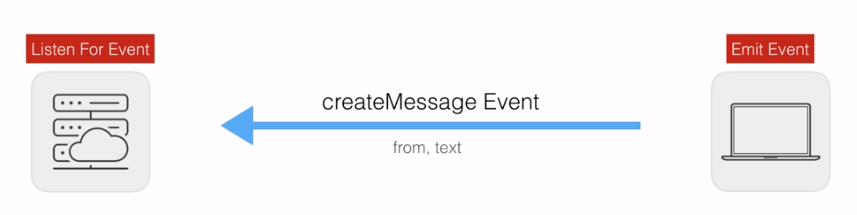
Once again we are sending some data across from and text. Now the problem with our createMessage Event is that the data flows in one direction. The data comes from a form inside the browser. It then gets sent over to the server and the server is kind of stuck. Sure, the data might be valid, the from and text fields might be correctly set up. In that case, we can emit a newMessage Event, rendering it to every browser who's connected to the server, but if the server receives invalid data it has no way to let the client know that something went wrong.
What we need is a way to acknowledge we got a request and have the option to send some data back. In this case we're going to add an acknowledgment for createMessage. If the client emits a valid request with valid from and text properties, we're going to acknowledge it, sending back no error message. If the data sent from client to server is invalid we're going to acknowledge it sending back the errors, so the client knows exactly what it needs to do to send a valid request. Now the result is going to look a little bit like this, and the data flow from server to client is going to be done via a callback:
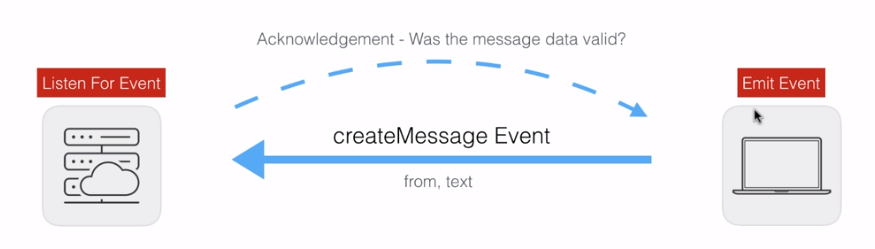
Your acknowledgment could be anything you like. In our case it could be was the message data valid? If you're creating an email application, you might only send the acknowledgement back to the client when the email was successfully sent. You don't need to send data, which is what we're going to do when valid data is sent across the pipeline. We're simply going to say, hey we got that message, everything's good to go, and the client can respond to that.
Now that we've gone through this, let's go ahead and implement it into our application.