
In this part of the section, we'll talk about a different way to emit events. Some events you want to send to everybody: a new message should go to every single user, including the one who sent it so it can show up inside the list of messages. Other events, on the other hand, should only go to other people, so if user one emits an event, it shouldn't go back to user one, but instead go only to users two and three.
A good example of this is when a user joins a chatroom. I want to print a little message, like Andrew joined, when someone joins, and I want to print a message, like welcome Andrew, for the actual user who joined. So, in the first tab I would see welcome Andrew, and in the second tab I would see Andrew joined. In order to get that done, we'll look at a different way to emit events in the server. This will be done via broadcasting. Broadcasting is the term for emitting an event to all but one specific user.
I'll start up the server once again using the nodemon server/server.js command, and inside Atom, we can now tweak how we emit the event in the io.emit method in server.js. Now, this is going to be the final way we do things, but we'll play around with broadcasting as well, which means I'll comment this out as opposed to removing it:
socket.on('createMessage', (message) => {
  console.log('createMessage', message);
  //io.emit('newMessage', {
  //  from: message.from,
  //  text: message.text,
  //  createdAt: new Date().getTime()
  //});
});
To broadcast, we have to specify the individual socket. This lets the Socket.io library know which users shouldn't get the event. In this case, the user that we call here is not going to get the event, but everyone else will. Now, we need to call socket.broadcast:
socket.on('createMessage', (message) => {
  console.log('createMessage', message);
  //io.emit('newMessage', {
  //  from: message.from,
  //  text: message.text,
  //  createdAt: new Date().getTime()
  //});
  socket.broadcast
});
Broadcast is an object that has its own emit function, and it's the exact same syntax as io.emit or socket.emit. The big difference is who it gets sent to. This will send the event to everybody but the mentioned socket, which means if I fire a createMessage event, the newMessage event will fire to everybody but myself, and that's exactly what we can do here.
It's going to be identical, which means we can go ahead and pass in the message event name. The arguments will be identical: the first one will be newMessage, and the other one will be the object with our properties, from: message.from and text: message.text. Last up,we have createdAt equal to a new timestamp, new Date().getTime:
socket.broadcast.emit('newMessage', {
  from: message.from,
  text: message.text,
  createdAt: new Date().getTime()
});
With this in place, we will not see the messages we send, but everybody else will. We can prove this by heading over to Google Chrome. I'll give both tabs a refresh, and from the second tab, once again, we will emit an event. We can actually use the up arrow key inside the web developer console to rerun one of our previous commands, and that's exactly what we'll do:
socket.emit('createMessage', {from: 'Andrew', text: 'This should work'});
Here, we're emitting a createMessage event with a from property set to Andrew and a text property equal to This should work. If I hit enter to send this off, you'll notice that this tab no longer receives the message:
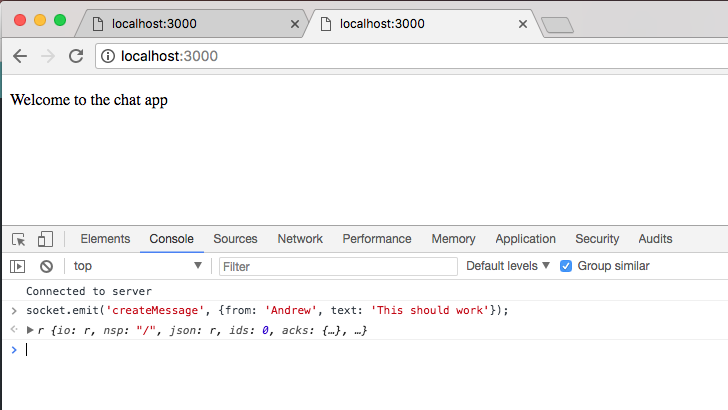
However, if I go to localhost:3000, we will get newMessage showing up with the message data:
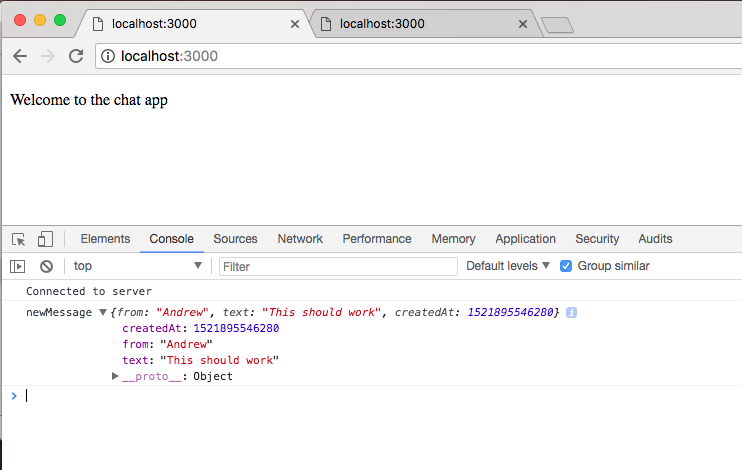
This is because tab two broadcasts the event, which means it was only received by other connections, such as tab one or any other connected user.