
The getCountries function is going to get a list of countries, just their names, and we're going to get it by currencyCode:
const getCountries = (currencyCode) => {

};
This one, just like getExchangeRate, is also going to return a promise from axios.get and the URL we want to get lives over in the browser:

So, right here we have our URL. We have the spot where we're going to dump our currencyCode, so we can knock that out. It's going to be a template string and we're going to get rid of CAD and inject whatever the currencyCode argument is:
const getCountries = (currencyCode) => {
  return axios.get(`https://restcountries.eu/rest/v2/currency/${currencyCode}`)
};
Now, at this point, once again, we do want to do a little manipulation to the data, so I could go ahead and use then. In the then callback, I can go ahead and access the response. What I want to do with the response is I just want to loop over it. I want to figure out all the countries that support my currency and then I want to return an array:
const getCountries = (currencyCode) => {
  return axios.get(`https://restcountries.eu/rest/v2/currency/${currencyCode}`).then((response) => {

  });
};
Now you know that we're going to get all those countries back, right? So, for cad we have an array with the single object inside it. For usd, we have an array with multiple objects inside it, so we're going to take this array of objects and convert it to an array of string.
We would start off with American Samoa:
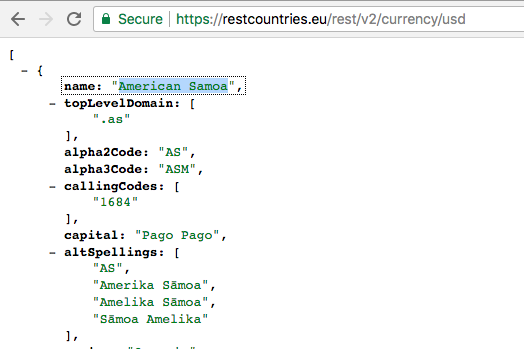
To do that, we're just going to use map. Back inside Atom, we can go ahead and knock this out really quickly by returning response.data, which is an array, which means it has access to that map method. We are then going to use map. Each individual item is going to be a country; each country has a name property, so we can return country.name, giving us an array of country names that support the currency. In this case, we can simplify that by implicitly returning country.name. Now, let's go ahead and test that out right here; getCountries. We're going to get countries back and we're going to dump countries to the screen. We only provide a single argument:
const getCountries = (currencyCode) => {
  return axios.get(`https://restcountries.eu/rest/v2/currency/${currencyCode}`).then((response) => {
    return response.data.map((country) => country.name);
  });
};

getCountries('USD').then((countries) => {
  console.log(countries);
});
So, if we save this and check things out over in the Terminal, we should see exactly what comes back. Here we have a list of all of the countries that we can use that currency in, in this case, the US dollar:
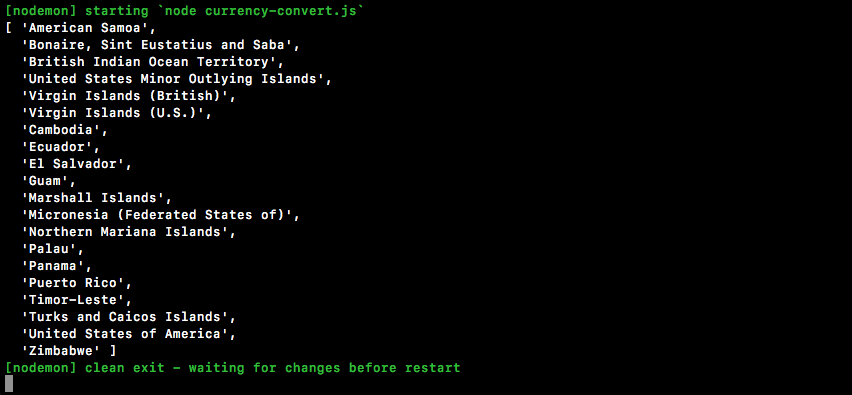
We could go over to EUR to see which countries support that:
getCountries('EUR').then((countries) => {
  console.log(countries);
});
If we save the file, we're going to get that list back in just a moment.
Here we have all the countries that support it, everything from Belgium all the way down to Zimbabwe and Spain:
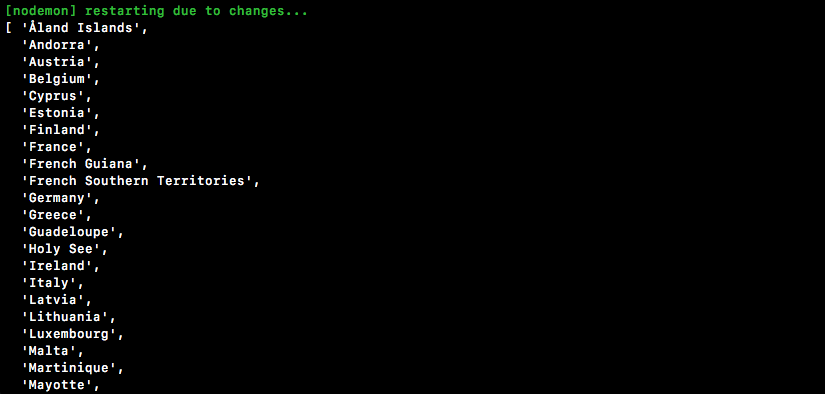
All those countries are included. Next up, is CAD:
getCountries('CAD').then((countries) => {
  console.log(countries);
});
You should just have that one, Canada, and it does indeed show up right there:

So, at this point, we have all the data we need to actually get things done. So, together we're going to build the equivalent of this function over in our promises and you're going to be building out the async one.
Over here, let's go ahead and get started: const convertCurrency. That is going to be the function we'll be building. It's the one that you'll eventually make async but, for now, we'll leave it as a regular arrow function (=>). We're going to get the currency code that we're converting from the one we're converting to, and the amount we're looking to convert.
const getCountries = (currencyCode) => {
  return axios.get(`https://restcountries.eu/rest/v2/currency/${currencyCode}`).then((response) => {
    return response.data.map((country) => country.name);
  });
};

const convertCurrency = (from, to, amount) => {

};
Inside here, we can kick things off by getting those countries. I'm going to return getCountries. I'm going to call that with the currency that we're converting to, then we can tack on then and we are going to get the countries list back. Next up, we're going to return a call to getExchangeRates - passing in from and to, and we're going to get that back as a promise as well, which means we can tack on another then call. Here we're going to get that rate:
const convertCurrency = (from, to, amount) => {
  return getCountries(to).then((tempCountries) => {
    return getExchangeRate(from, to);
  }).then((rate) => {

  });
};
Now, inside the then callback, we can go ahead and actually calculate all the stuff we're going to calculate. In this case, we're going to generate that long string I was talking about.
Let's first start off by creating a const; this const will be called exchangedAmount. All we're going to do is take the amount the user passed in and multiply it by the exchange rate; so, in this case, we would successfully convert US dollars from Canadian dollars. Now, down below, we can go ahead and start working on that string. We're going to return a template string and, inside here, we're going to do quite a few things.
So, first off, we're going to start off with the amount. The amount in the currency you're coming from is worth. Then we're going to put the amount in the currency you're going to, it's exchangedAmount. Then we'll toss in to:
const convertCurrency = (from, to, amount) => {
  return getCountries(to).then((countries) => {
    return getExchangeRate(from, to);
  }).then((rate) => {
    const exchangedAmount = amount * rate;

    return `${amount} ${from} is worth ${exchangedAmount} ${to}`;
 });
};
So, this is part one. We can actually go ahead and test this out before even moving on. Next, I'm going to switch the getCountries call over to a convertCurrency call. We're going to go ahead and convert Canadian dollars over to US Dollars. Let's go ahead and convert a hundred of those. Now we're going to get the status back, as opposed to actually getting back the countries list:
const convertCurrency = (from, to, amount) => {
  return getCountries(to).then((countries) => {
  return getExchangeRate(from, to);
}).then((rate) => {
  const exchangedAmount = amount * rate;

  return `${amount} ${from} is worth ${exchangedAmount} ${to}`;
 });
};

convertCurrency('CAD', 'USD', 100).then((status) => {
  console.log(status);
});
We can go ahead and save currency-convert and see what happens over inside the Terminal. Over here, we get 100 CAD is worth 73.947 USD, and this is a great first step:

Now, we're also going to tack on that country's list, which we do not have access to in this function. We can go through the same step we used last time. We'll create tempCountries. Up above, we can make a new variable called countries and we'll set countries equal to tempCountries like this:
const convertCurrency = (from, to, amount) => {
  let countries;
  return getCountries(to).then((tempCountries) => {
    countries = tempCountries;
    return getExchangeRate(from, to);
  }).then((rate) => {
    const exchangedAmount = amount * rate;

    return `${amount} ${from} is worth ${exchangedAmount} ${to}.`;
  });
};
Now we'll be able to access those countries and do something with them. What are we going to do? We're just going to join them all together, separated by a comma, to create that nice list. That'll be the currency that we're talking about.
Then, we'll add a colon and then we will interpolate the following. So, we're going to take all those countries, we're going to take that array, and we're going to convert it over to a string using join. What do we want to put between all of them? We're going to put a comma and a space, we're going to create a comma separated list of countries that that currency can be used in:
const convertCurrency = (from, to, amount) => {
  let countries;
  return getCountries(to).then((tempCountries) => {
    countries = tempCountries;
    return getExchangeRate(from, to);
  }).then((rate) => {
    const exchangedAmount = amount * rate;

    return `${amount} ${from} is worth ${exchangedAmount} ${to}. ${to} can be used in the following countries: ${countries.join(', ')}`;
  });
};
Now we can go ahead and save currency- convert and see what happens over inside nodemon when things restart, 100 CAD is worth 73 USD. USD can be used in the following countries:

Then we have a list of all the countries we can use it in. Let's go ahead and test out a different variation. Let's go ahead and switch US dollars over to Canadian dollars:
convertCurrencyAlt('USD', 'CAD', 100).then((status) => {
  console.log(status);
});
This time around, we're going to get a different output as follows:

The Canadian dollar can be used in the following countries, in this case, just Canada. Everything is working as expected. The problem is we're using promise chaining in order to get everything done. We need to use the async function instead of that.