
If you remember, on message we have a createdAt property for both newMessage and newLocationMessage. All we need to do is get that value, pass it in to moment, and then generate our formatted string.
We can make a new variable called formattedTime, and we can set this equal to a call to moment passing in the timestamp, message.createdAt:
socket.on('newMessage', function (message) {
  var formattedTime = moment(message.createAt)
Now we can go ahead and do whatever we like. We could call format passing in the exact same string we use over in time.js, the hour, the minutes and the am/pm; h:, two lowercase ms, followed by a space and a lowercase a:
var formattedTime = moment(message.createdAt).format('h:mm a');
With this in place we now have that formatted time and we can go ahead and add it inside li.text. Now I know I'm using template strings inside of our client-side code. We'll be removing this pretty soon so there's no need to make that tweak yet since I'm not testing in Internet Explorer or any other browser, although the final version of the app will not include template strings. Right after the from statement, we're going to go ahead and inject another value, the formattedTime which we just created previous. So our message should read name like Admin, the time followed by the text:
socket.on('newMessage', function (message) {
  var formattedTime = moment(message.createAt).format('h:mm a');
  var li = jQuery('<li></li>');
  li.text('${message.from} ${formattedTime}: ${message.text}');
I'm going to go ahead and save index.js, and give the browser a refresh to load that client-side code:
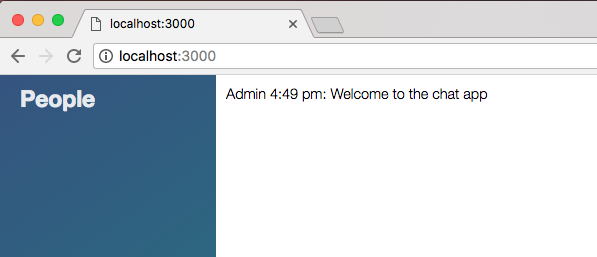
As shown in the preceding screenshot, we see Admin 4:49 pm: Welcome to the chat app, and that is the correct time. I can go ahead and send a message, This is from a user, send it off, and we can see it's now 4:50 pm:
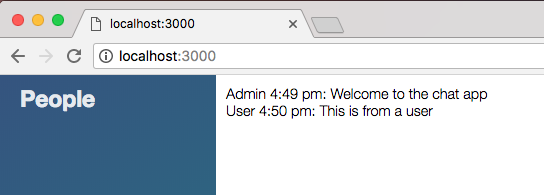
This is from a user shows up, everything is working great.