
The first part we already know, /todos/, but now what we need is a URL parameter. URL parameters follow this pattern: it's a colon followed by a name. Now I could call this :todoId, or anything else, but what we're going to call it for this section is :id. This is going to create an id variable; it's going to be on the request object, the one we'll set up in just a moment, and we'll be able to access that variable. That means when someone makes the GET /todos/1234324 request, the callback will fire, the one we're going to specify now, and we'll be able to query by the ID they pass in. Now, we are still going to get the request and response object, the only difference is we're now going to be using something off of request. This one is req.params. The req.params object is going to be an object, it's going to have key value pairs where the key is the URL parameter, like id, and the value is whatever value was actually put there. In order to demonstrate this, I am going to simply call res.send, sending back the req.params object:
//GET /todos/12345
app.get('/todos/:id', (req, res) => {
   res.send(req.params);
});
This is going to let us test out this route inside of Postman and see exactly how it works. Inside of the Terminal I can start up our server. I'm going to use following command to start things up:
nodemon server/server.js
Now the server's on localhost:3000 and we can make a GET request to this, the /todos/:id URL. Over inside Postman I'm going to do just that; we have the GET method, the URL is localhost, and it's still on port 3000/todos/, and then we can type whatever we like, for example, 123. Now, when I send this off what we get back is that req.params object, and right in Body you can see it has an id property set to 123:
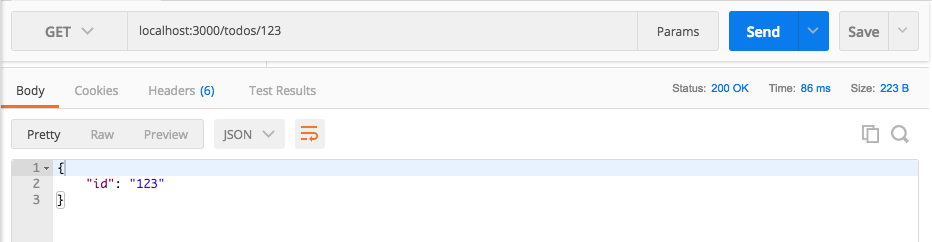
That means we are able to access the value in the URL using req.params.id, and that is exactly what you're going to need to do for the challenge. Over inside of Atom I'll start things off by creating that variable, a var id = req.params.id variable.
With this in place you now know everything you need in order to complete the challenge, which is going to be to finish filling out this route. First up, you're going to validate the ID using that ObjectID isValid method we explored over in the mongoose-queries file. I'll leave a little comment, Valid id using isValid. Now, if it's not valid, what you're going to do is stop the function execution and you're going to respond with a 404 response code, because the ID passed in is not valid, and there's no way it's ever going to be in the collection. We're going to respond with the 404 response code letting the user know that the Todo was not found, and you can send back an empty body, which means you can just call send without passing in any value. It would be similar to the res.status(400).send(e) statement with no error, and you would also change 400 to 404.
Now, after that, you're going to start querying the database and this is going to happen using findById. I want you to take the Id and query the Todos collection, looking for a matching document; there's two ways this could go. There's the success case and there is the error case. If we get an error, that one is pretty self-explanatory: all we're going to do is send back a 400 response code letting the user know that the request was not valid, and we're also going to go ahead and send back nothing. We're not going to be sending back that error argument because the error that prints for the error message could contain private information. We're going to be beefing out our error handling later. Currently, as you can see, we have the function duplicated in quite a few places. That will get moved into one location later but for now you can respond with a 400 response code and send an empty body back. This brings us to the success case. Now, if there is a Todo, if todo, you're going to go ahead and send it back. If there is no Todo, if no todo, this means the call did succeed, but the ID was not found in the collection. All you're going to do is go ahead and send back a 404 response code with an empty body.
Now, both of these statements are going to look really similar; you're sending back a 404 letting the user know that the ID they passed in does not match any ID of a document in the Todos collection. Now you know how to do all of this, you can use anything you need to get this done. That means you can use the mongoose-queries file, you can use the mongoosejs.com documentation, you can use Stack Overflow, Google, or anything else; it's not about memorizing exactly how to get stuff done, it's about working through those problems on your own. Eventually you will memorize a lot of these techniques as they come up again and again, but for now your goal is to just get it working. When you're done, go ahead and fire off this request over in the Postman application. That means you're going to want to grab an ID that is valid from Robomongo and paste it right in the URL. You can also test what happens with IDs that are valid, but don't exist in the database, and IDs that are invalid, such as 123, which is not a valid ObjectID. With this in place you are ready to start the challenge.