
To create a delete route we're going to use app.delete. Then we're going to provide the URL, which will look identical to the one we have for getting an individual Todo by Id, /todos/:id. This will be the ID we can access inside of the callback function. The callback function will get the same request and response arguments, and inside I'll leave some comments to guide you in the right direction, but you're going to be responsible for filling every single thing out. First up, get the id. You're going to pull off the ID just like we do up above and we're going to do that because the next thing you're going to do is validate the id. If it's not valid, return 404. If it's not valid you're going to send a 404 back just like we do above. Next up, you're going to remove todo by id and this is going to require you to use that function we just discussed over inside of the mongoose-remove file. You're going to remove it by ID and there's two ways that could go. We could have a success or we could have an error. If we do get an error you can respond in the usual way, sending back a 400 status code with empty body. Now, if it's a success we're going to need to make sure that a Todo was actually deleted by checking that the doc came back; if no doc, send 404, so the person knows that the ID could not be found and it could not be removed, if doc, send doc back with 200. Now, the reason we need to check if the doc exists is because this function, findByIdAndRemove, is still going to have its success case called even if no Todo gets deleted.
I can prove this by rerunning the file after having deleted the item with that ID. I'm going to comment out findOneAndRemove, head into the Terminal, and rerun the script:

We get null as the value of Todo. That means you want to set up an if statement, to do something specific if no item was actually deleted. With this in place, you are ready to go. You know how to do all of this, most of it is done in the route up above and everything specific to removing an item was done over in this playground file.
The first thing we need to do is grab the ID off of the request object. I'm going to make a variable called id, setting it equal to req.params; this is where all of our URL parameters are stored, then we get it by value. We have id set up so we would get the id property. I'm going to remove the comment and down below we can validate the ID, if(ObjectID.isValid). Now, we're checking if this ID is valid, and if it is valid, well we don't really want to do anything, all we care about is if it's not valid. So, I'm going to flip the Boolean value and inside of the if condition we can now run some code when the ID is not valid. That code is going to send back a 404 status code. I'm going to use return to prevent the rest of the function from being executed, then we're going to go ahead and respond, setting the status, res.status, equal to 404, and we'll call send to initiate the response with no body data. Now that the ObjectID is valid, we can move on down below actually removing it.
We're going to kick things off by calling Todo.findByIdAndRemove. Now, findByIdAndRemove as you know takes just one argument, the actual id to remove, we can call then, passing in our success callback, which as we know will get called with the individual todo document. Now, inside of the success case we still have to make sure a Todo is actually deleted. If there was no Todo, we're going to send a 404 back; if there was no Todo, we are going to respond using return and set the status using res.status to 404, and call send to initiate the response. Now, if this if statement doesn't run it means a Todo was actually deleted. In that case we want to respond with 200, letting the user know that everything went well, and we're going to send the todo argument back, res.send, passing in todo. The only thing left to do for this Todo challenge is to call catch. We're going to call catch so we can do something with any potential errors. All we're going to do is respond using res.status, setting it equal to 400, and we'll go ahead and call send with no arguments sending back an empty response:
app.delete('/todos/:id', (req, res) => {
   var id = req.params.id;

   if(!ObjectID.isValid(id)) {
         return res.status(404).send();
   }

   Todo.findByIdAndRemove(id).then((todo) => {
         if(!todo) {
               return res.status(404).send();
         }
         res.send(todo);
   }).catch((e) => {
         res.status(400).send();
   });
});
With this in place, we are now good to go. We have everything set up just like we wanted to, which means we can remove the comments from down below, and you'll notice that the method we have down below looks really similar to the one we have up above, and this is going to be the case for a lot of our routes that manage an individual Todo item. We're always going to want to get that ID, we're always going to want to validate that the ObjectID is indeed a real ObjectID, and inside of our success and error cases, similar things are also going to happen. We want to make sure that a doc was actually deleted. If it wasn't we'll send back that 404, and with this in place we can now verify that this route works.
Now we can save the file and start up the server in the Terminal. I'll use the clear command to clear the Terminal output and then we can run the following command:
node server/server.js
Once the server is up, we can move into Postman and start firing off a couple of requests. First up, I'm going to create a few Todos. I'll send this POST /todos off, and then I'll change the text property and send it off again. I'll change the body text to Some other todo item, sending that off, and now we should have two todos. If I go to GET /todos and fetch them, we get our two todos:
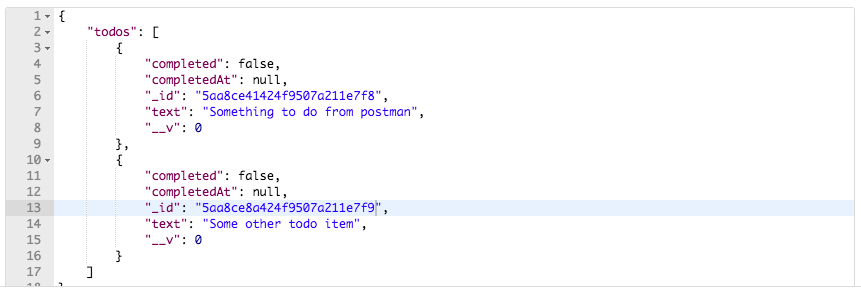
Now, I am going to need one of these IDs; this is going to be the todo that we delete, so what I will do is copy this to the clipboard, then we can go ahead and create our new route. This new route is going to use the delete method so we're going to switch from GET to DELETE, then we can go ahead and provide the URL using the environment variable URL that we created in the last section. The route is /todos/id. I'm going to paste the ID in there:

Now I can go ahead and run the request. When we run it, we get a status code of 200 OK; everything went well, and we have the document that we deleted:
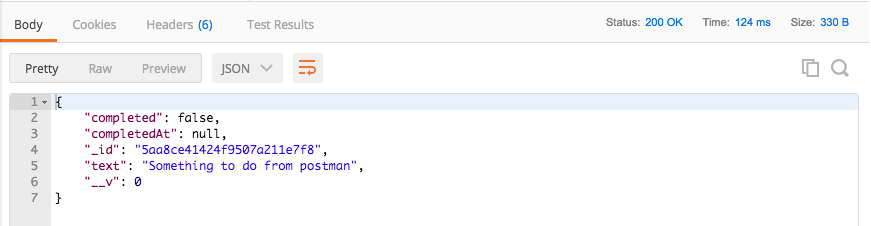
If I go back to GET /todos and rerun it, now we only have one document; the item that we passed in as the ID to delete did indeed get deleted. I'm going to save this request to our collection so we can fire it off without having to manually enter all of that information. Let's save as DELETE, followed by the route /todos/:id:
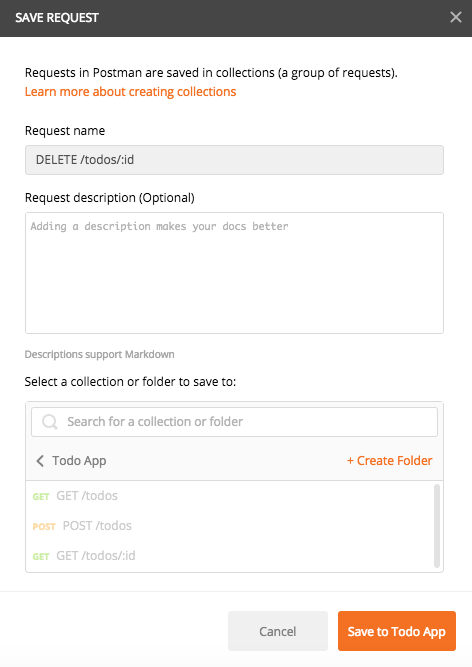
We are going to save this to an existing collection, the Todo App collection. Now we have a DELETE /todos/:id route sitting right in Collections, we can always go ahead and access it whenever we need to. Now, from here, we're going to go ahead and fire the request again, this is going to try and delete a Todo whose ID is valid but doesn't match one in the collection, and we get 404 back. Now if I make this ID invalid by deleting a bunch of characters and I send that off, we also get a 404 status code because the ID is invalid, which is fantastic.
With this in place, we can now make a commit. Over inside of the Terminal, I'm going to shut the server down, run git status, and you'll see we have two files.
We have a new file, the Mongoose playground file, and we have our modified server file. I'm going to use git add . to add all of those to the next commit, and we'll use git commit with the -m flag to make the commit, Add DELETE/todos/:id route:
git commit -m 'Add DELETE /todos/:id route'
I'm going to make the commit and push it up to GitHub. We can also go ahead and deploy our application using the following command:
git push heroku master
Now we'll be able to delete our Todos inside of the Heroku application. With this in place, we are now done. In the next section we're going to write some test cases for the route we just set up.