
The first step in this process will be to import the function we just created. I'm going to do that creating a constant in server.js. We'll use ES6 destructuring to grab generateMessage, and we're going to grab it off of a call to require. Now we're requiring a local file in a different directory. We're going to start with ./, go into the utils directory since we're currently in the server directory, and then grab the file message by specifying it:
const socketIO = require('socket.io');

const {generateMessage} = require('./utils/message');
Now we have access to generateMessage, and instead of creating these objects we can call generateMessage. In socket.emit, we're going to replace Welcome to the chat app and the Admin variables with arguments generateMessage ('Admin', 'Welcome to the chat app'):
socket.emit('newMessage', generateMessage('Admin', 'Welcome to the chat app'));
We have the exact same functionality but now we're using a function to generate that object for us, which is going to make scaling that out a lot easier. It's also going to make updating what is inside a message much easier as well. Next up, we can change the one we have down below for New user joined. We're going to go ahead and replace this with the call to generateMessage as well.
Once again this one's from the Admin so the first argument will be the string Admin, the second argument is the text New user joined:
socket.emit('newMessage', generateMessage('Admin', 'Welcome to the chat app'));
This one is done too, and the final one is the one that actually gets sent to the user from a user, which means we have message.from and message.text; those are going to be our arguments. We're going to call generateMessage with those two arguments, message.from, and message.text as the second argument:
socket.on('createMessage', (message) => {
  console.log('createMessage', message);
  io.emit('newMessage', generateMessage('Admin', 'New user joined'));
With this in place we are done. The last thing left to do for this section is test that this is working as expected. I'm going to start up the server using nodemon, without a space between node and mon, server/server.js:
nodemon server/server.js
Once the server is up, we can go ahead and test things out by opening up a couple of tabs with the Developer Tools open.
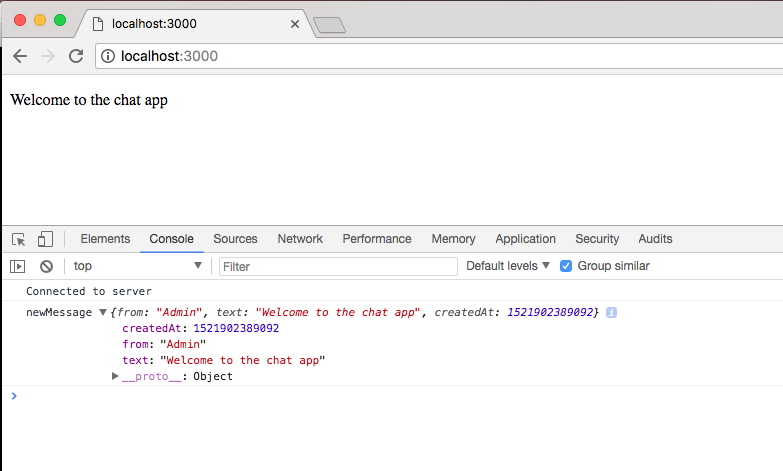
For the first tab I'm going to visit localhost:3000. Inside the console we should see our new message printing, the object looks the same even though it's now generated by the function, and we can test that everything else is working as expected too by opening up a second tab and opening up its Developer Tools:
This time around the first tab should see a new message, here we have a New user joined text, that's still working. If we emit a custom message from this second tab, it should show up in the first. I'm going to use the up arrow key to run one of our previous createMessage event emitters.
I'm going to fire off the function, and if I go to the first tab we do indeed get the message, which is fantastic:
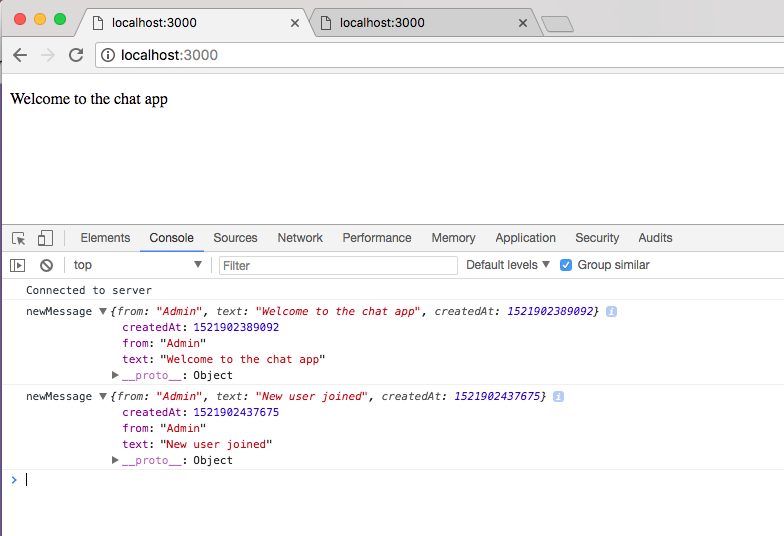
This should work, prints in the first tab and it also prints in the second since we're calling io.emit as opposed to the broadcast method.
Now that everything is working, we are done; we can make a commit and wrap this section. I'm going to call git status from the Terminal. Here we have new files as well as modified ones, which means we're going to want to call git add .. Next up, we can call git commit with a message flag, create generateMessage utility:
git commit -m 'create generateMessage utility'
I'm going to push this up to GitHub and that is it for this one. In the next section, we're going to take a look at Socket.io acknowledgments.