
Now, another cool thing about the console is that we have access to the variables created by our application; most notably the socket variable. This means that inside Google Chrome, in the developer console, we can call socket.emit and we emit whatever we like.
I can emit an action, createEmail, and I can pass in some data as the second argument, an object where I have a to attribute equal to julie@example.com. I have my other attributes too—something like text, which I can set equal to Hey:
socket.emit('createEmail', {to: 'julie@example.com', text: 'Hey'});
This is an example of how we can use the developer console to make debugging our app even easier. We can type a statement, hit enter, and it's going to go ahead and emit the event:
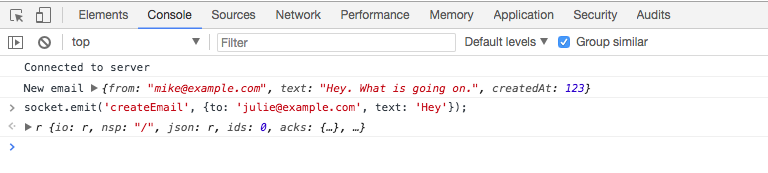
Inside the Terminal, we'll get that event and do something with it—whether it's creating the email or doing anything else we might require. Inside the Terminal, you can see createEmail showed up. We'll send that one to Julie, and then there's the text, Hey. It all got to the server from the client:

Now that we have this in place and we've played around with how we can use these custom events, it's time to move from the email application to the actual app we're going to be building: the chat app.